

Best picks
Best Robot Vacuums for a Large House
Coverage, Refills and Maps
Choose a robot vacuum for a large house with mode-specific coverage, recharge-and-resume checks, water-service planning and clear multi-floor tradeoffs.
By thisSWEEP EditorialUpdated November 5, 20268 min read1 pick
On this page · The short answer
The short answer
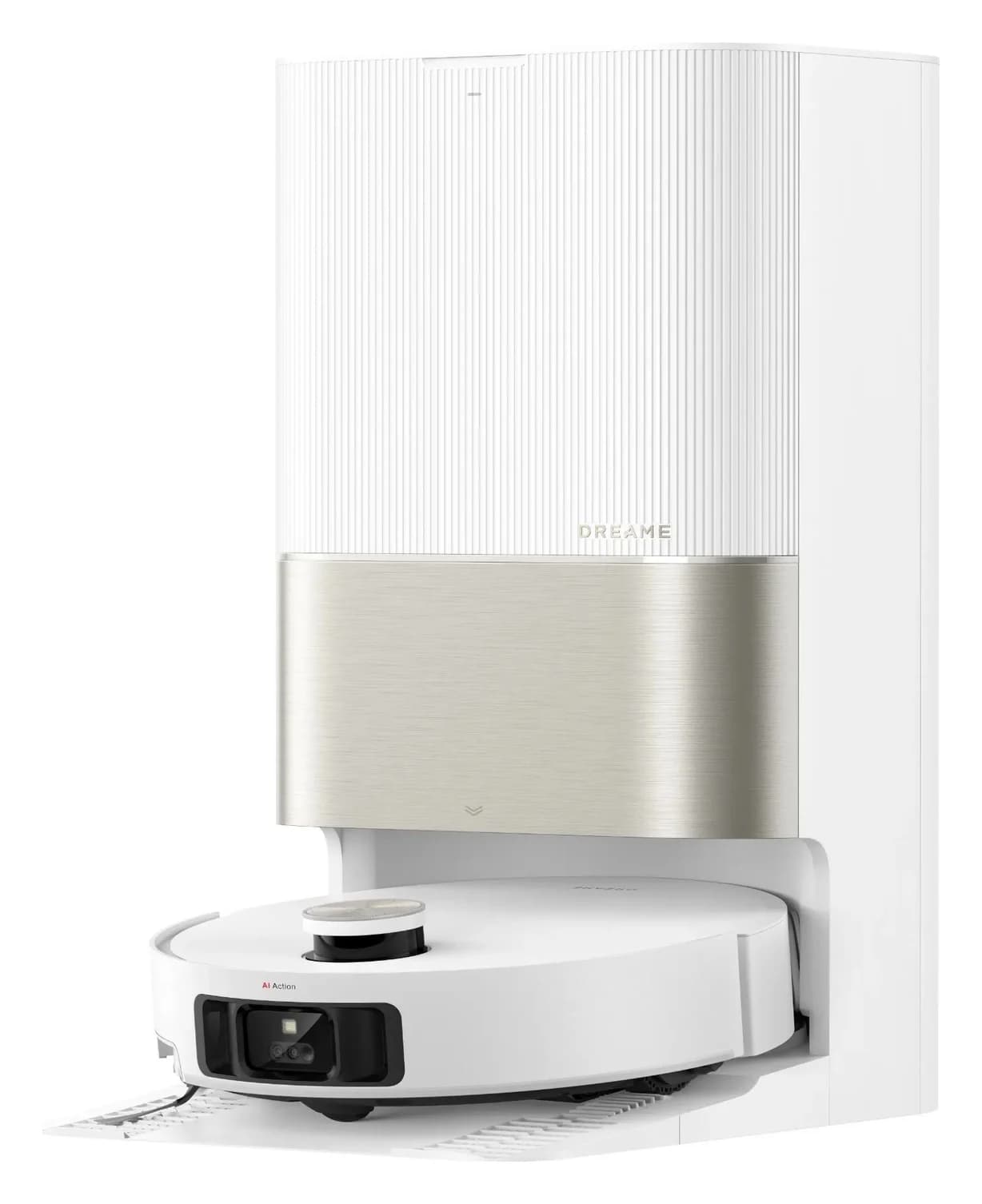
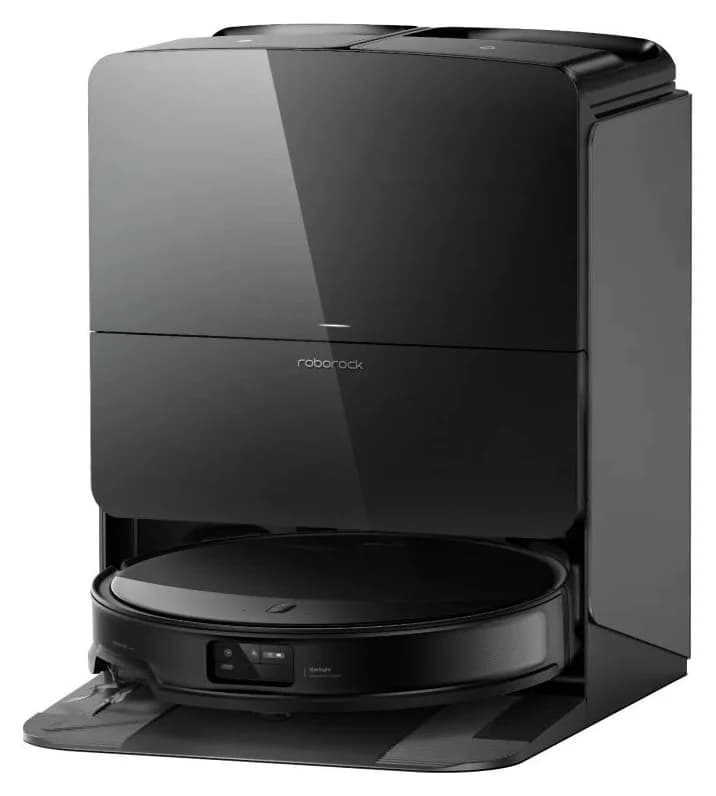
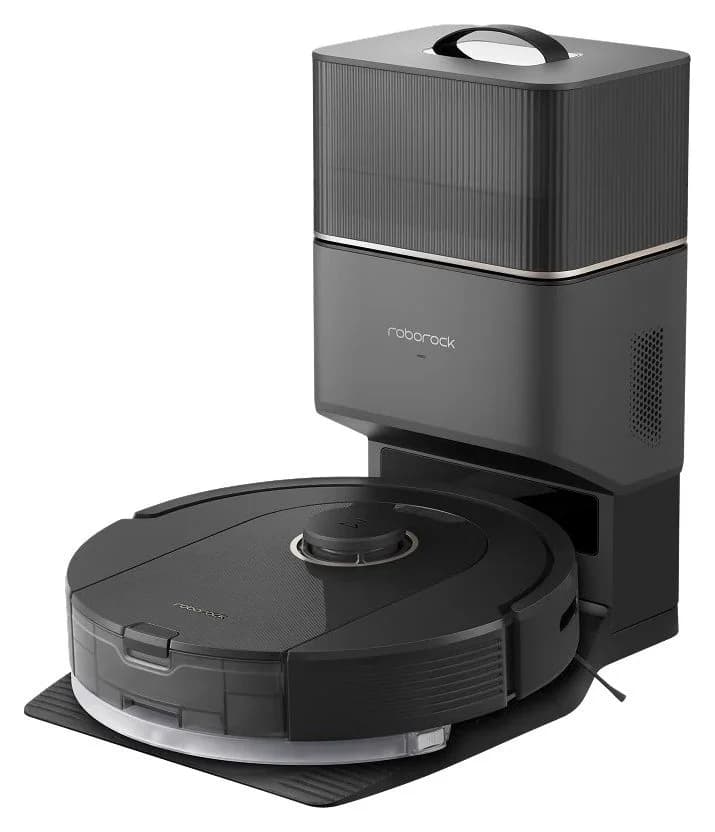
The Dreame X50 Ultra is our first choice for a large mixed-floor house, based on its documented recharge/resume and automatic mop servicing. Choose the Roborock Saros 10R for its low body only after confirming new US stock, or consider the Q5 Pro+ for vacuum-first cleaning after verifying availability. Size the job around reachable area on each connected floor and the servicing you can actually do.
Quick picks and coverage comparison
Compare specifications and all conditions
Dreame X50 Ultra, standard tank-base bundle
- Best fit
- Overall mixed-floor choice
- Published runtime and coverage
- Up to 220 minutes, Quiet vacuuming and mopping; separately, up to 205 m², Quiet vacuuming
- Work left for you
- Fill clean water, empty and clean used-water tank, replace supplies
Roborock Saros 10R, tank-based Multifunctional Dock 4.0
- Best fit
- Low furniture; conditional alternative
- Published runtime and coverage
- Comparable mode-specific runtime and area not confirmed; 79.8 mm published height
- Work left for you
- Tank servicing, tray care and supplies; verify new stock
Roborock Q5 Pro+ with RockDock Plus
- Best fit
- Vacuum-first candidate
- Published runtime and coverage
- Up to 240 minutes / 350 m² (3,767 sq ft), Quiet mode on hard floors, full battery
- Work left for you
- Bags and brush/filter care; manual mop care if fitted; stock unverified
Full comparison table
Swipe to compare. Row labels stay visible.
| Exact US configuration | Best fit | Published runtime and coverage | Work left for you |
|---|---|---|---|
| Dreame X50 Ultra, standard tank-base bundle | Overall mixed-floor choice | Up to 220 minutes, Quiet vacuuming and mopping; separately, up to 205 m², Quiet vacuuming | Fill clean water, empty and clean used-water tank, replace supplies |
| Roborock Saros 10R, tank-based Multifunctional Dock 4.0 | Low furniture; conditional alternative | Comparable mode-specific runtime and area not confirmed; 79.8 mm published height | Tank servicing, tray care and supplies; verify new stock |
| Roborock Q5 Pro+ with RockDock Plus | Vacuum-first candidate | Up to 240 minutes / 350 m² (3,767 sq ft), Quiet mode on hard floors, full battery | Bags and brush/filter care; manual mop care if fitted; stock unverified |
Scroll horizontally to see every column
| Exact US configuration | Best fit | Published runtime and coverage | Work left for you |
|---|---|---|---|
| Dreame X50 Ultra, standard tank-base bundle | Overall mixed-floor choice | Up to 220 minutes, Quiet vacuuming and mopping; separately, up to 205 m², Quiet vacuuming | Fill clean water, empty and clean used-water tank, replace supplies |
| Roborock Saros 10R, tank-based Multifunctional Dock 4.0 | Low furniture; conditional alternative | Comparable mode-specific runtime and area not confirmed; 79.8 mm published height | Tank servicing, tray care and supplies; verify new stock |
| Roborock Q5 Pro+ with RockDock Plus | Vacuum-first candidate | Up to 240 minutes / 350 m² (3,767 sq ft), Quiet mode on hard floors, full battery | Bags and brush/filter care; manual mop care if fitted; stock unverified |
Sources: Dreame US specifications and footnotes, Saros overview, Q5 Pro series and the manuals linked below.
Availability matters: Dreame's captured X50 page offers the standard bundle for purchase. The captured Saros US offer is unavailable; Q5 Pro+ new-stock availability was not verified. Those alternatives are conditional, not instructions to buy refurbished or imported substitutes.
Best overall on documented features: Dreame X50 Ultra
X50 Ultra combines automatic dust emptying, mop washing, drying and robot water refilling. Its station holds 4.5 L clean / 4.0 L used water. The US manual identifies the RLX85CE robot and RCXE0105 station; this guide covers that tank-based package.
For a large job, enable Auto Resume Cleaning in the app. The manual says it returns to charge and resumes unfinished work; DND can delay resumption, and manually docking it can end the job. Mop-wash frequency is also an app setting. These controls deserve attention before you schedule an unattended clean.
The maintenance commitment remains substantial: Dreame tells you to clean the used-water tank after the task. Choose this system if regular tank handling is acceptable. The store separately offers X50 Ultra, X50 Ultra Complete and cleaning-solution bundles; compare the selected box contents before buying extras. The adjacent X40 Ultra comparison column describes a different model and supplies none of our X50 figures.
Check X50 Ultra specifications and availability at Dreame. Read the US manual.
Low-profile alternative: Roborock Saros 10R
Saros 10R's 79.8 mm published body makes it the shortlist alternative to measure against low furniture. Its dock can detach the mops for vacuum-only work; enable automatic removal in the app. Check the lowest furniture edge, not just the opening at its center.
The S91COP robot / EWFD28LRR US tank dock still needs clean-water filling and wastewater disposal. The overview also describes a refill-and-drain configuration; do not assign that installation's capabilities to this tank bundle.
Recharge/resume is documented, but charging figures conflict: the overview advertises 2.5 hours, while the US manual says approximately 3 hours. We leave recharge duration unresolved instead of promising a particular whole-house turnaround. With runtime and area also not stated by Roborock, choose this alternative for access and dock functions rather than assumed endurance. Confirm new stock before committing.
Check the exact Saros US bundle at Roborock. Read its US manual.
Vacuum-first candidate: Roborock Q5 Pro+
Q5 Pro+ is worth investigating for a largely dry-cleaning routine, subject to a current US stock check. Its coverage claim has unusually useful conditions: Quiet mode, hard floors and a full battery. Keep those conditions attached to the figures when comparing it with a carpet-heavy or stronger-suction schedule.
The Plus package includes RockDock Plus automatic emptying; the plain Q5 Pro does not include that dock. Its detachable mop module requires manual servicing. The US manual says to clean the cloth after 60 minutes of mopping, wash it after each use and remove the module when not mopping. For this guide's vacuum-first use, leave that module off.
Its US manual covers Q50ULE with AED06LRR or AED07LRR auto-empty docks; check the supplied dock label. Keep Q5 Max+ specifications separate and match accessories by the exact model.
Check Q5 Pro+ configuration details at Roborock. Read the US Plus manual.
Build a coverage worksheet for your house
Measure room by room. For rectangular rooms, multiply length by width and subtract permanently inaccessible floor. Count reachable floor beneath furniture; exclude closed rooms and blocked doorways until you resolve access. Keep carpet vacuuming and eligible hard-floor mopping separate.
Main level
- Reachable hard floor
- Fill in
- Reachable carpet
- Fill in
- Area you intend to mop
- Fill in
All specifications
- Dock reachable throughout?
- Yes / no
Upper level
- Reachable hard floor
- Fill in
- Reachable carpet
- Fill in
- Area you intend to mop
- Fill in
All specifications
- Dock reachable throughout?
- Yes / no
Other isolated area
- Reachable hard floor
- Fill in
- Reachable carpet
- Fill in
- Area you intend to mop
- Fill in
All specifications
- Dock reachable throughout?
- Yes / no
Full comparison table
Swipe to compare. Row labels stay visible.
| Connected floor or zone | Reachable hard floor | Reachable carpet | Area you intend to mop | Dock reachable throughout? |
|---|---|---|---|---|
| Main level | Fill in | Fill in | Fill in | Yes / no |
| Upper level | Fill in | Fill in | Fill in | Yes / no |
| Other isolated area | Fill in | Fill in | Fill in | Yes / no |
Scroll horizontally to see every column
| Connected floor or zone | Reachable hard floor | Reachable carpet | Area you intend to mop | Dock reachable throughout? |
|---|---|---|---|---|
| Main level | Fill in | Fill in | Fill in | Yes / no |
| Upper level | Fill in | Fill in | Fill in | Yes / no |
| Other isolated area | Fill in | Fill in | Fill in | Yes / no |
Use the maker's matching-mode area as a screening figure. There is no defensible shared cleaning-speed figure for these candidates in the evidence here. Do not apply a fixed discount to a laboratory maximum and present the result as guaranteed home coverage.
For scheduling, use this planning identity: elapsed job time = cleaning and travel + mop-wash visits + charging pauses + human interventions. During the return window, record start and finish times, unfinished rooms, wash visits, refill stops and wastewater emptying. Use the same suction, pass count and mop settings you intend to keep. Split the schedule if it misses your household's deadline or needs service when nobody is available.
Measure each connected floor
Fill in reachable hard floor, carpet and the area you intend to mop.
Match the cleaning mode
Keep each published area and runtime beside its stated conditions.
Count the servicing
Record charging pauses, mop-wash visits and manual tank handling during your return window.
Multiple floors: maps, transport and dock access
Q5 Pro supports up to four saved floors. Roborock and Dreame do not state the saved-floor limit for X50 Ultra or Saros 10R; verify that limit for your intended app setup before ordering.
Plan on carrying the robot between levels: stair climbing is not documented in these manuals. Start separate jobs on separate floors. A saved map cannot supply charging, emptying or mop washing where no compatible dock is present. Saros's manual specifically requires starting from its dock for automatic mop washing; Dreame recommends starting from its base.
- Yes: Saved maps help organize cleaning on different levels; Q5 Pro documents the feature.
- Partly: A carried robot still needs a plan for charging, dust and water servicing.
- No: A dock on another level cannot provide unattended mid-job servicing through a staircase.
For frequent upstairs mopping, favor a dedicated robot-and-station setup on that level if carrying and servicing would defeat the automation. Treat another dock as a separate compatibility purchase; this guide does not establish second-dock support.
Fit the service space before the robot
These are the manuals' placement requirements, not dimensions to add blindly to the dock footprint:
X50 Ultra
- Documented placement space
- More than 39" in front, more than 2" each side; retain tank access above
Saros 10R tank dock
- Documented placement space
- Reserve at least 0.75 m high × 0.4 m wide × 1.2 m deep
Q5 Pro+
- Documented placement space
- At least 0.3 m each side, 1 m in front and above
Full comparison table
Swipe to compare. Row labels stay visible.
| System | Documented placement space |
|---|---|
| X50 Ultra | More than 39" in front, more than 2" each side; retain tank access above |
| Saros 10R tank dock | Reserve at least 0.75 m high × 0.4 m wide × 1.2 m deep |
| Q5 Pro+ | At least 0.3 m each side, 1 m in front and above |
Scroll horizontally to see every column
| System | Documented placement space |
|---|---|
| X50 Ultra | More than 39" in front, more than 2" each side; retain tank access above |
| Saros 10R tank dock | Reserve at least 0.75 m high × 0.4 m wide × 1.2 m deep |
| Q5 Pro+ | At least 0.3 m each side, 1 m in front and above |
Dreame recommends tile or marble beneath its station to reduce water-stain risk. Check tank lifting, bag access and the route to your sink in person. Open the rooms you want cleaned and measure doorway transitions; the high-threshold buying guide covers that separate fit decision.
X50's connected setup uses Dreamehome and 2.4 GHz Wi-Fi. Saros's US manual also specifies 2.4 GHz, and the Q5 page explicitly requires the Roborock app and agreement to its terms. Whole-home network coverage, account terms, cloud/offline map behavior and any paid-feature requirements need checking for your setup; no offline or subscription-free promise is made here.
Water workload and exact replacement supplies
For X50 Ultra and Saros 10R, automatic robot refilling draws from the station's tank. It does not establish automatic household-water supply. There is no verified area-per-tank or refill interval here: plan water service separately from battery endurance. X50's manual calls for used-water-tank cleaning after each task; Saros's manual also describes manual dirty-water disposal and tank cleaning.
X50 Ultra
- Official replacement route
- US accessory kit, SKU 20010100001357: one DuoBrush, two side brushes, two filters, two dust bags, one cleaning solution and six mop pads. The linked offer is labelled Membership; check its purchase terms.
Saros 10R
- Official replacement route
- Dock bags RR-CDYCX0-QRevo-06, six-pack; mop cloths RR-KJTB4-Saros10R-M04, four-pack. The mop listing expressly excludes Saros 10. The captured pad offer is out of stock.
Q5 Pro+
- Official replacement route
- Dock bags RR-CDYCX0-Q5-06, six-pack. Brush and filter care remains necessary; exact replacement brush/filter part numbers were not confirmed here.
Full comparison table
Swipe to compare. Row labels stay visible.
| System | Official replacement route |
|---|---|
| X50 Ultra | US accessory kit, SKU 20010100001357: one DuoBrush, two side brushes, two filters, two dust bags, one cleaning solution and six mop pads. The linked offer is labelled Membership; check its purchase terms. |
| Saros 10R | Dock bags RR-CDYCX0-QRevo-06, six-pack; mop cloths RR-KJTB4-Saros10R-M04, four-pack. The mop listing expressly excludes Saros 10. The captured pad offer is out of stock. |
| Q5 Pro+ | Dock bags RR-CDYCX0-Q5-06, six-pack. Brush and filter care remains necessary; exact replacement brush/filter part numbers were not confirmed here. |
Scroll horizontally to see every column
| System | Official replacement route |
|---|---|
| X50 Ultra | US accessory kit, SKU 20010100001357: one DuoBrush, two side brushes, two filters, two dust bags, one cleaning solution and six mop pads. The linked offer is labelled Membership; check its purchase terms. |
| Saros 10R | Dock bags RR-CDYCX0-QRevo-06, six-pack; mop cloths RR-KJTB4-Saros10R-M04, four-pack. The mop listing expressly excludes Saros 10. The captured pad offer is out of stock. |
| Q5 Pro+ | Dock bags RR-CDYCX0-Q5-06, six-pack. Brush and filter care remains necessary; exact replacement brush/filter part numbers were not confirmed here. |
For Saros, the US bundle also lists the RR-LW2-Saros10R-M02 filter pack and RR-ZS4-QrevoCurv-01 main brush. Keep that exact-model match when replenishing. For broader dock choices, see our self-emptying robot vacuum guide.
Build your annual supply budget from pack quantities actually needed × current pack cost, plus approved cleaner. Subtract included spares and round up to complete packs. Track bag fill and part wear before assuming a replacement cadence; a kit's contents are not an annual consumption forecast. Do not order a full kit whenever only a bag needs replacing.
How we choose
We compare official US product pages, their test-condition footnotes and model-specific manuals. Recommendations prioritize connected coverage, recharge/resume, access and servicing. This is specification-based research without first-hand cleaning results; suction claims do not settle pickup quality. We distinguish exact US packages, leave unsupported fields unknown and retain unresolved charging and stock limitations. Commissions do not decide the shortlist (disclosure).
Verdict
Choose X50 Ultra first for a large mixed-floor schedule if its tank routine fits your household. Consider Saros 10R when low furniture is decisive and new stock is confirmed. Investigate Q5 Pro+ for vacuum-first cleaning once availability clears. The deciding question is whether your chosen setup completes each connected floor within your schedule with a service workload you will keep up.
Frequently asked questions
Can one robot vacuum clean a large house?
It can be a practical choice when the cleaning area connects to its dock and the schedule allows charging and servicing. X50 Ultra and both Roborock candidates document recharge/resume, but their conditions matter: DND settings can interrupt resumption. Measure reachable floor area by floor, choose the actual cleaning mode, and check whether the complete job finishes before your household needs the rooms again.
What is the best robot vacuum for multiple floors?
Choose around how you will move and service it. Q5 Pro supports up to four saved floors, while the saved-floor limits for X50 Ultra and Saros 10R are not stated by the makers. Plan to carry the robot between levels. A stored map does not provide another charging or mop-washing station, so schedule each level separately and check its dock access.
How often will I need to refill the water?
There is no verified whole-house refill interval here. X50 Ultra lists a 4.5 L clean-water tank and 4.0 L used-water tank, but its manual also schedules mop washing through the app and tells you to clean the used-water tank after each task. Record actual refills and wastewater emptying for your chosen rooms and washing settings before deciding whether the workload suits you.
Does the Q5 Pro+ wash its mop automatically?
Its documented auto-empty dock charges the robot and collects dust; mop care is manual. The US manual says to clean the cloth after 60 minutes of mopping, wash it after each use, and remove the module when not mopping. Choose it here for vacuum-first cleaning. If you want routine mopping across extensive hard floors, consider the wash-and-dry stations instead.
Dreame X50 Ultra
Related guides
Explainer · Robot Vacuum & Mop Combos
Dreame L10s Ultra Generations: Which Robot and Dock Should You Buy?
Identify the exact Dreame L10s Ultra generation, compare its robot and dock, and match bags, filters and mops. Know when to choose a complete alternative.
Best picks · Robot Vacuum & Mop Combos
Best Robot Mops for Tile Floors: Tile Finish, Grout and Dock Care
Choose a robot mop for tile with clear roller and spinning-pad picks, grout and stone checks, exact cleaner matches, rug limits and practical dock-care advice.
Best picks · Robot Vacuum & Mop Combos
Best Roomba Vacuum and Mop: Which Combo and AutoWash Kit Fits?
Choose the right Roomba vacuum and mop: compare Plus 515, Plus 575 and Max 775 kits, rug limits, dock servicing and exact replacement pads, filters and bags.