

Buying guide
Roborock Replacement Docks
Match Your Robot Before Buying
Find the right Roborock replacement dock by robot and station label. Check US voltage, missing parts, standalone stock and complete robot-and-dock alternatives.
By thisSWEEP EditorialUpdated November 6, 20268 min read3 picks
On this page · The short answer
The short answer
Roborock Q7 M5+ complete US package
- Choose
- Replace the whole setup; keep mop care manual
- Check
- Treat “upgraded” as product positioning; it does not authorize swapping the new dock onto your old robot.
To buy a replacement Roborock dock, match your robot’s label to a documented station model and electrical region. The official standalone charging dock for S5 Max, S6 Pure and S4 Max was sold out when checked. If you need a complete robot-and-dock replacement, our starting picks are Q7 M5+ for dust emptying and QV 35A for mop washing.
Availability snapshot: November 3, 2026. Roborock’s store data marked both colors of the Q7 M5+ and QV 35A packages available, and both colors of the standalone charger unavailable. These are maker-store observations; recheck your selected version before ordering.
Quick picks: a station or a whole system?
Compare specifications and all conditions
Replace the whole setup; keep mop care manual
- Our pick
- Roborock Q7 M5+ complete US package
- Functions documented
- Charging and automatic dust emptying; manual mop washing
- Buying route
- Check the complete package
Replace the whole setup; automate mop care
- Our pick
- QV 35A complete US package
- Functions documented
- Charging, emptying, mop washing, cold-air drying and robot refilling
- Buying route
- Check the complete package
Keep an S5 Max, S6 Pure or S4 Max
- Our pick
- Exact charging-dock replacement enquiry
- Functions documented
- Charging; power cable excluded
- Buying route
- Official listing was sold out; ask about supply
Full comparison table
Swipe to compare. Row labels stay visible.
| Your situation | Our pick | Functions documented | Buying route |
|---|---|---|---|
| Replace the whole setup; keep mop care manual | Roborock Q7 M5+ complete US package | Charging and automatic dust emptying; manual mop washing | Check the complete package |
| Replace the whole setup; automate mop care | QV 35A complete US package | Charging, emptying, mop washing, cold-air drying and robot refilling | Check the complete package |
| Keep an S5 Max, S6 Pure or S4 Max | Exact charging-dock replacement enquiry | Charging; power cable excluded | Official listing was sold out; ask about supply |
Scroll horizontally to see every column
| Your situation | Our pick | Functions documented | Buying route |
|---|---|---|---|
| Replace the whole setup; keep mop care manual | Roborock Q7 M5+ complete US package | Charging and automatic dust emptying; manual mop washing | Check the complete package |
| Replace the whole setup; automate mop care | QV 35A complete US package | Charging, emptying, mop washing, cold-air drying and robot refilling | Check the complete package |
| Keep an S5 Max, S6 Pure or S4 Max | Exact charging-dock replacement enquiry | Charging; power cable excluded | Official listing was sold out; ask about supply |
If your robot still cleans well, start with the replacement enquiry. Buy a whole system only after comparing that route with the complete package you would actually use. Our self-emptying robot guide covers the broader choice.
Complete replacement for dust emptying: Roborock Q7 M5+
Choose this package if you want to replace both pieces and keep mop care manual. The US box list includes the robot, auto-empty dock, power cord, mop module, mop, moisture-proof mat and guides. Its linked US manual identifies robot RRA0TCP and auto-empty dock AED08LRR, rated 120 V AC, 60 Hz.
The dock transfers debris automatically after cleaning; the manual still instructs you to empty the water tank, wash the mop cloth and air-dry it. That makes this our dust-emptying choice when automatic mop washing is unnecessary. Check the Q7 M5+ package at Roborock.
Variant trap: Roborock markets it as “Upgraded from Q5 Max+,” but the Q5 Max+ manual lists AED06LRR / AED07LRR, while this package’s manual lists AED08LRR. Treat “upgraded” as product positioning; it does not authorize swapping the new dock onto your old robot. Black and white new-package variants were available at the check. Match the complete package and its station label before choosing a color.
Complete replacement for mop care: Roborock QV 35A
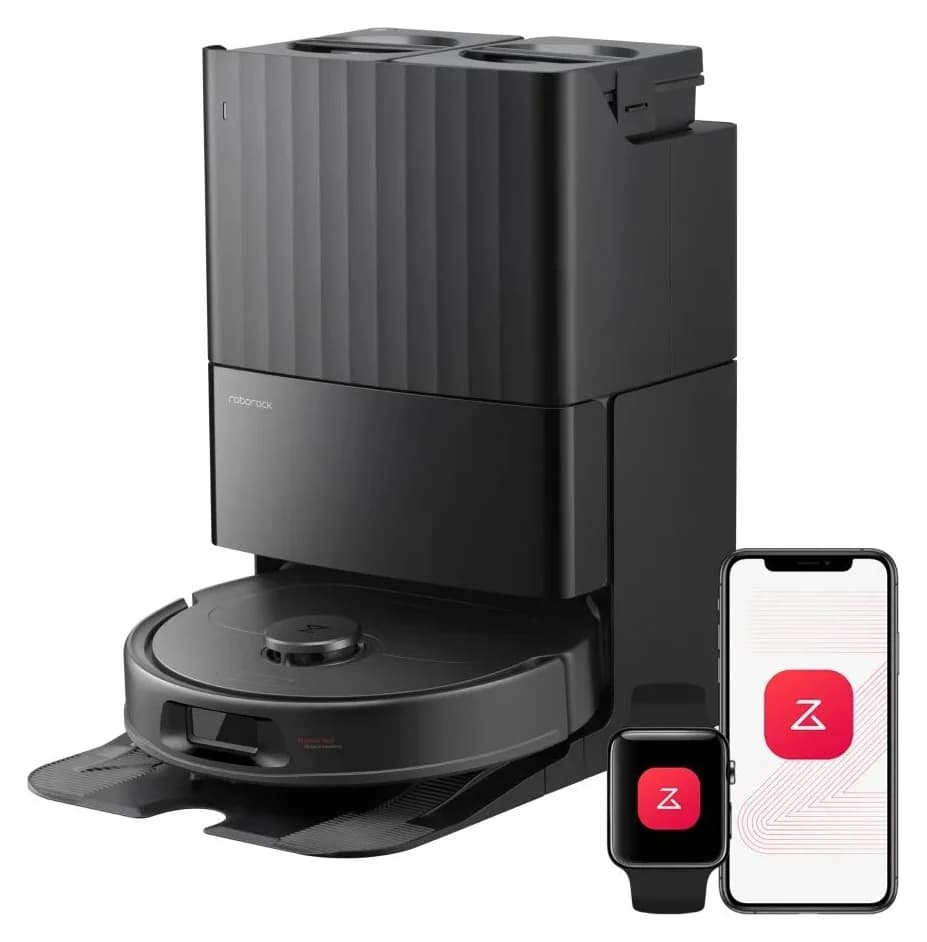
Choose the QV 35A when washing the mop is the chore you want to automate. Its dock washes mops and empties dust; the official FAQ specifically describes cold-air drying of the mops and tray. The manual also describes returning to the dock for robot water-tank refilling. Do not assume heated drying from the word “multifunctional.”
The linked US manual pairs robot RRE0PEE with EWFD36LRR, rated 120 V AC, 60 Hz. The box list includes the dock with a pre-installed disposable bag, its base, a power cable and two mopping modules alongside the robot. This is a whole-system alternative; it does not establish a station-only replacement for an existing Qrevo.
You still fill the dock’s clean-water tank, empty its dirty-water tank and clean the removable tray. Choose this tank setup only if that routine works for your home. Both black and white new-package variants were available when checked. Check the QV 35A package at Roborock.
Older-model charging replacement: the official standalone dock
Roborock’s US listing explicitly names S5 Max, S6 Pure and S4 Max and includes one charging dock, with no power cable. It is the station-only candidate to request for those named robots, subject to label confirmation and supply. Both colors were unavailable, so it is not a ready-to-order recommendation.
The S4 Max US manual permits CDZ11RR or CDZ12RR chargers and gives their input as 100–240VAC, 50–60 Hz. The store listing does not expose the supplied station’s model label. Request that label and the correct regional cable before paying; do not assign the S4 manual’s charger identity to every item bearing a similar name.
There is also a naming mismatch: the listing URL contains “s6-maxv,” while the visible product title lists S5 Max, S6 Pure and S4 Max. Keep S6 MaxV compatibility unconfirmed until Roborock supplies an explicit match. Check the official charger listing.
Robot-to-station compatibility: read both labels
Photograph the robot label, serial number, old dock label and its AC-input marking before contacting support. The QV 35A manual locates the robot’s serial-number sticker underneath. Send both the commercial name and regulatory model where available.
The following are documented US pairings, not permission to buy a visually similar station. “Unconfirmed” means Roborock’s US store and manuals do not establish a current station-only purchase.
S4 Max
- Documented station and AC input
- CDZ11RR / CDZ12RR; 100–240VAC, 50–60 Hz
- Function boundary
- Charging
- Standalone purchase status
- Official named-model charger listing sold out; supplied label unpublished
S5 Max / S6 Pure
- Documented station and AC input
- Station code and electrical marking unpublished on the listing
- Function boundary
- Charging
- Standalone purchase status
- Named in the same sold-out listing; cable excluded
Q5 Max+ / Q50ULE
- Documented station and AC input
- AED06LRR / AED07LRR; 120 V, 50–60 Hz
- Function boundary
- Dust emptying and charging
- Standalone purchase status
- Station-only purchase unconfirmed; complete Q5 Max+ listing also sold out
Q7 M5+ / RRA0TCP
- Documented station and AC input
- AED08LRR; 120 V, 60 Hz
- Function boundary
- Dust emptying and charging
- Standalone purchase status
- Complete package verified; station-only purchase unconfirmed
QV 35A / RRE0PEE
- Documented station and AC input
- EWFD36LRR; 120 V, 60 Hz
- Function boundary
- Emptying, washing, cold-air drying, refilling and charging
- Standalone purchase status
- Complete package verified; station-only purchase unconfirmed
Saros 10R / S91COP
- Documented station and AC input
- EWFD28LRR; 120 V, 60 Hz
- Function boundary
- Empty Wash Fill Dock; manual specifies this dock only
- Standalone purchase status
- Station-only purchase unconfirmed; checked tank-bundle listing sold out
Full comparison table
Swipe to compare. Row labels stay visible.
| Robot identity | Documented station and AC input | Function boundary | Standalone purchase status |
|---|---|---|---|
| S4 Max | CDZ11RR / CDZ12RR; 100–240VAC, 50–60 Hz | Charging | Official named-model charger listing sold out; supplied label unpublished |
| S5 Max / S6 Pure | Station code and electrical marking unpublished on the listing | Charging | Named in the same sold-out listing; cable excluded |
| Q5 Max+ / Q50ULE | AED06LRR / AED07LRR; 120 V, 50–60 Hz | Dust emptying and charging | Station-only purchase unconfirmed; complete Q5 Max+ listing also sold out |
| Q7 M5+ / RRA0TCP | AED08LRR; 120 V, 60 Hz | Dust emptying and charging | Complete package verified; station-only purchase unconfirmed |
| QV 35A / RRE0PEE | EWFD36LRR; 120 V, 60 Hz | Emptying, washing, cold-air drying, refilling and charging | Complete package verified; station-only purchase unconfirmed |
| Saros 10R / S91COP | EWFD28LRR; 120 V, 60 Hz | Empty Wash Fill Dock; manual specifies this dock only | Station-only purchase unconfirmed; checked tank-bundle listing sold out |
Scroll horizontally to see every column
| Robot identity | Documented station and AC input | Function boundary | Standalone purchase status |
|---|---|---|---|
| S4 Max | CDZ11RR / CDZ12RR; 100–240VAC, 50–60 Hz | Charging | Official named-model charger listing sold out; supplied label unpublished |
| S5 Max / S6 Pure | Station code and electrical marking unpublished on the listing | Charging | Named in the same sold-out listing; cable excluded |
| Q5 Max+ / Q50ULE | AED06LRR / AED07LRR; 120 V, 50–60 Hz | Dust emptying and charging | Station-only purchase unconfirmed; complete Q5 Max+ listing also sold out |
| Q7 M5+ / RRA0TCP | AED08LRR; 120 V, 60 Hz | Dust emptying and charging | Complete package verified; station-only purchase unconfirmed |
| QV 35A / RRE0PEE | EWFD36LRR; 120 V, 60 Hz | Emptying, washing, cold-air drying, refilling and charging | Complete package verified; station-only purchase unconfirmed |
| Saros 10R / S91COP | EWFD28LRR; 120 V, 60 Hz | Empty Wash Fill Dock; manual specifies this dock only | Station-only purchase unconfirmed; checked tank-bundle listing sold out |
Sources: S4 Max manual, Q5 Max+ manual, Q7 M5+ manual, QV 35A manual, Saros 10R manual.
Roborock says a non-Plus Q10 S5 or Q10 X5 can charge on its corresponding Plus station but cannot auto-empty there; those Plus docks are not sold separately. Charging contact alone therefore fails the upgrade check. For S7 decisions, use our dedicated S7 Auto-Empty Dock compatibility guide.
- Yes: Q7 M5+: documented complete robot and AED08LRR package
- Yes: QV 35A: documented complete robot and EWFD36LRR package
- Partly: Older-model standalone charger: named fit, but sold out and label confirmation needed
- No: Q10 S5 or X5 without Plus: corresponding Plus dock does not add auto-emptying
Before replacing anything: check the failure
Roborock’s support guidance says to check the power connection and try another outlet. The S4 Max manual calls for cleaning the robot and dock charging contacts with a dry cloth. Follow your own model’s maintenance instructions, then request a diagnosis if charging still fails.
For Q7 M5+, the manual lists disabled auto-emptying, a missing bag, returning without cleaning and Do Not Disturb settings as reasons emptying may not start. Work through those settings before assuming the emptying motor or station needs replacing. Roborock support is the next step when there is no confirmed match.
Missing parts and the real replacement cost
Ask for an itemized quote covering the station, regional cable, required bin or connector, bag, ramp/base, covers, tanks and cleaning tray as applicable. Compare the usable replacement kit, delivery and warranty terms with a complete new package; leave unknown costs unresolved until quoted.
For Saros 10R’s EWFD28LRR, the manual says not to operate without both water tanks, dust-container cover, disposable bag, cleaning-solution cartridge and cleaning-tray module. The QV 35A manual similarly requires its tanks, cover, bag, tray filter and cleaning tray. A service replacement described only as a “dock” needs a written included-parts list.
We have not verified a separately sold bin or water connector that authorizes any cross-model conversion here. Order such a part only after Roborock identifies its exact number and supported pairing.
Measure the approach and service space
Treat the maker’s side/front gaps separately from its reserved-space dimensions. Measure access for lifting the bag cover and removing tanks too; a station that fits under a shelf may still be awkward to service.
S4 Max charger
- Official placement requirement
- More than 0.5 m each side and 1.5 m in front
- What to measure
- Clear approach; cable route
Q7 M5+
- Official placement requirement
- At least 0.5 m each side and 1.5 m in front
- What to measure
- Approach plus bag-cover access
QV 35A
- Official placement requirement
- Reserve at least 0.9 m high × 0.4 m wide × 1.2 m deep
- What to measure
- Reserved area and tank-removal access
Saros 10R
- Official placement requirement
- Reserve at least 0.75 m high × 0.4 m wide × 1.2 m deep
- What to measure
- Reserved area and tank-removal access
Full comparison table
Swipe to compare. Row labels stay visible.
| Setup | Official placement requirement | What to measure |
|---|---|---|
| S4 Max charger | More than 0.5 m each side and 1.5 m in front | Clear approach; cable route |
| Q7 M5+ | At least 0.5 m each side and 1.5 m in front | Approach plus bag-cover access |
| QV 35A | Reserve at least 0.9 m high × 0.4 m wide × 1.2 m deep | Reserved area and tank-removal access |
| Saros 10R | Reserve at least 0.75 m high × 0.4 m wide × 1.2 m deep | Reserved area and tank-removal access |
Scroll horizontally to see every column
| Setup | Official placement requirement | What to measure |
|---|---|---|
| S4 Max charger | More than 0.5 m each side and 1.5 m in front | Clear approach; cable route |
| Q7 M5+ | At least 0.5 m each side and 1.5 m in front | Approach plus bag-cover access |
| QV 35A | Reserve at least 0.9 m high × 0.4 m wide × 1.2 m deep | Reserved area and tank-removal access |
| Saros 10R | Reserve at least 0.75 m high × 0.4 m wide × 1.2 m deep | Reserved area and tank-removal access |
The Q7 M5+ page lists its dock as 212 × 178 × 259 mm in the maker’s dimension order. That closed-unit measurement does not replace its placement gaps. Keep an obstructed approach or inaccessible lid off your shortlist even when the case itself fits.
Record the labels
Photograph the robot, station and AC-input marking; keep the serial number with them.
Get the pairing confirmed
Request the exact station revision, electrical region and included-parts list.
Compare complete costs
Include missing parts and delivery, then compare a matched robot-and-dock package.
Check service access
Measure the approach, bag-cover opening and tank-removal space before payment.
How we choose
We compare official US listings, their linked manuals and maker-store variant data. Recommendations prioritize a documented pairing, included parts, availability and the chore the dock automates. This is document research; no physical testing was performed. A manual confirms an allowed pairing, while a complete-system offer establishes what is sold together. Neither establishes an unlisted station-only offer. Unpublished labels and unresolved availability stay visible.
Verdict
For a healthy robot, request an exact, region-matched replacement first. The older-model standalone charger is a conditional lead while supply remains unavailable. If replacing the whole system makes sense, choose Q7 M5+ for dust emptying or QV 35A for mop washing with cold-air drying. If your labels do not match the documentation, stop at support confirmation before buying.
Frequently asked questions
Can I buy a Roborock replacement dock separately?
Sometimes. Roborock has a US station-only charging-dock listing for S5 Max, S6 Pure and S4 Max, but both colors were unavailable at our check and the power cable is excluded. For other robots, use the station models in the compatibility table to request a replacement from Roborock. A manual's compatibility statement does not establish current station-only stock.
Are all Roborock docks compatible?
No. The US manuals pair Q7 M5+ with AED08LRR and Saros 10R with EWFD28LRR. Treat these as separate documented pairings. A shared brand or the ability to charge does not establish emptying or mop-care compatibility: Roborock explicitly says a Q10 S5 cannot auto-empty on a Q10 S5+ station and does not recommend that combination.
Can I upgrade a Q10 S5 or Q10 X5 by buying the Plus dock?
Roborock says the non-Plus Q10 S5 and Q10 X5 can charge on their corresponding Plus docks but cannot auto-empty there. It also says those Plus docks are not sold separately. Choose a documented complete Plus package if automatic emptying is essential, or ask support about replacing a failed station already supplied with a Plus robot.
Does the QV 35A dock dry mops with hot air?
The QV 35A's official FAQ specifies cold air for drying its mops and cleaning tray. The station also washes mops and empties dust, and its manual describes returning for robot water-tank refilling. If heated washing or drying decides your purchase, verify those functions for the exact alternative package rather than inferring them from a multifunctional dock name.
Should I replace the dock when my Roborock will not charge?
Check the existing setup first. Roborock's charging guidance includes checking the power connection and trying another outlet; the S4 Max manual calls for cleaning the robot and dock charging contacts with a dry cloth. If the problem persists, request a diagnosis before ordering a station. Those checks do not prove which component has failed.
Roborock Q7 M5+ complete US package
Related guides
Buying guide · Robot Docks
Roborock S7 Auto-Empty Dock: Compatibility and Replacement Buying Guide
Find the documented US Roborock S7 auto-empty dock, required dustbin and bag checks. Compare dock IDs, voltage, package contents and replacement options.
Buying guide · Robot Docks
Robot Vacuum Dock Cabinets: Check Operating Clearance Before Buying
Hide your robot vacuum dock without blocking docking or tank access. Compare official station clearances, screen cabinet sizes, and choose an open location.