

Buying guide
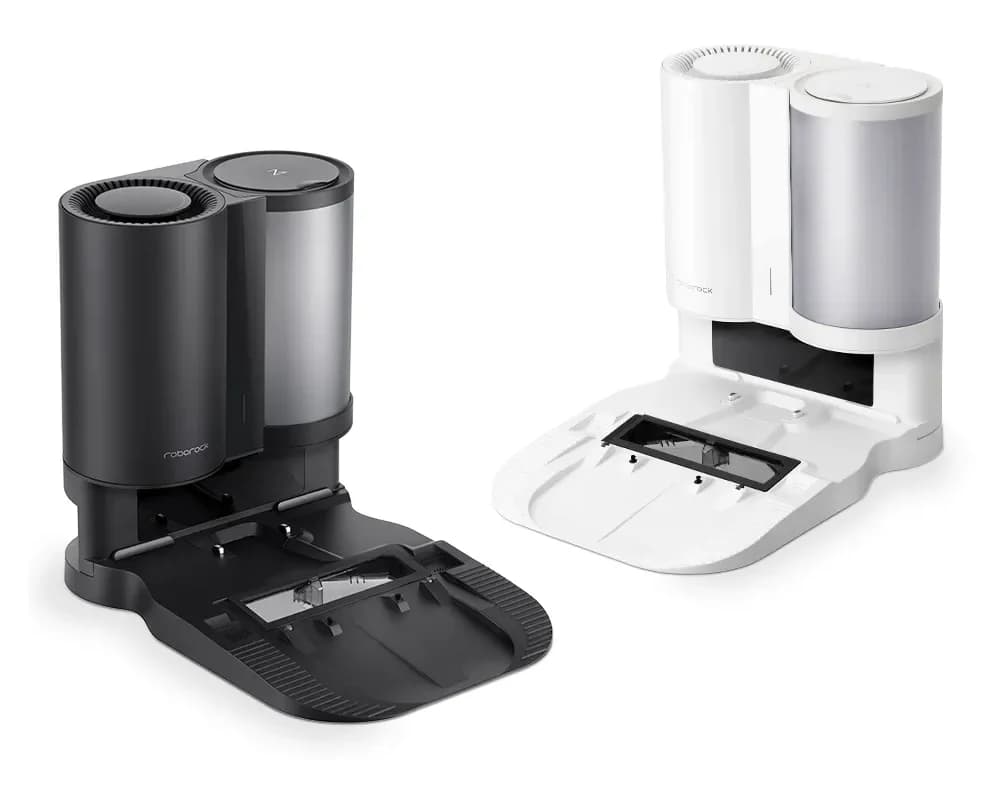
Roborock S7 Auto-Empty Dock
Compatibility and Replacement Buying Guide
Find the documented US Roborock S7 auto-empty dock, required dustbin and bag checks. Compare dock IDs, voltage, package contents and replacement options.
By thisSWEEP EditorialUpdated November 4, 20269 min read
On this page · Quick picks: what should an S7 owner do?
The original Roborock S7 can use the original Auto-Empty Dock, identified in the US dock manual as AED01LRR or AED02LRR, with the correct robot dustbin and air-inlet setup. That is our conditional compatibility pick, but we have no verified current new or refurbished standalone offer to recommend. Keep your charging dock while checking with Roborock; do not buy a newer station on the strength of “S7,” “Ultra” or “RockDock” in its name.
This guide covers the existing-S7 upgrade purchase. For a complete replacement robot, start with our self-emptying robot vacuum guide.
Quick picks: what should an S7 owner do?
Original S7; adding self-emptying
- Our pick or next action
- Original US Auto-Empty Dock, AED01LRR/AED02LRR, only after verification
- Purchase boundary
- Needs the auto-empty robot dustbin, opened air inlet and complete dock accessories
Existing original auto-empty dock; needs bags
- Our pick or next action
- Ask Roborock for the bag matched to that dock code
- Purchase boundary
- No exact current US retail bag SKU or pack verified here
Seller offers Auto-Empty Dock Pure, a Q5 Max+ dock or an Ultra station
- Our pick or next action
- Hold the purchase pending an explicit S7 match
- Purchase boundary
- None qualifies as an original-S7 replacement in our evidence
No complete compatible dock can be confirmed
- Our pick or next action
- Keep the existing charging arrangement or compare a complete robot package
- Purchase boundary
- A replacement robot is a separate purchase
Full comparison table
Swipe to compare. Row labels stay visible.
| Your situation | Our pick or next action | Purchase boundary |
|---|---|---|
| Original S7; adding self-emptying | Original US Auto-Empty Dock, AED01LRR/AED02LRR, only after verification | Needs the auto-empty robot dustbin, opened air inlet and complete dock accessories |
| Existing original auto-empty dock; needs bags | Ask Roborock for the bag matched to that dock code | No exact current US retail bag SKU or pack verified here |
| Seller offers Auto-Empty Dock Pure, a Q5 Max+ dock or an Ultra station | Hold the purchase pending an explicit S7 match | None qualifies as an original-S7 replacement in our evidence |
| No complete compatible dock can be confirmed | Keep the existing charging arrangement or compare a complete robot package | A replacement robot is a separate purchase |
Scroll horizontally to see every column
| Your situation | Our pick or next action | Purchase boundary |
|---|---|---|
| Original S7; adding self-emptying | Original US Auto-Empty Dock, AED01LRR/AED02LRR, only after verification | Needs the auto-empty robot dustbin, opened air inlet and complete dock accessories |
| Existing original auto-empty dock; needs bags | Ask Roborock for the bag matched to that dock code | No exact current US retail bag SKU or pack verified here |
| Seller offers Auto-Empty Dock Pure, a Q5 Max+ dock or an Ultra station | Hold the purchase pending an explicit S7 match | None qualifies as an original-S7 replacement in our evidence |
| No complete compatible dock can be confirmed | Keep the existing charging arrangement or compare a complete robot package | A replacement robot is a separate purchase |
The S7 compatibility FAQ establishes the original pairing. The US dock manual supplies the dock IDs, required parts and setup instructions.
Conditional dock pick: the original US Auto-Empty Dock
Start with the robot's identity, then the candidate dock's rating label. The original S7 manual calls the robot roborock S7 and lists CDZ11RR/CDZ12RR charging docks. The S7 MaxV manual identifies that different robot as S270RR. Do not transfer a MaxV package's compatibility to the original S7.
Robot-and-dock comparison table
Original S7: roborock S7
- Candidate dock
- Original Auto-Empty Dock: AED01LRR/AED02LRR
- What the official documents establish
- Documented S7 upgrade when fitted with the auto-empty dustbin and opened air inlet
Original S7: roborock S7
- Candidate dock
- CDZ11RR/CDZ12RR
- What the official documents establish
- Standard charging arrangement in the S7 manual; not the auto-empty upgrade
S7 MaxV: S270RR
- Candidate dock
- AED01LRR/AED02LRR
- What the official documents establish
- Listed in the MaxV manual; MaxV Plus includes an Auto-Empty Dock
S7 MaxV: S270RR
- Candidate dock
- Empty Wash Fill Dock: EWFD01LRR/EWFD02LRR
- What the official documents establish
- Listed for MaxV; MaxV Ultra includes an Empty Wash Fill Dock, not proof of original-S7 fit
Original S7
- Candidate dock
- Auto-Empty Dock Pure: AED03LRR/AED04LRR
- What the official documents establish
- Separate dock identity; no original-S7 pairing verified here
Original S7
- Candidate dock
- Q5 Max+ dock: AED06LRR/AED07LRR
- What the official documents establish
- Q5 Max+ manual identifies robot Q50ULE and these docks; no original-S7 pairing verified here
Full comparison table
Swipe to compare. Row labels stay visible.
| Robot | Candidate dock | What the official documents establish |
|---|---|---|
| Original S7: roborock S7 | Original Auto-Empty Dock: AED01LRR/AED02LRR | Documented S7 upgrade when fitted with the auto-empty dustbin and opened air inlet |
| Original S7: roborock S7 | CDZ11RR/CDZ12RR | Standard charging arrangement in the S7 manual; not the auto-empty upgrade |
| S7 MaxV: S270RR | AED01LRR/AED02LRR | Listed in the MaxV manual; MaxV Plus includes an Auto-Empty Dock |
| S7 MaxV: S270RR | Empty Wash Fill Dock: EWFD01LRR/EWFD02LRR | Listed for MaxV; MaxV Ultra includes an Empty Wash Fill Dock, not proof of original-S7 fit |
| Original S7 | Auto-Empty Dock Pure: AED03LRR/AED04LRR | Separate dock identity; no original-S7 pairing verified here |
| Original S7 | Q5 Max+ dock: AED06LRR/AED07LRR | Q5 Max+ manual identifies robot Q50ULE and these docks; no original-S7 pairing verified here |
Scroll horizontally to see every column
| Robot | Candidate dock | What the official documents establish |
|---|---|---|
| Original S7: roborock S7 | Original Auto-Empty Dock: AED01LRR/AED02LRR | Documented S7 upgrade when fitted with the auto-empty dustbin and opened air inlet |
| Original S7: roborock S7 | CDZ11RR/CDZ12RR | Standard charging arrangement in the S7 manual; not the auto-empty upgrade |
| S7 MaxV: S270RR | AED01LRR/AED02LRR | Listed in the MaxV manual; MaxV Plus includes an Auto-Empty Dock |
| S7 MaxV: S270RR | Empty Wash Fill Dock: EWFD01LRR/EWFD02LRR | Listed for MaxV; MaxV Ultra includes an Empty Wash Fill Dock, not proof of original-S7 fit |
| Original S7 | Auto-Empty Dock Pure: AED03LRR/AED04LRR | Separate dock identity; no original-S7 pairing verified here |
| Original S7 | Q5 Max+ dock: AED06LRR/AED07LRR | Q5 Max+ manual identifies robot Q50ULE and these docks; no original-S7 pairing verified here |
Sources: S7 manual, original dock manual, MaxV manual, MaxV bundle definitions, Pure manual, and Q5 Max+ manual.
There is a source conflict worth preserving: the older compatibility FAQ says the Auto-Empty Dock works “only with S7,” while the MaxV manual explicitly lists the same dock codes. Use the FAQ to establish S7 support, not to exclude the later documented MaxV pairing or approve every S7-suffixed robot.
- Yes: Documented: original S7 with the original US Auto-Empty Dock and required robot parts
- Partly: Conditional: a replacement offer whose label, contents and support still need confirmation
- No: Exclude from this shortlist: Pure, Q5 Max+ or Ultra stations without explicit original-S7 documentation
Check US electrical identity
The original US dock manual specifies 100–120VAC, 50–60Hz, with 20VDC, 1.2A output. Roborock's regional-voltage guidance separately describes US emptying docks as 100–120V and EU versions as 220–240V. Its standard charging-dock guidance covers 100–240V; that wider range does not establish the auto-empty dock's input rating.
A separate CE regional variant also exists: the CE dock manual identifies AED01HRR and AED02HRR, rated 220–240VAC. That variant documents a cyclone separator in the dock dustbin and a conversion back to bagged use by rotating the cyclone separator out and installing a dust bag holder with a disposable bag. This is why some regional listings describe the same-named dock as bagless: the US manual for AED01LRR/AED02LRR instead requires a dust bag and does not document any bagless conversion. Treat the two as different configurations; a bagless description does not match the documented US station, and its 220–240V rating rules it out for a US outlet.
What must come with a standalone replacement?
The original dock manual's accessory page identifies a dock base, power cable, screwdriver, auto-empty robot dustbin and disposable dust bag. It also says the dock's filter, dustbin and bag are installed during production. That is the factory setup reference, not a guarantee about a seller's remaining stock or a previously owned unit.
Standalone original dock
- What you are choosing
- Upgrade for the S7 you already own
- What must be confirmed
- Dock assembly, base, fastening screws, cable, screwdriver, auto-empty robot bin, installed filters and correct bag
Historical S7+ package
- What you are choosing
- Robot with Auto-Empty Dock, as described by Roborock
- What must be confirmed
- Complete package contents and condition; do not assume a split package retains the upgrade bin
S7 MaxV Plus / Ultra
- What you are choosing
- MaxV robot with Auto-Empty Dock / Empty Wash Fill Dock respectively
- What must be confirmed
- Different robot and package identities; check that package's documentation
Q5 Max+ package
- What you are choosing
- Q50ULE robot with its documented auto-empty dock
- What must be confirmed
- A complete replacement option to assess separately, not a documented S7 dock upgrade
Full comparison table
Swipe to compare. Row labels stay visible.
| Package being considered | What you are choosing | What must be confirmed |
|---|---|---|
| Standalone original dock | Upgrade for the S7 you already own | Dock assembly, base, fastening screws, cable, screwdriver, auto-empty robot bin, installed filters and correct bag |
| Historical S7+ package | Robot with Auto-Empty Dock, as described by Roborock | Complete package contents and condition; do not assume a split package retains the upgrade bin |
| S7 MaxV Plus / Ultra | MaxV robot with Auto-Empty Dock / Empty Wash Fill Dock respectively | Different robot and package identities; check that package's documentation |
| Q5 Max+ package | Q50ULE robot with its documented auto-empty dock | A complete replacement option to assess separately, not a documented S7 dock upgrade |
Scroll horizontally to see every column
| Package being considered | What you are choosing | What must be confirmed |
|---|---|---|
| Standalone original dock | Upgrade for the S7 you already own | Dock assembly, base, fastening screws, cable, screwdriver, auto-empty robot bin, installed filters and correct bag |
| Historical S7+ package | Robot with Auto-Empty Dock, as described by Roborock | Complete package contents and condition; do not assume a split package retains the upgrade bin |
| S7 MaxV Plus / Ultra | MaxV robot with Auto-Empty Dock / Empty Wash Fill Dock respectively | Different robot and package identities; check that package's documentation |
| Q5 Max+ package | Q50ULE robot with its documented auto-empty dock | A complete replacement option to assess separately, not a documented S7 dock upgrade |
The S7+ information page establishes the robot-and-dock package. For a standalone offer, request photographs of the rating label and laid-out contents before paying. Reject an unresolved match rather than planning to source an unidentified bin later.
Required robot conversion and first empty
The dock manual requires replacing the standard robot dustbin and removing the plate covering the robot's air inlet. Roborock's emptying troubleshooting also says the main-brush cover's tabs must sit correctly in their slots.
Assemble the base
Use the supplied screwdriver and the manual's marked fastening points; connect the correct power cable.
Prepare the robot
Remove the standard dustbin and air-inlet plate, then install the auto-empty dustbin.
Set up the dock
Follow the placement clearances below, store excess cable and put away the standard charging dock.
Let the robot return
Auto-emptying starts after cleaning when the robot docks itself; the Dock button can trigger manual emptying while charging.
Roborock's pairing FAQ says emptying defaults to Smart mode even without Wi-Fi. The manual nevertheless identifies app settings and Do Not Disturb as reasons automatic emptying might not start. Its troubleshooting table adds one more trigger to rule out: auto-emptying does not start below a 10% robot battery level, so charge the robot past that point if docking looks healthy but nothing empties.
Charging successfully therefore does not settle whether the required dustbin, air path or emptying settings are correct.
Measure the approach and bag-service space
The US manual gives dock dimensions as 457 × 314 × 383mm, without labeling the axes in that table. Keep that published tuple separate from usable clearance; confirm the assembled base's orientation before planning a cabinet.
It requires a hard, flat floor, at least 0.5m on either side, 1.5m in front and 1m above. The same manual warns that a carpet or mat can tilt the dock and cause docking problems. These are placement requirements, not optional space-saving suggestions.
- 0.5mMinimum clearance on each side
- 1.5mMinimum clear approach in front
- 1mMinimum clearance above the dock
The bag lifts vertically through the top lid. Leave that access usable, and keep direct sunlight and obstructions away from the location beacon, as the manual directs. If your intended alcove cannot meet these requirements, rule it out before buying the dock.
If you instead plan a move to the complete-system alternative below, do not reuse these figures: the Qrevo S Pro US manual reserves a different envelope of at least 0.4 m wide, 1.2 m deep and 0.9 m high, flat against a wall on a hard, flat floor. Its station also adds removable clean- and dirty-water tanks and a cleaning tray, so plan a carrying route for the tanks, not just bag access.
Bag pick: confirm the original dock's replacement part
For Roborock RockDock auto-empty dock dust bags, the dock identity decides the purchase. The original US dock manual requires a disposable bag; it is not permission to run this version bagless. It documents the supplied bag but does not identify a current retail replacement SKU or pack count.
Original dock's supplied disposable bag
- Official identification
- Shown in the AED01LRR/AED02LRR manual
- Original S7 dock decision
- Correct documented bag type; ask Roborock for the current exact replacement part
Current Q5-family six-pack
- Official identification
- RR-CDYCX0-Q5-06; fit list includes S7 MaxV Ultra, S7 Max Ultra and S7 Pro Ultra
- Original S7 dock decision
- Listing does not name S7+ or the original dock; do not substitute on the strength of “S7”
Current Qrevo/Saros six-pack
- Official identification
- RR-CDYCX0-QRevo-06; separate named families
- Original S7 dock decision
- Listing does not establish an original-S7 dock match
Full comparison table
Swipe to compare. Row labels stay visible.
| Bag being considered | Official identification | Original S7 dock decision |
|---|---|---|
| Original dock's supplied disposable bag | Shown in the AED01LRR/AED02LRR manual | Correct documented bag type; ask Roborock for the current exact replacement part |
| Current Q5-family six-pack | RR-CDYCX0-Q5-06; fit list includes S7 MaxV Ultra, S7 Max Ultra and S7 Pro Ultra | Listing does not name S7+ or the original dock; do not substitute on the strength of “S7” |
| Current Qrevo/Saros six-pack | RR-CDYCX0-QRevo-06; separate named families | Listing does not establish an original-S7 dock match |
Scroll horizontally to see every column
| Bag being considered | Official identification | Original S7 dock decision |
|---|---|---|
| Original dock's supplied disposable bag | Shown in the AED01LRR/AED02LRR manual | Correct documented bag type; ask Roborock for the current exact replacement part |
| Current Q5-family six-pack | RR-CDYCX0-Q5-06; fit list includes S7 MaxV Ultra, S7 Max Ultra and S7 Pro Ultra | Listing does not name S7+ or the original dock; do not substitute on the strength of “S7” |
| Current Qrevo/Saros six-pack | RR-CDYCX0-QRevo-06; separate named families | Listing does not establish an original-S7 dock match |
Check the maker's Q5-family bag listing and Qrevo/Saros bag listing, then use our Roborock replacement dust-bag guide for other dock families. Neither current pack is our original-S7 recommendation.
For the original bag, the manual says to replace it as needed or when full. Pulling its handle seals it, and the seal cannot be restored after removal. Do not turn marketing duration claims into a guaranteed replacement schedule.
Complete-system alternative: Qrevo S Pro, US Black
If your goal extends beyond dust emptying to automatic mop care, the documented complete-system alternative is the US Black Qrevo S Pro bundle. Roborock's Qrevo S Pro overview documents dual liftable spinning mops, high-temperature mop self-cleaning, warm-air drying, automatic dust emptying and automatic robot-tank refilling. Its US manual identifies the robot as RRE0PEE and the Empty Wash Fill Dock as EWFD24LRR, rated 120 V, 60 Hz.
This is a new-robot purchase, not an S7 upgrade: no pairing between that station and the original S7 is documented here. Its maintenance routine is also different — the manual covers filling and carrying clean- and dirty-water tanks and maintaining the cleaning tray — so it adds water chores in exchange for the mop automation. Connected setup uses 2.4 GHz Wi-Fi and the Roborock app.
Current purchase status and support
Official-source check: November 3, 2026. No qualifying new or refurbished US standalone S7 dock was verified. We inspected Roborock's dock information page, US storefront catalog and certified-refurbished page. This is a bounded research result, not a claim that every seller is out of stock or that Roborock has formally discontinued it. No exact current US replacement-bag offer was verified either.
Roborock's repair and spare-parts policy says availability varies by model, production year and inventory. Contact support-us@roborock.com with your robot identity and candidate dock label; request the correct auto-empty bin, bag part number, cable, condition and applicable warranty in the same inquiry.
The refurbished program's FAQ states a 6-month limited warranty and 30-day return policy for its refurbished products. Those program terms do not verify a standalone S7 offer or establish coverage for an unrelated seller. Obtain the terms attached to the actual offer before buying.
How we choose
We compare official robot and dock manuals, support articles, regional electrical guidance, accessory lists and current maker-store information. This is document research, without physical product testing. Missing retail identities and package contents remain unresolved; our conditional dock choice is a compatibility decision, not a stock or performance claim. No Amazon purchase link or product card is enabled without a verified product identity.
Verdict
For an original S7, pursue the original US Auto-Empty Dock only with its documented dustbin, air-inlet conversion and complete parts. If Roborock cannot confirm an obtainable compatible package and replacement bag, keep your charging dock or compare a complete robot through our self-emptying guide. Do not spend on an undocumented dock pairing.
Frequently asked questions
Can I add an auto-empty dock to the original Roborock S7?
Yes. Roborock documents the original S7 with its original Auto-Empty Dock; the US dock manual identifies AED01LRR and AED02LRR. The upgrade requires the auto-empty robot dustbin and removal of the plate covering the robot's air inlet. Compatibility does not establish availability: we have no verified current standalone purchase recommendation. Confirm the dock label, regional voltage and complete parts before buying.
Can the original S7 use an Ultra or Auto-Empty Dock Pure station?
We have no documented original-S7 match for those stations in the sources reviewed. The S7 MaxV manual lists an Empty Wash Fill Dock for S270RR, a different robot. Auto-Empty Dock Pure has its own manual and dock codes. Do not buy either as an S7 replacement without an explicit exact-model confirmation from Roborock; a shared brand or similar name does not establish the pairing.
Which replacement dust bags fit the S7 auto-empty dock?
Match the bag to the original dock's AED01LRR or AED02LRR identity. Its manual documents a disposable bag that seals when removed, but we could not verify a current US retail replacement SKU or pack. The current Q5-family and Qrevo/Saros bag listings do not name this original dock or S7+. Ask Roborock for the exact replacement part before ordering a pack sold simply as RockDock bags.
Does the S7 auto-empty dock require Wi-Fi to empty?
Roborock's pairing FAQ says auto-emptying is enabled by default in Smart mode even without the robot connected to Wi-Fi. Its dock manual also allows manual emptying with the robot's Dock button while charging. App settings can disable automatic emptying, and Do Not Disturb can prevent it. This documents the emptying function; it does not establish that all mapping or app features work offline.
Why does my S7 charge but fail to empty?
Check the upgrade parts first: the dock manual requires the auto-empty dustbin and removal of the robot's air-inlet plate. Roborock also says to check the main-brush cover, dust inlet and dock air duct. If automatic emptying does not start, review the app's emptying setting and Do Not Disturb period, and let the robot return after cleaning rather than placing it on the dock manually.
Related guides
Buying guide · Robot Docks
Robot Vacuum Dock Cabinets: Check Operating Clearance Before Buying
Hide your robot vacuum dock without blocking docking or tank access. Compare official station clearances, screen cabinet sizes, and choose an open location.
Buying guide · Robot Docks
Roborock Replacement Docks: Match Your Robot Before Buying
Find the right Roborock replacement dock by robot and station label. Check US voltage, missing parts, standalone stock and complete robot-and-dock alternatives.