

Buying guide
Roborock Replacement Dust Bags
Match Robot and Dock First
Find the right Roborock replacement dust bags by robot and dock. Compare genuine six-packs, check Qrevo and Pure variants, and avoid ordering an unverified fit.
By thisSWEEP EditorialUpdated November 9, 20268 min read2 picks
On this page · The short answer
The short answer
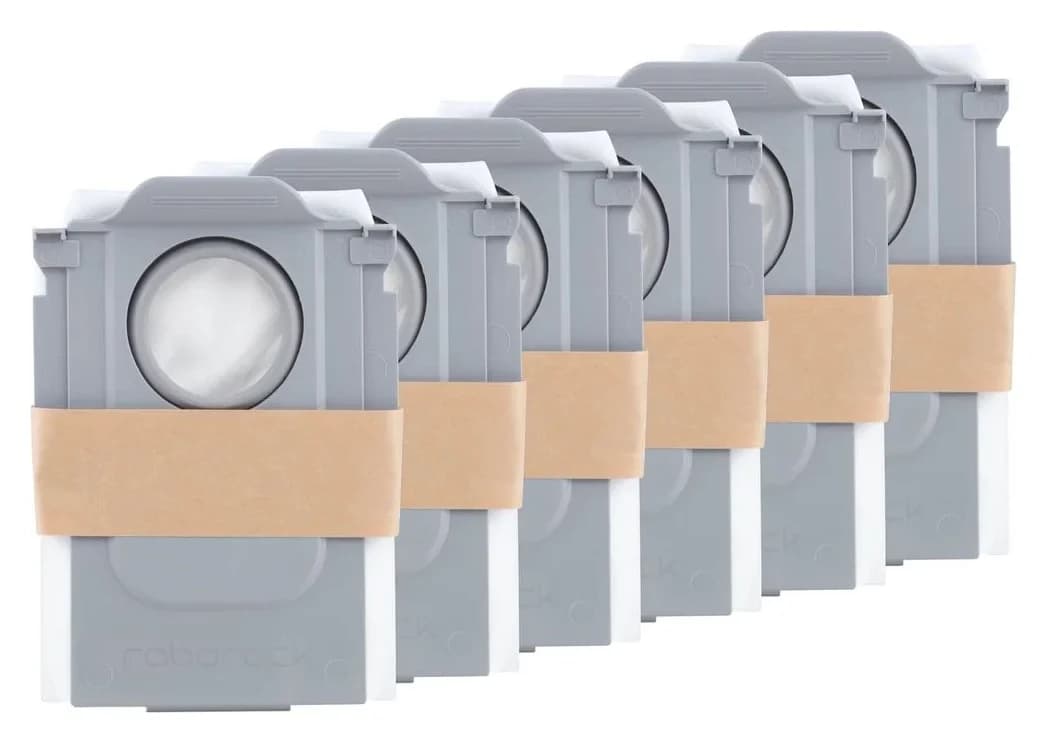
Roborock · RR-CDYCX0-QRevo-06
Dust Bag
- Choose
- For matched Saros 10R and Qrevo Curv docks
- Check
- Not compatible with older S7-series docks or Q-series robots that lack self-empty docks per the maker's listed fit
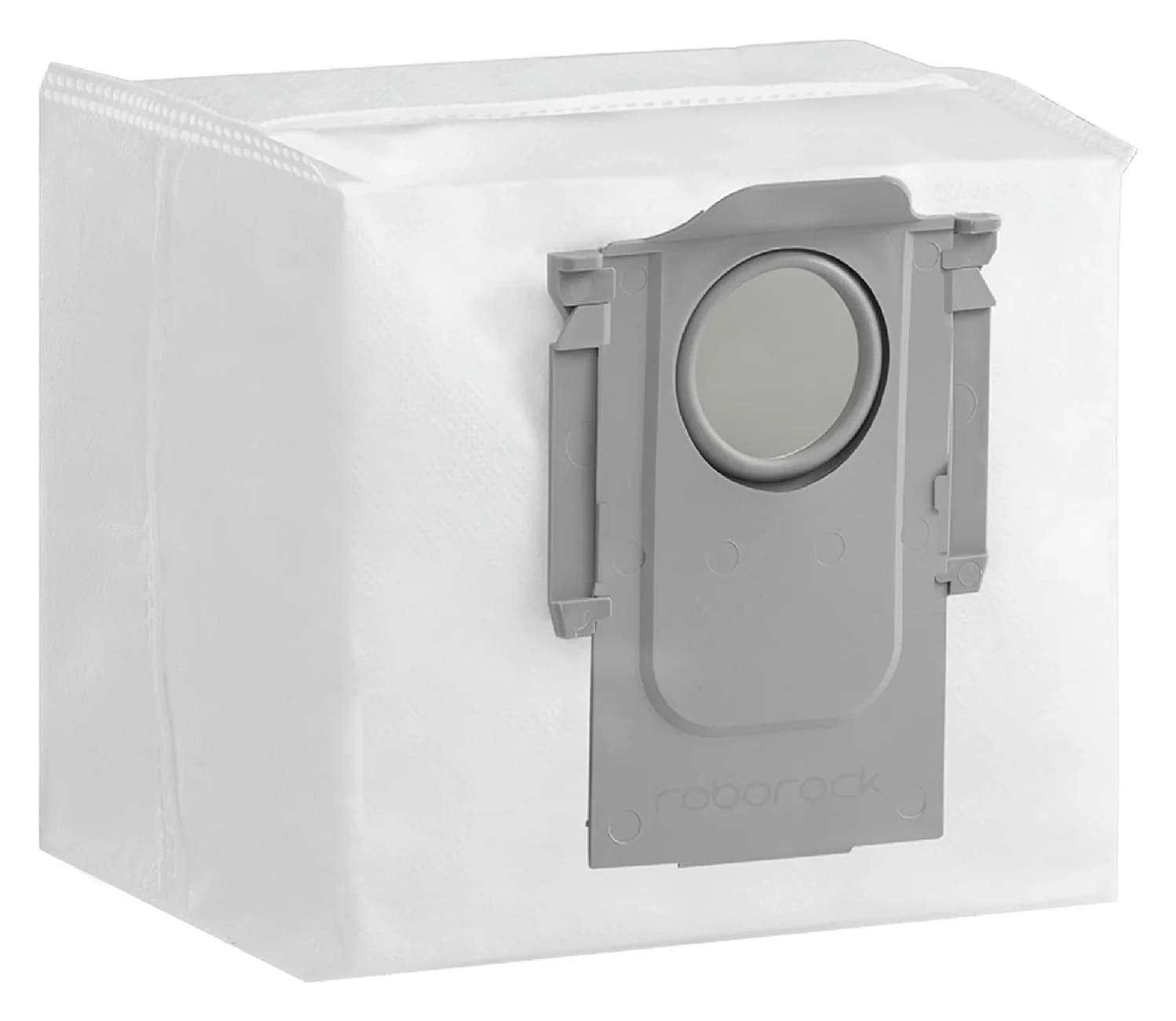
Roborock · RR-CDYCX0-Q5-06
Dust Bag
- Choose
- For matched Q5+/Pure and S7 MaxV Ultra docks
- Check
- Not compatible with Qrevo, S8 or Saros docks, which use a different dust bag (RR-CDYCX0-QRevo-06) sold separately
Compare the picks
| Specification | #1 Dust Bag | #2 Dust Bag |
|---|---|---|
| Compatible models | S8 MaxV Ultra, S8 Max Ultra, Qrevo Series, Qrevo Curv Series, Qrevo Edge Series, Saros Series, QV Series (US-market docks, per the maker's product page) | S7 Series, Q5 Series (US-market docks, per the maker's product page) |
| Maker part number | RR-CDYCX0-QRevo-06 | RR-CDYCX0-Q5-06 |
| Pack contents | 6 disposable dust bags for self-emptying docks | 6 disposable dust bags for self-emptying docks |
| Works with | S8 MaxV Ultra, S8 Max Ultra, Qrevo Series, Qrevo Curv Series, Qrevo Edge Series, Saros Series, QV Series self-emptying docks (maker's official compatibility list) | S7 Series, Q5 Series self-emptying docks (maker's official compatibility list) |
| Best for | Less daily upkeep, Self-emptying | Less daily upkeep, Self-emptying |
| Buy | Find on Amazon | Find on Amazon |
For Roborock bag replacement, our pick for the verified US Saros 10R and original Qrevo Curv packages is RR-CDYCX0-QRevo-06; for the matched Q5+/Pure and S7 MaxV Ultra setups below, choose RR-CDYCX0-Q5-06. Both genuine packs contain six bags, but Roborock gives them different compatibility lists. Match the robot and dock before ordering; leave an unidentified dock unmatched.
Quick picks
- Matched Saros 10R or original Qrevo Curv: Roborock Qrevo/Saros six-pack, Roborock RR-CDYCX0-QRevo-06. Both exact US robot product pages offer this accessory.
- Matched Q5+/Pure or S7 MaxV Ultra: Roborock Q5/S7 MaxV Ultra six-pack, Roborock RR-CDYCX0-Q5-06. The maker explicitly lists both robot packages; use the dock checks below.
- Q5 Max+, original Q Revo, or an unknown replacement dock: use the candidate row, then confirm the actual dock. These rows are not unconditional buy recommendations.
Read the robot and dock separately
Write down the complete robot name, including any +, Max, MaxV or Ultra suffix. Then copy the dock's model code from its own label and compare it with the relevant US manual. Photograph both labels before contacting support; ask for the replacement bag's exact SKU, not simply whether it is a “Roborock bag.”
This distinction matters even within one robot range. The S7 MaxV US manual lists AED01LRR/AED02LRR Auto-Empty Docks separately from EWFD01LRR/EWFD02LRR Empty Wash Fill Docks. A robot name without its dock cannot settle the bag purchase.
Identify the robot
Preserve the complete model name and suffix from your paperwork and label.
Identify the dock
Copy its model code and check the US manual, then use the matching row below.
Resolve any gap
Ask Roborock to confirm the bag SKU for your robot-and-dock pair before ordering.
Verified matches and purchase holds
The bag count describes the replacement pack, not the bags supplied with a complete robot. Matched means an exact-model accessory placement or a named robot match joined to its official dock documentation. Hold means the evidence is incomplete for that purchase.
Saros 10R, S91COP, US tank bundle
- Dock to check
- EWFD28LRR; Multifunctional Dock 4.0
- Bag pack / quantity
- Roborock RR-CDYCX0-QRevo-06 / 6 bags
- Decision
- Matched: exact US accessory placement
Original Qrevo Curv, US factory bundle
- Dock to check
- Multifunctional Dock 3.0 supplied with that model
- Bag pack / quantity
- Roborock RR-CDYCX0-QRevo-06 / 6 bags
- Decision
- Matched: exact US accessory placement; check a replacement dock separately
Q5+, Q340RR, US
- Dock to check
- Auto-Empty Dock Pure AED03LRR or AED04LRR
- Bag pack / quantity
- Roborock RR-CDYCX0-Q5-06 / 6 bags
- Decision
- Matched: Q5+ bag listing and matching dock identities in both manuals
S7 MaxV Ultra, S270RR, US
- Dock to check
- Empty Wash Fill Dock EWFD01LRR or EWFD02LRR
- Bag pack / quantity
- Roborock RR-CDYCX0-Q5-06 / 6 bags
- Decision
- Matched: Ultra bag listing; keep separate from the Auto-Empty Dock
Q7 Max+, US, with Auto-Empty Dock Pure
- Dock to check
- Auto-Empty Dock Pure AED03LRR or AED04LRR
- Bag pack / quantity
- Roborock RR-CDYCX0-Q5-06 / 6 bags
- Decision
- Matched: Q7 Series named on the bag listing, joined to the Pure dock manuals; check the label
Q8 Max+, US
- Dock to check
- Supplied auto-empty station; keep the full name including the +
- Bag pack / quantity
- Roborock RR-CDYCX0-Q5-06 / 6 bags
- Decision
- Named match on the bag page; confirm the station before ordering
Q5 Max+, Q50ULE, US
- Dock to check
- Manual lists AED06LRR and AED07LRR; supplied revision unconfirmed
- Bag pack / quantity
- Roborock RR-CDYCX0-Q5-06 / 6 bags; candidate
- Decision
- Named match on the bag page; hold until the actual package's dock label is confirmed
Original Q Revo, QX0PEA, US
- Dock to check
- EWFD11LRR or EWFD12LRR
- Bag pack / quantity
- Roborock RR-CDYCX0-QRevo-06 / 6 bags; family-listed candidate
- Decision
- Hold for exact dock-to-SKU confirmation
Saros Z70
- Dock to check
- Station supplied with that model
- Bag pack / quantity
- Roborock RR-CDYCX0-QRevo-06 / 6 bags; family-listed candidate
- Decision
- Hold: Saros Series listing; check a replacement station separately
S7 MaxV with Auto-Empty Dock
- Dock to check
- AED01LRR or AED02LRR
- Bag pack / quantity
- No verified pick here
- Decision
- Hold: do not transfer the Ultra row to this dock
Unknown dock code, region or replacement configuration
- Dock to check
- Not established
- Bag pack / quantity
- No verified pick here
- Decision
- Hold: send both labels to Roborock
Full comparison table
Swipe to compare. Row labels stay visible.
| Robot/package | Dock to check | Bag pack / quantity | Decision |
|---|---|---|---|
| Saros 10R, S91COP, US tank bundle | EWFD28LRR; Multifunctional Dock 4.0 | Roborock RR-CDYCX0-QRevo-06 / 6 bags | Matched: exact US accessory placement |
| Original Qrevo Curv, US factory bundle | Multifunctional Dock 3.0 supplied with that model | Roborock RR-CDYCX0-QRevo-06 / 6 bags | Matched: exact US accessory placement; check a replacement dock separately |
| Q5+, Q340RR, US | Auto-Empty Dock Pure AED03LRR or AED04LRR | Roborock RR-CDYCX0-Q5-06 / 6 bags | Matched: Q5+ bag listing and matching dock identities in both manuals |
| S7 MaxV Ultra, S270RR, US | Empty Wash Fill Dock EWFD01LRR or EWFD02LRR | Roborock RR-CDYCX0-Q5-06 / 6 bags | Matched: Ultra bag listing; keep separate from the Auto-Empty Dock |
| Q7 Max+, US, with Auto-Empty Dock Pure | Auto-Empty Dock Pure AED03LRR or AED04LRR | Roborock RR-CDYCX0-Q5-06 / 6 bags | Matched: Q7 Series named on the bag listing, joined to the Pure dock manuals; check the label |
| Q8 Max+, US | Supplied auto-empty station; keep the full name including the + | Roborock RR-CDYCX0-Q5-06 / 6 bags | Named match on the bag page; confirm the station before ordering |
| Q5 Max+, Q50ULE, US | Manual lists AED06LRR and AED07LRR; supplied revision unconfirmed | Roborock RR-CDYCX0-Q5-06 / 6 bags; candidate | Named match on the bag page; hold until the actual package's dock label is confirmed |
| Original Q Revo, QX0PEA, US | EWFD11LRR or EWFD12LRR | Roborock RR-CDYCX0-QRevo-06 / 6 bags; family-listed candidate | Hold for exact dock-to-SKU confirmation |
| Saros Z70 | Station supplied with that model | Roborock RR-CDYCX0-QRevo-06 / 6 bags; family-listed candidate | Hold: Saros Series listing; check a replacement station separately |
| S7 MaxV with Auto-Empty Dock | AED01LRR or AED02LRR | No verified pick here | Hold: do not transfer the Ultra row to this dock |
| Unknown dock code, region or replacement configuration | Not established | No verified pick here | Hold: send both labels to Roborock |
Scroll horizontally to see every column
| Robot/package | Dock to check | Bag pack / quantity | Decision |
|---|---|---|---|
| Saros 10R, S91COP, US tank bundle | EWFD28LRR; Multifunctional Dock 4.0 | Roborock RR-CDYCX0-QRevo-06 / 6 bags | Matched: exact US accessory placement |
| Original Qrevo Curv, US factory bundle | Multifunctional Dock 3.0 supplied with that model | Roborock RR-CDYCX0-QRevo-06 / 6 bags | Matched: exact US accessory placement; check a replacement dock separately |
| Q5+, Q340RR, US | Auto-Empty Dock Pure AED03LRR or AED04LRR | Roborock RR-CDYCX0-Q5-06 / 6 bags | Matched: Q5+ bag listing and matching dock identities in both manuals |
| S7 MaxV Ultra, S270RR, US | Empty Wash Fill Dock EWFD01LRR or EWFD02LRR | Roborock RR-CDYCX0-Q5-06 / 6 bags | Matched: Ultra bag listing; keep separate from the Auto-Empty Dock |
| Q7 Max+, US, with Auto-Empty Dock Pure | Auto-Empty Dock Pure AED03LRR or AED04LRR | Roborock RR-CDYCX0-Q5-06 / 6 bags | Matched: Q7 Series named on the bag listing, joined to the Pure dock manuals; check the label |
| Q8 Max+, US | Supplied auto-empty station; keep the full name including the + | Roborock RR-CDYCX0-Q5-06 / 6 bags | Named match on the bag page; confirm the station before ordering |
| Q5 Max+, Q50ULE, US | Manual lists AED06LRR and AED07LRR; supplied revision unconfirmed | Roborock RR-CDYCX0-Q5-06 / 6 bags; candidate | Named match on the bag page; hold until the actual package's dock label is confirmed |
| Original Q Revo, QX0PEA, US | EWFD11LRR or EWFD12LRR | Roborock RR-CDYCX0-QRevo-06 / 6 bags; family-listed candidate | Hold for exact dock-to-SKU confirmation |
| Saros Z70 | Station supplied with that model | Roborock RR-CDYCX0-QRevo-06 / 6 bags; family-listed candidate | Hold: Saros Series listing; check a replacement station separately |
| S7 MaxV with Auto-Empty Dock | AED01LRR or AED02LRR | No verified pick here | Hold: do not transfer the Ultra row to this dock |
| Unknown dock code, region or replacement configuration | Not established | No verified pick here | Hold: send both labels to Roborock |
Sources: Roborock's Qrevo/Saros bag list and Q5/S7 MaxV Ultra bag list; US product pages for Saros 10R and Qrevo Curv; US manuals for Saros 10R, Q5+, Pure, Q5 Max+ and Q Revo. The S7 MaxV manual above separates its dock types.
For matched Saros 10R and Qrevo Curv docks: Roborock RR-CDYCX0-QRevo-06
Choose RR-CDYCX0-QRevo-06 for the matched packages in the table. Roborock's Saros 10R product page and original Qrevo Curv product page place this pack in their model-specific accessory sections. Their embedded accessory data identifies the same SKU, giving a stronger check than the pack's family wording alone.
The bag page also names S8 MaxV Ultra, S8 Max Ultra, Qrevo, Qrevo Curv, Qrevo Edge, Saros and QV series. Treat those broader series names as a starting point for checking an exact model and dock, particularly if the dock has been replaced or imported.
For the original Q Revo, the US manual identifies the dock revisions shown in the table, while the bag page supplies a family-level listing. We leave the final SKU match pending rather than extending the exact Saros or Curv check to it. Likewise, this Curv check is for the original package; do not automatically extend it to every differently named Curv version.
The bag page's broader Saros Series listing also covers Saros Z70, so a Z70 supplied with its factory station is a family-listed candidate rather than an exact placement; treat it like the table's hold row, and check a replacement station separately.
Check the matched Qrevo/Saros pack at Roborock.
For matched Q5+/Pure and S7 MaxV Ultra docks: Roborock RR-CDYCX0-Q5-06
Choose the separate RR-CDYCX0-Q5-06 pack for the verified older-family rows. Roborock's US part page explicitly names Q5+ and S7 MaxV Ultra. Its embedded product data supplies the SKU; the visible title supplies the six-piece quantity.
The same listing's compatibility line also names Q8 Max+, Q5 Pro+, Q5 Max+, Q55 DuoRoller+, Q10 X5+, Q10 S5+, Q7 L5+, Q7 M5+, Q7 Series, S7 Max Ultra and S7 Pro Ultra. Those are robot-level matches only: still confirm the actual dock before ordering, because the pack is chosen by the station's model code, not the robot name alone.
For RockDock Auto-Empty Dock Pure dust bags, the documented route here is the Q5+ pairing. The Q5+ manual and the Pure manual both identify AED03LRR and AED04LRR, and Roborock's Q5 overview names Auto-Empty Dock Pure. That supports this specific match without inventing a separate “Pure-only” pack.
Q5 Max+ needs an additional package check. The same bag page names Q5 Max+, but its US manual lists AED06LRR and AED07LRR. We have not confirmed which revision an individual marketplace offer supplies. Keep the purchase on hold until the actual included dock is established; do not rename either revision Pure.
Q7 Max+ joins the Pure route. The bag listing covers the Q7 Series, and Roborock's support pages group Roborock Q7 Max Series with Roborock Auto-Empty Dock Pure. If your Q7 Max+ package carries Pure dock AED03LRR or AED04LRR, the Q5 pack row applies; treat any other Q7 dock as unmatched until Roborock confirms the SKU.
For an original S7 or an uncertain S7 dock purchase, start with our S7 auto-empty dock compatibility guide, then return to the exact bag row. A replacement dock is a separate compatibility decision.
Check the matched Q5/S7 MaxV Ultra pack at Roborock.
Variants and cost per compatible bag
S8 naming is a useful trap to catch: Roborock lists S8+ and S8 Pro Ultra on the Q5-pack page, but S8 Max Ultra and S8 MaxV Ultra on the Qrevo-pack page. Preserve the full name when comparing offers. A shared “S8” label is insufficient.
Both recommended packs contain 6 bags. For either matched pack, calculate current delivered pack total ÷ 6 = cost per compatible bag. Use the selected pack's checkout total, including applicable delivery and tax, and compare totals on the same basis. We do not publish static prices.
Count only bags that match your dock. If comparing a mixed maintenance kit, do not divide its total by the number of brushes, filters and bags combined. A larger pack deserves consideration only after the model match is settled; do not buy extra quantity to compensate for uncertain fit.
- Yes: Exact robot name and dock identity agree with a matched row
- Yes: Selected maker SKU and bag quantity match the intended pack
- Partly: Family wording or an unconfirmed supplied dock needs confirmation
- No: An unidentified dock is not ready for a bag purchase
These picks are genuine Roborock packs. We have not established an alternative maker's exact US dock-and-revision match for an aftermarket bag, so there is no aftermarket recommendation here. Require a documented match before comparing it on cost.
Change the bag and keep the air path clear
Switch the product off and unplug it before maintenance, as the Pure manual instructs. Follow your own model's cover-removal directions.
For Pure, remove the dustbin cover vertically, lift out the used bag and discard it. Roborock says the handle seals the bag on removal. Wipe the dock filter with a dry cloth, slide a new bag into its slot, and replace the cover. The support FAQ says the filter inside the Pure/RockDock Plus dock dustbin is not detachable; wipe it or vacuum it instead of trying to remove it.
For Saros 10R, remove the dust container cover and discard the used bag. Clean the filter with a dry cloth, insert the new bag fully into the slot, spread it evenly, then reinstall the cover so the container is securely sealed. Its US manual says to fit the bag before replacing the cover. Treat these bags as disposable; do not substitute the robot's washable-filter instructions.
If emptying remains weak, the Saros 10R manual also points to blockages in the filter, air duct, suction inlet, air inlet, dustbin or bag, and to incorrectly installed main brushes or their cover. A fresh bag does not resolve every air-path problem.
For Pure, check the dustbin cover and app auto-emptying settings. Its manual says DND mode, a return without cleaning, or moving the robot onto the dock manually can prevent automatic emptying. It also advises against frequent manual emptying. Follow the model-specific troubleshooting procedure before repeatedly triggering another cycle.
Bag changes leave other upkeep on the schedule. For brush selection and revision checks, use our Roborock replacement brushes guide.
How we choose
We compare official US bag listings, product-page accessory placements and model-specific manuals. A robot listing joined to its manual establishes the documented dock pair; it does not verify an individual seller's package. Exact placements, family-level candidates and unresolved offers remain visibly different in the table.
These are compatibility picks based on documentation, with no physical fit, filtration or cleaning evaluation by this site. The links go to Roborock. We leave unsupported capacity, filtration-grade and fixed-service-life claims out of the comparison. See our disclosure.
Verdict
Buy RR-CDYCX0-QRevo-06 for the matched US Saros 10R or original Qrevo Curv package. Buy RR-CDYCX0-Q5-06 for the documented Q5+/Pure or S7 MaxV Ultra pairing. For Q5 Max+, the original Q Revo or an unidentified dock, resolve the table's hold before ordering; then compare the current delivered total per compatible bag.
Frequently asked questions
Which dust bags fit the original Roborock Q Revo?
Roborock lists the Qrevo series for RR-CDYCX0-QRevo-06, its six-bag pack. The original Q Revo US manual identifies docks EWFD11LRR and EWFD12LRR. That establishes the dock identities and the listed family, but we have not verified an exact dock-to-SKU statement for those revisions. Ask Roborock to confirm your label before ordering.
Which replacement dust bags should I buy for Qrevo Curv?
For the original US Qrevo Curv with its factory Multifunctional Dock 3.0, our pick is RR-CDYCX0-QRevo-06. Roborock places this six-pack in that exact model's accessory section. This check covers the original Curv package; confirm a replacement dock or a differently named Curv version separately rather than extending the match by appearance.
Which bags fit RockDock Auto-Empty Dock Pure?
For the verified US Q5+ pairing with Pure dock AED03LRR or AED04LRR, choose RR-CDYCX0-Q5-06. Roborock lists Q5+ for this six-pack, and the Q5+ and Pure manuals identify those dock codes. If you have only the word Pure, without the robot and dock identities, leave the purchase unmatched until Roborock confirms it.
Does Q5 Max+ use the Qrevo bag pack?
Roborock lists Q5 Max+ on the separate RR-CDYCX0-Q5-06 six-pack page. Its US manual lists auto-empty docks AED06LRR and AED07LRR. Confirm which dock is actually included with your package before buying bags; this guide has not verified an individual marketplace offer. Do not identify that dock as Pure simply from the search phrase.
Can I wash and reuse a Roborock dust bag?
Treat these as disposable replacements. The Pure and Saros 10R manuals instruct owners to remove and discard the used bag, then install a new one. Their bag-change instructions call for a dry cloth on the dock filter area. Instructions for a robot's washable filter are separate and should not be applied to the dust bag.
How often should I replace my Roborock dust bag?
The model manuals say to replace it as required. Roborock's support FAQ suggests every 7 weeks for Auto-Empty Dock Pure, RockDock Plus, RockDock Ultra and Multifunctional Dock, explicitly depending on actual use. Treat that as a reminder to inspect, not a guaranteed lifespan or a reason to keep using a blocked bag.

Related guides
Buying guide · Bags & Filters
Eufy Robot Vacuum Filters: How to Change and Match the Right Part
Change your eufy robot vacuum filter and choose the correct replacement. Compare 11S MAX, original 11S, G30 revisions and X10 Pro Omni filter packs and kits.
Buying guide · Bags & Filters
Roborock QV 35A Dust Bags: The Genuine Pack and Dock Check
Find the genuine Roborock QV 35A dust bag pack, check robot and dock labels, avoid the similar Q5 bags, and follow the official replacement and fault checks.
Buying guide · Bags & Filters
Roomba 670 Replacement Filter: Correct Pack, Kit and Fit Checks
Find the correct Roomba 670 filter, compare the genuine filter pack and maintenance kit, avoid 700-series mix-ups, and follow the right dry-cleaning routine.