

Buying guide
Roborock Side Brush Replacement
Which Brush and Kit Fit?
Find the right Roborock side brush, main roller or cover by exact model and part code. Compare genuine packs, kit contents, screw mounts and replacement steps.
By thisSWEEP EditorialUpdated November 6, 20269 min read3 picks
On this page · The short answer
The short answer
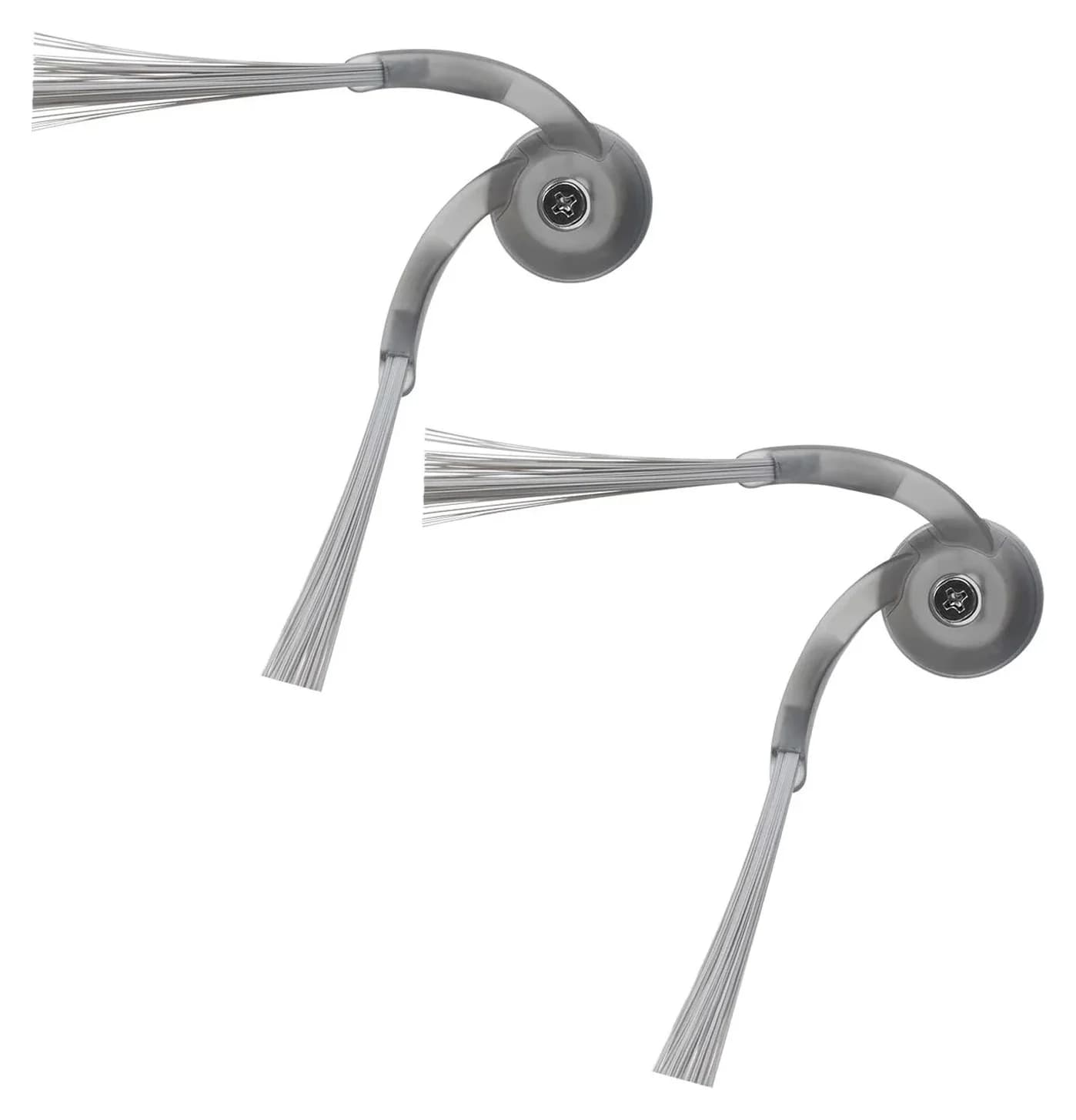
Roborock · RR-BS2-QrevoCurv-02
Side Brushes
- Pack contents
- 2 side brushes
- Choose
- Keep the complete maintenance kit model-specific
- Check
- Only fits Qrevo Curv and Qrevo Edge, not earlier Qrevo/S/Q-series robots, which use the RR-BS0/BS5 two-packs
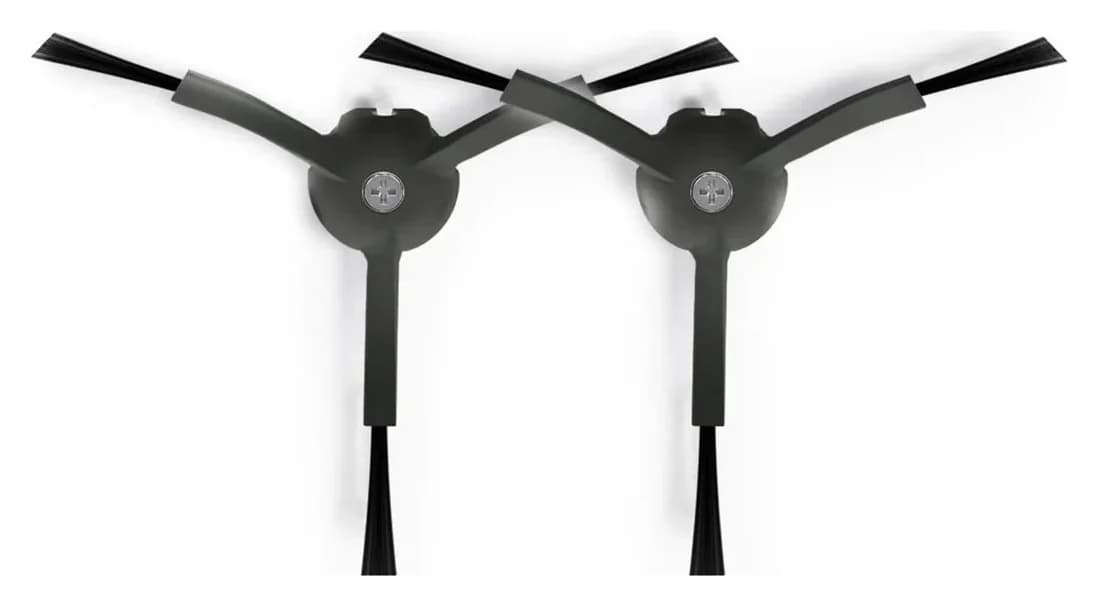
Roborock · RR-BS5-Q85MaxPlus-M2
Black Side Brushes Replacement
- Pack contents
- 2 black side brushes
- Choose
- These exact names appear in the black pack's description
- Check
- Not for newer FlexiArm designs on Saros and recent Qrevo Curv/Edge models, which use a different side brush sold separately
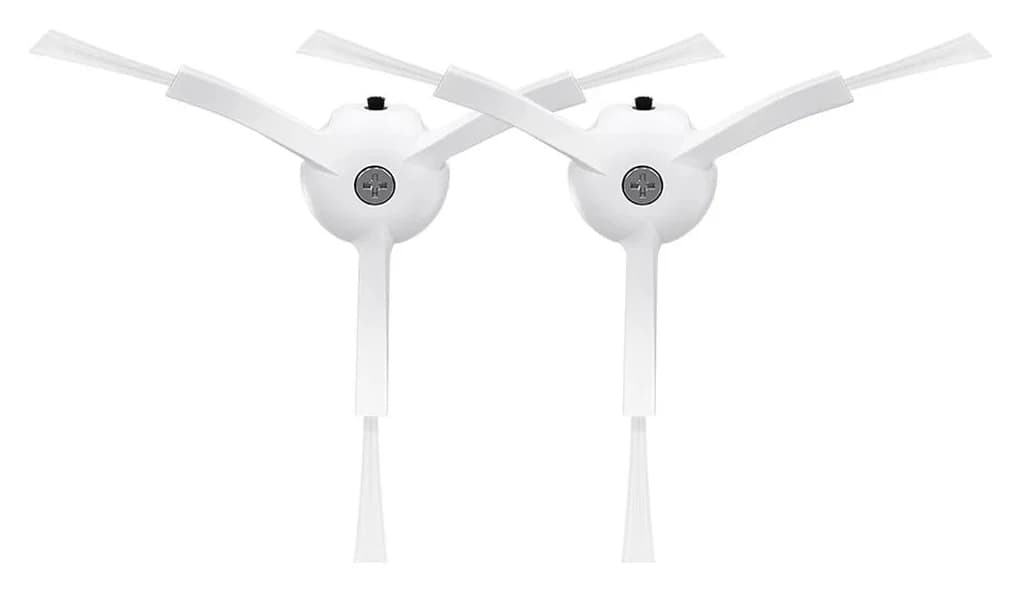
Roborock · RR-BS0-Q80MaxPlus-M2
White Side Brushes Replacement
- Pack contents
- 2 white side brushes
- Choose
- The white pack's model list names these legacy robots explicitly
- Check
- Not for newer FlexiArm designs on Saros and recent Qrevo Curv/Edge models, which use a different side brush sold separately
For a Roborock side brush replacement, start with the complete robot name: our picks are RR-BS2-QrevoCurv-02 for Saros 10/10R and original Qrevo Curv/Edge, or RR-BS5-Q85MaxPlus-M2 for Q5 Max+ and the earlier models listed below. Both are genuine two-side-brush packs; the DuoDivide RR-ZS4-QrevoCurv-01 is a main brush, a separate purchase. Match the part code, mounting instructions and itemized contents before ordering from the linked Roborock US pages. Side-brush sources: Saros/Curv, black pack, main brush.
Quick picks: match the exact robot first
These are documented matches from Roborock's US accessory descriptions, with the Saros models also cross-checked against their robot pages. They are a bounded shortlist, not permission to fit every robot sharing a family name.
Compare specifications and all conditions
Saros 10 or Saros 10R
- Model
- Roborock RR-BS2-QrevoCurv-02
- Pack
- 2 side brushes
- Buying decision
- Keep the complete maintenance kit model-specific
Original Qrevo Curv or Qrevo Edge
- Model
- Roborock RR-BS2-QrevoCurv-02
- Pack
- 2 side brushes
- Buying decision
- Check any extra suffix before extending this match
Q5 Max+, Q5 Pro or Q5 Pro+
- Model
- Roborock RR-BS5-Q85MaxPlus-M2 (Black)
- Pack
- 2 side brushes
- Buying decision
- These exact names appear in the black pack's description
Original Q5 or Q5+; S7, S7 MaxV or S7 MaxV Ultra
- Model
- Roborock RR-BS5-Q85MaxPlus-M2 (Black)
- Pack
- 2 side brushes
- Buying decision
- The selectable black variant is documented on the combined-color page
Qrevo, Qrevo S, Qrevo Pro, Qrevo Master, Qrevo Plus or Qrevo Slim
- Model
- Roborock RR-BS5-Q85MaxPlus-M2 (Black)
- Pack
- 2 side brushes
- Buying decision
- A shared side brush does not establish a shared main roller
S8, S8+ or S8 Pro Ultra
- Model
- Roborock RR-BS5-Q85MaxPlus-M2 (Black)
- Pack
- 2 side brushes
- Buying decision
- The black pack's own compatibility text names these S8 models
S5, S5 Max, S6, S6 Pure, S6 MaxV, S7, S7 MaxV or S7 MaxV Ultra
- Model
- Roborock RR-BS0-Q80MaxPlus-M2 (White)
- Pack
- 2 side brushes
- Buying decision
- The white pack's model list names these legacy robots explicitly
Full comparison table
Swipe to compare. Row labels stay visible.
| Your exact robot | Model | Pack | Buying decision |
|---|---|---|---|
| Saros 10 or Saros 10R | Roborock RR-BS2-QrevoCurv-02 | 2 side brushes | Keep the complete maintenance kit model-specific |
| Original Qrevo Curv or Qrevo Edge | Roborock RR-BS2-QrevoCurv-02 | 2 side brushes | Check any extra suffix before extending this match |
| Q5 Max+, Q5 Pro or Q5 Pro+ | Roborock RR-BS5-Q85MaxPlus-M2 (Black) | 2 side brushes | These exact names appear in the black pack's description |
| Original Q5 or Q5+; S7, S7 MaxV or S7 MaxV Ultra | Roborock RR-BS5-Q85MaxPlus-M2 (Black) | 2 side brushes | The selectable black variant is documented on the combined-color page |
| Qrevo, Qrevo S, Qrevo Pro, Qrevo Master, Qrevo Plus or Qrevo Slim | Roborock RR-BS5-Q85MaxPlus-M2 (Black) | 2 side brushes | A shared side brush does not establish a shared main roller |
| S8, S8+ or S8 Pro Ultra | Roborock RR-BS5-Q85MaxPlus-M2 (Black) | 2 side brushes | The black pack's own compatibility text names these S8 models |
| S5, S5 Max, S6, S6 Pure, S6 MaxV, S7, S7 MaxV or S7 MaxV Ultra | Roborock RR-BS0-Q80MaxPlus-M2 (White) | 2 side brushes | The white pack's model list names these legacy robots explicitly |
Scroll horizontally to see every column
| Your exact robot | Model | Pack | Buying decision |
|---|---|---|---|
| Saros 10 or Saros 10R | Roborock RR-BS2-QrevoCurv-02 | 2 side brushes | Keep the complete maintenance kit model-specific |
| Original Qrevo Curv or Qrevo Edge | Roborock RR-BS2-QrevoCurv-02 | 2 side brushes | Check any extra suffix before extending this match |
| Q5 Max+, Q5 Pro or Q5 Pro+ | Roborock RR-BS5-Q85MaxPlus-M2 (Black) | 2 side brushes | These exact names appear in the black pack's description |
| Original Q5 or Q5+; S7, S7 MaxV or S7 MaxV Ultra | Roborock RR-BS5-Q85MaxPlus-M2 (Black) | 2 side brushes | The selectable black variant is documented on the combined-color page |
| Qrevo, Qrevo S, Qrevo Pro, Qrevo Master, Qrevo Plus or Qrevo Slim | Roborock RR-BS5-Q85MaxPlus-M2 (Black) | 2 side brushes | A shared side brush does not establish a shared main roller |
| S8, S8+ or S8 Pro Ultra | Roborock RR-BS5-Q85MaxPlus-M2 (Black) | 2 side brushes | The black pack's own compatibility text names these S8 models |
| S5, S5 Max, S6, S6 Pure, S6 MaxV, S7, S7 MaxV or S7 MaxV Ultra | Roborock RR-BS0-Q80MaxPlus-M2 (White) | 2 side brushes | The white pack's model list names these legacy robots explicitly |
Sources: Saros/Curv pack, black pack, combined-color pack, white pack, Saros 10 and 10R.
Saros and original Curv/Edge side brush: RR-BS2-QrevoCurv-02
Choose this pack when you need the side brush on a Saros 10 or 10R, or the original Curv/Edge models above. Roborock's product data specifies Side Brush*2 and the SKU RR-BS2-QrevoCurv-02. Both Saros robot pages also offer this accessory. Check the genuine side-brush pack at Roborock.
For the 10R, the manual describes a screw-secured side brush whose central groove aligns with a raised position on the robot. That is the mounting instruction to follow; the presence of a screw alone is not our compatibility test. The accessory description does not itemize spare screws, a screwdriver or the moving arm assembly. Confirm those separately if your missing or damaged part extends beyond the brush. 10R manual, routine maintenance.
Q5 Max+ and earlier-model black side brush: RR-BS5-Q85MaxPlus-M2
This is our Q5 Max+ side-brush pick because the black pack explicitly names that revision, alongside Q5 Pro and Q5 Pro+. It contains 2 side brushes and carries SKU RR-BS5-Q85MaxPlus-M2. Roborock also presents the same accessory on the Q5 Max+ robot page. Check the black pack at Roborock.
For original Q5/Q5+ and the older S7 models in the table, use the combined-color listing's model description and select its Black variant with that same SKU. Keep the exact listing distinction: the separate black and combined-color descriptions enumerate different models. The shared SKU supports the matches above; their broad titles alone would not.
White is a documented variant, not an automatic color swap. Its code is RR-BS0-Q80MaxPlus-M2, and the white pack's own US model list explicitly names S7, S7 MaxV, S7 MaxV Ultra, Q5, Q5+, Q7, Q7+, Q7 Max, Q7 Max+, S6, S6 Pure, S6 MaxV, S5 and S5 Max. It does not name Q5 Max+. Use the white code only for a robot on that list, and seek that exact confirmation before substituting it. Check the white pack at Roborock.
The black pack's compatibility text also explicitly names S8, S8+ and S8 Pro Ultra (among the newer S8 and Qrevo models listed in the selector). Those names are part of that listing's own text, not a family-name extension.
DuoDivide main brush: RR-ZS4-QrevoCurv-01
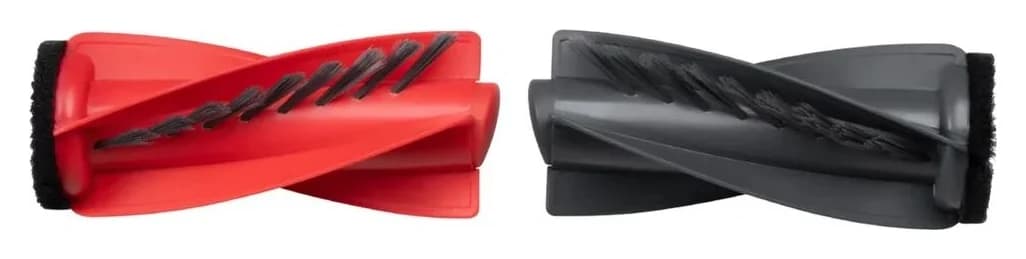
For the Saros 10/10R main brush, choose RR-ZS4-QrevoCurv-01. Its accessory description explicitly names Saros 10, Saros 10R, Qrevo Curv series, Qrevo Edge series and Qrevo S5V; Roborock describes the 10R's system as DuoDivide. Check the replacement main brush, and see the 10R system description.
The listing does not itemize a side brush or cover with this main-brush item. Q5 Max+ uses DuoRoller, according to its own page; this DuoDivide accessory description does not establish a Q5 Max+ match. Do not turn a shared side-brush recommendation into permission to swap main-brush systems. For robot-level differences, use our Saros 10 versus 10R guide.
FreeFlow main brush for Saros Z70: RR-ZS4-SarosZ70-M01
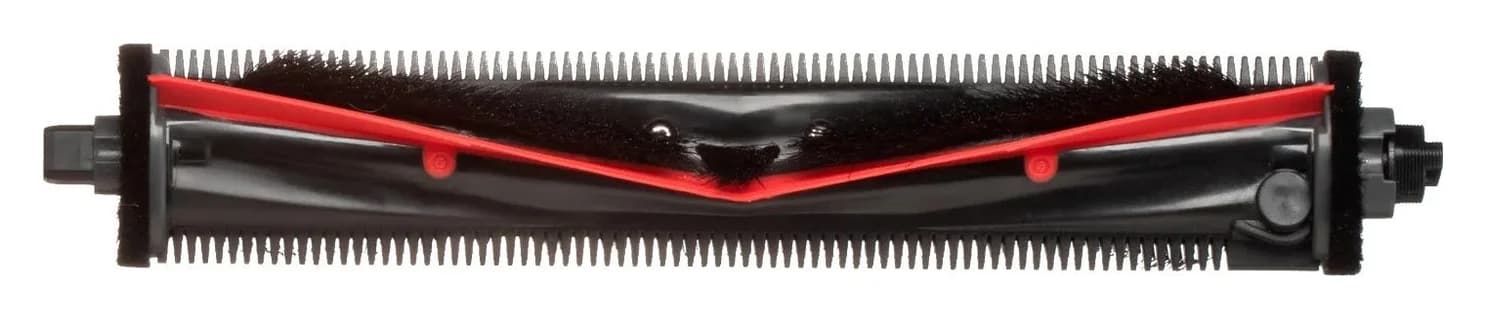
For the Saros Z70, the main brush has its own Z70-specific listing: RR-ZS4-SarosZ70-M01, described as compatible with Roborock Saros Z70. Roborock's Z70 overview calls this main-brush system FreeFlow, and its side brush is the FlexiArm Riser design. Do not substitute the DuoDivide RR-ZS4-QrevoCurv-01 here: that listing does not name the Z70. Check the Z70 main brush at Roborock.
The Z70's main-brush cover is sold separately under its own code, RR-ZSZ5-SarosZ70-M01, on the dedicated cover listing. Order that item only when the cover is the damaged component.
Original Qrevo main brush: RR-S7-ZS-02
For an original Qrevo, Qrevo S or Qrevo Pro main brush, the separate official listing is RR-S7-ZS-02. It also explicitly names Qrevo MaxV, Qrevo Plus, QV 35A, QV 35S, Q7 Max, S7 MaxV, S7 Pro Ultra and S7 Max Ultra. Check this main-brush listing at Roborock.
Do not buy by the URL's short “s7-main-brush” label: use the current title and compatibility description. This description does not name original S7, T7S or Q5 Max+. Nor does it establish fit for Qrevo Master or Slim merely because those models share the black side-brush pack.
Cover only: RR-ZSZ1-Saros10R-P01 needs an extra check
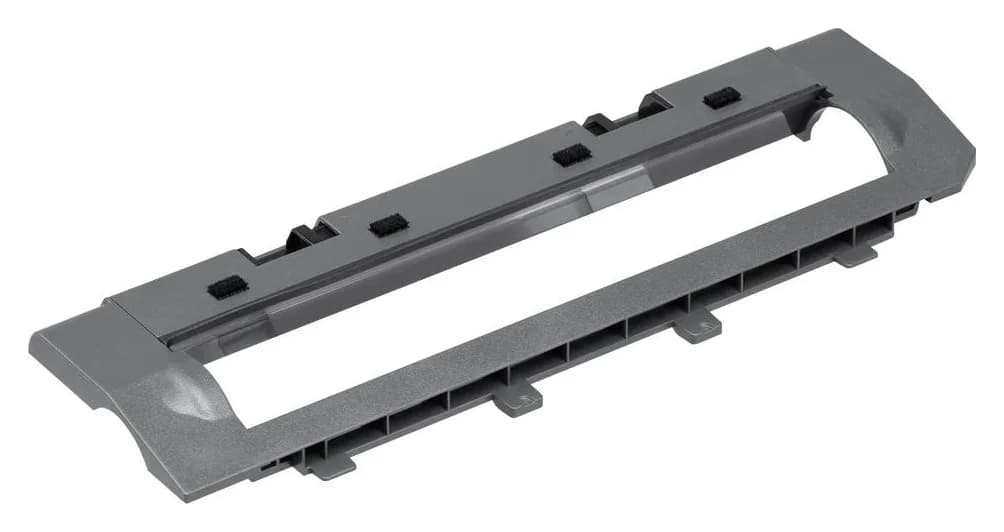
If you need a replacement cover, Roborock separately lists RR-ZSZ1-Saros10R-P01 for Saros 10R, Saros 10, Qrevo Curv, Qrevo Edge, Curv S5X, Edge S5A and Qrevo S5V. Check that cover at Roborock. It is not the main-brush SKU.
There is an unresolved overlap: Roborock also sells RR-ZSZ2-QrevoCurv-01, whose description names Curv/Edge series, Saros 10/10R and Qrevo S5V. The pages do not explain a revision difference or establish that the covers are interchangeable. Match your original part code if available; otherwise ask Roborock which cover your exact robot needs before buying either. Other cover listing.
For the older S7 generation, Roborock sells a dedicated main-brush cover in black and white variants, described as compatible with S7, S7+, S7 MaxV, S7 MaxV Plus, S7 MaxV Ultra, S7 Max Ultra, Q5, Q5+, Q7, Q7+, Q7 Max and Q7 Max+. Confirm your variant's code against that page before ordering; the cover is a separate item from any main-brush listing.
Loose brushes versus kits: what is actually itemized?
“Not itemized” below means unconfirmed, not a promise that the item is absent. Do not budget on receiving it.
RR-BS2-QrevoCurv-02
- Side brushes
- 2
- Main brush
- Not itemized
- Other itemized contents
- Cover and spare screws not itemized
Black RR-BS5-Q85MaxPlus-M2
- Side brushes
- 2
- Main brush
- Not itemized
- Other itemized contents
- Cover and spare screws not itemized
RR-ZS4-QrevoCurv-01
- Side brushes
- Not itemized
- Main brush
- Main-brush item; set quantity not itemized
- Other itemized contents
- Cover not itemized
RR-S7-ZS-02
- Side brushes
- Not itemized
- Main brush
- Main-brush item; quantity not itemized
- Other itemized contents
- Cover not itemized
RR-ZSZ1-Saros10R-P01
- Side brushes
- Not itemized
- Main brush
- Not itemized
- Other itemized contents
- Main-brush cover
Saros 10 accessories pack
- Side brushes
- 2
- Main brush
- 1 set
- Other itemized contents
- 2 filters, 2 VibraRise cloths, 2 Edgewise cloths, 3 dust bags; cover not itemized
Full comparison table
Swipe to compare. Row labels stay visible.
| Official item | Side brushes | Main brush | Other itemized contents |
|---|---|---|---|
| RR-BS2-QrevoCurv-02 | 2 | Not itemized | Cover and spare screws not itemized |
| Black RR-BS5-Q85MaxPlus-M2 | 2 | Not itemized | Cover and spare screws not itemized |
| RR-ZS4-QrevoCurv-01 | Not itemized | Main-brush item; set quantity not itemized | Cover not itemized |
| RR-S7-ZS-02 | Not itemized | Main-brush item; quantity not itemized | Cover not itemized |
| RR-ZSZ1-Saros10R-P01 | Not itemized | Not itemized | Main-brush cover |
| Saros 10 accessories pack | 2 | 1 set | 2 filters, 2 VibraRise cloths, 2 Edgewise cloths, 3 dust bags; cover not itemized |
Scroll horizontally to see every column
| Official item | Side brushes | Main brush | Other itemized contents |
|---|---|---|---|
| RR-BS2-QrevoCurv-02 | 2 | Not itemized | Cover and spare screws not itemized |
| Black RR-BS5-Q85MaxPlus-M2 | 2 | Not itemized | Cover and spare screws not itemized |
| RR-ZS4-QrevoCurv-01 | Not itemized | Main-brush item; set quantity not itemized | Cover not itemized |
| RR-S7-ZS-02 | Not itemized | Main-brush item; quantity not itemized | Cover not itemized |
| RR-ZSZ1-Saros10R-P01 | Not itemized | Not itemized | Main-brush cover |
| Saros 10 accessories pack | 2 | 1 set | 2 filters, 2 VibraRise cloths, 2 Edgewise cloths, 3 dust bags; cover not itemized |
Sources: the individual accessory pages above and Saros 10 pack contents. That full kit explicitly excludes Saros 10R, despite the standalone main brush's documented match to both robots. Its maker SKU is RR-PJLB12-Saros10-M12, and Roborock currently lists it as unavailable on its own store — treat it as a contents reference and check with Roborock for current ordering options. Use our Roborock dust-bag selector when replenishing bags separately.
How to replace the side brush and clean the main brushes
Identify the part before disassembly. The 10R manual's bottom-view labels distinguish the side brush, main brushes and main-brush cover. Its safety instructions require switching off the product and removing the plug from the socket before maintenance.
For the Saros 10R, follow this order from its manual:
Release the screw
Unscrew the side-brush screw, then remove the brush.
Clean the removed brush
Remove accumulated debris as part of the manual's cleaning procedure.
Align and secure
Align the central groove with the raised position on the robot, then tighten the screw to reinstall the brush.
The Q5 Max+ manual likewise says to unscrew, remove and clean the side brush, reinstall it and tighten the screw. The original Qrevo Curv manual gives the same screw-removal sequence. Neither justifies guessing a screw size or fitting a differently listed brush. Sources: Q5 Max+ FCC manual and Qrevo Curv manual.
Clean before you buy. The S7 manual defines two brush-related stoppages: Error 5, “Main brush jammed. Clean main brush and bearings.” and Error 6, “Side brush jammed. Remove and clean side brush.” If your robot reports one of these, follow the matching cleaning instruction before ordering replacement consumables — a jam often needs cleaning, not a new part.
For 10R main brushes, press the cover latches inward, lift out the brushes and remove the bearings to clear hair at the ends. Reinstall with the brush, bearing and robot-arrow colors matching, then seat the cover teeth and press until it clicks. Roborock recommends a wet cloth for the main brushes, air-drying away from direct sunlight, and no corrosive cleaner or disinfectant. The Q5 Max+ instructions separately mention removing its main-brush caps; follow that robot's procedure rather than transferring every detail from the 10R.
Replacement intervals are model-specific
The 10R, original Qrevo Curv and Q5 Max+ manuals specify the same schedule: side brush—clean monthly, replace every 3–6 months; main brushes—clean every 2 weeks, replace every 6–12 months. They also say the actual replacement frequency can vary and abnormal wear calls for immediate replacement. Treat those as maintenance recommendations for these models, not a universal lifespan or a reason to postpone replacing a damaged part.
T7S and other names that need confirmation
For “Roborock T7S main brush,” we cannot establish a purchase match from the official US fit lists used here. Do not translate an S7-related name into T7S compatibility. The “Cleaning Brush*2pcs” listing names Saros 10 and several S8/S7 Ultra models; it does not document a T7S main-brush match. Send Roborock your full model, market and existing part details for confirmation.
Qrevo Curv 2 Flow also needs care. Its separate side-brush listing has SKU RR-BS1-QrevoCurv2Flow-M01, but its description calls the item a main-brush cover. That is a conflict within Roborock's own listing. We withhold a pick for it instead of extending the broader “Curv series” wording. See the conflicting official item.
Before checkout: compare the complete usable purchase
- Yes: Match the complete model and accessory code to an explicit official fit list
- Yes: Confirm the number of brushes in the selected pack
- Partly: Spare screws, tools and covers: buy only after confirming what is included
- No: A broad family name or matching color as the only evidence of fit
- No: A full Saros 10 kit for a Saros 10R
When comparing offers, use cost per compatible replacement, not the largest headline piece count. Divide the current checkout total by the number of brushes you actually need and can use. Count filters, pads and bags only if their exact models are also useful to you; leave unconfirmed hardware out of the value calculation. If only the side brush needs replacing, start with its documented loose pack before considering an entire maintenance kit.
One more identity check at this stage: the US Saros 10R manual identifies the robot itself by model number S91COP. That is the robot's own label, separate from any replacement accessory's SKU — confirm both the robot's model identity and the accessory's part code when confirming an order, and do not treat one as proof of the other. Saros 10R manual.
How we choose
We compare official US accessory descriptions, maker SKUs and model-specific manuals. The recommendations concern documented fit and contents; we have not physically evaluated pickup, noise or durability. Where Roborock's pages overlap or contradict each other, we keep the uncertainty visible and withhold unsupported cross-model matches. Commissions do not decide a recommendation; see our disclosure.
Verdict
Buy RR-BS2-QrevoCurv-02 for the documented Saros/original Curv/Edge side-brush matches, or black RR-BS5-Q85MaxPlus-M2 for Q5 Max+ and the earlier models in the selector. Choose RR-ZS4-QrevoCurv-01 only when the compatible main brush is the part you need. Check covers separately, keep complete kits model-specific, and get confirmation before ordering for T7S or the conflicting Curv 2 Flow listing.
Frequently asked questions
Which Roborock side brush fits the Q5 Max+?
Roborock's US black two-piece side-brush listing explicitly names Q5 Max+, Q5 Pro and Q5 Pro+. Its maker SKU is RR-BS5-Q85MaxPlus-M2. Match that code and your complete model name before ordering. The separate white listing has a different code and names original Q5 and Q5+, so its color alone does not establish a Q5 Max+ match.
Are all Roborock side brushes interchangeable?
Do not assume universal fit. Roborock lists RR-BS2-QrevoCurv-02 for Saros and Qrevo Curv/Edge families, while RR-BS5-Q85MaxPlus-M2 explicitly covers Q5 Max+ and several earlier models. The Saros 10R manual also requires aligning the brush's central groove with the raised mount before tightening its screw. Use the exact model list and part code together.
How often should I replace Roborock brushes?
The Saros 10R, original Qrevo Curv and Q5 Max+ manuals specify cleaning the side brush monthly and replacing it every 3–6 months. They specify cleaning main brushes every 2 weeks and replacing them every 6–12 months. These are model-specific maintenance recommendations; the manuals say replacement frequency depends on actual conditions and abnormal wear calls for immediate replacement.
Does a Roborock brush kit include the main brush cover?
Read the itemized package rather than the word kit. The Saros 10 accessories pack lists two side brushes, two filters, two VibraRise mop cloths, two Edgewise mop cloths, one main-brush set and three dust bags. It does not itemize a main-brush cover and explicitly excludes Saros 10R. Roborock separately lists covers, so confirm any cover and mounting hardware before checkout.
Which Roborock T7S main brush should I buy?
The official US fit lists linked here do not establish a T7S replacement. The product named Cleaning Brush two-piece pack lists other robots and does not document T7S main-brush compatibility. Ask Roborock to confirm the replacement code against your exact T7S revision and market. We leave that purchase unresolved rather than treating a similar S7 name or roller appearance as proof.
Related guides
Buying guide · Brushes & Mop Pads
Roborock S6 Replacement Brushes: Exact Fits, Covers and Kits
Find the right Roborock S6 replacement brush: compare S6, S6 Pure and S6 MaxV fit, roller and cover codes, side-brush packs, kit contents and installation.
Buying guide · Brushes & Mop Pads
Roborock T7S Main Brush: Choose the Right Roller or Cover
Find a Roborock T7S main brush, distinguish rollers from covers and cleaning brushes, check regional model labels, and avoid unverified maintenance kits.
Buying guide · Brushes & Mop Pads
Roborock S5 Main Brush: Choose the Correct Roller, Cover or Kit
Choose the right Roborock S5 main brush with roller-end checks, cover guidance and kit comparisons. Separate S5 from S5 Max before ordering replacement parts.