

Buying guide
Roborock Q7 Dust Bags
Match the Pack to Your US Dock
Find the right Roborock Q7 dust bags by robot and US dock label. Compare Q7 Max+, Q8 Max+ and newer Q7 variants, then check pack contents and replace the bag.
By thisSWEEP EditorialUpdated November 9, 20267 min read1 pick
On this page · The short answer
The short answer
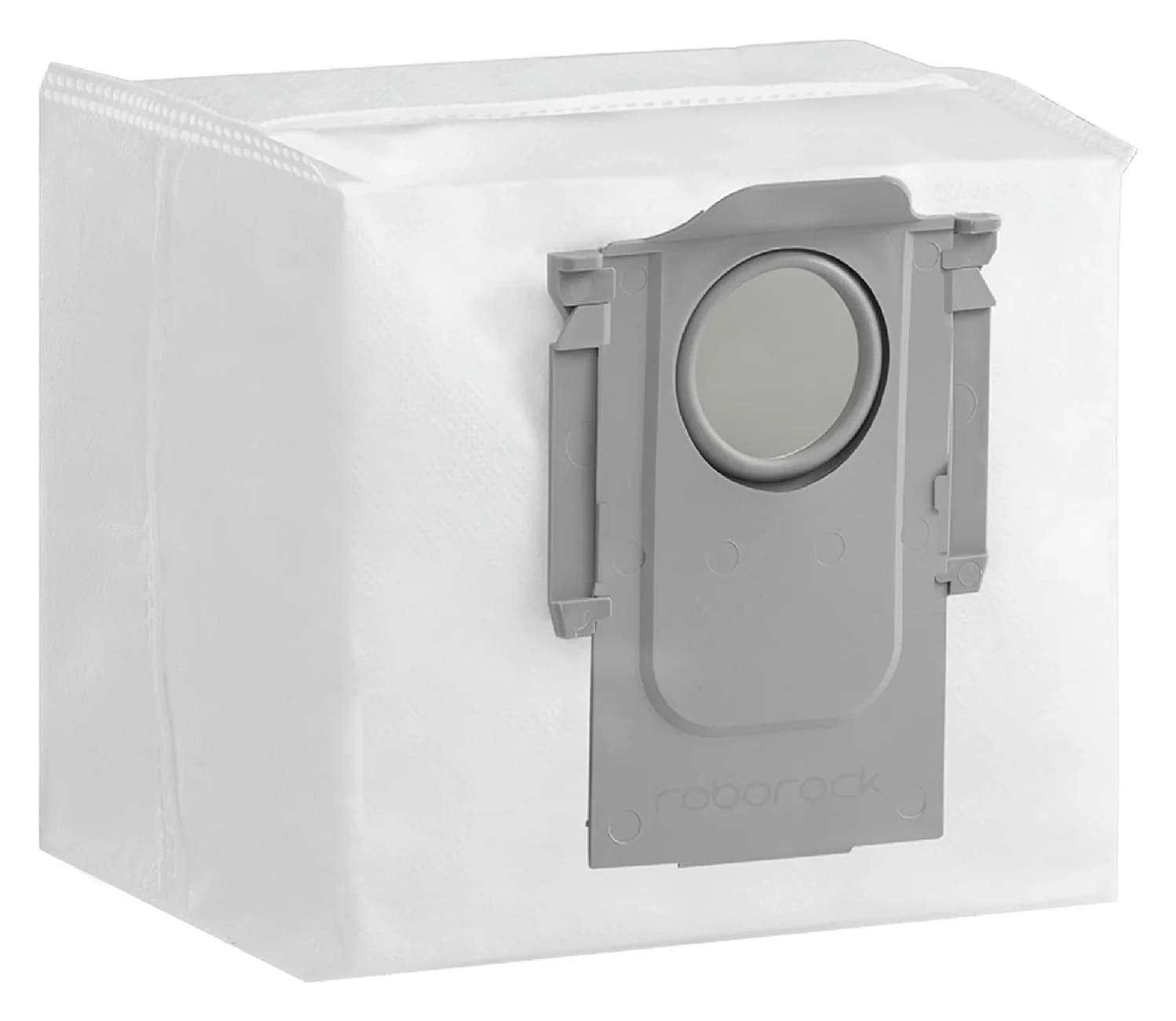
Roborock · RR-CDYCX0-Q5-06
Dust Bag
- Check
- Not compatible with Qrevo, S8 or Saros docks, which use a different dust bag (RR-CDYCX0-QRevo-06) sold separately
For a US Q7+, Q7 Max+ or Q8 Max+ with its documented bagged dock, our pick is Roborock's genuine six-bag pack, RR-CDYCX0-Q5-06. Its US compatibility listing covers Q7 Series and explicitly names Q8 Max+; the dock crosswalk below explains how we narrow that family wording. A Q7 or Q7 Max using only its standard charging base needs no dock bag.
Quick picks
- Classic Q7+ or Q7 Max+: choose the genuine US six-bag pack after matching AED03LRR or AED04LRR on the dock.
- Q8 Max+: choose that same pack after matching AED06LRR or AED07LRR; the US bag page names Q8 Max+ directly.
- Q7 M5+ or Q7 L5+: the same US pack lists both explicitly, but their FCC manuals identify AED08LRR, a different dock from the classic Q7 setup.
- Charging base only, or an unreadable/replacement dock: confirm the base first. Buy no bags for a standard charging dock; defer an uncertain auto-empty match.
Those are routes to the same consumable, rather than separate products to rank. For another Roborock base, start with our general replacement dust-bag selector.
Identify the robot and dock before buying
The plus sign describes the package in these documented examples. Roborock's Q7 Max+ US page names the Auto-Empty Dock Pure, while the Q7 Max FCC manual distinguishes standard chargers from auto-empty docks. The Q7+ manual identifies the robot as Q400RR, the same identifier used in the standard Q7 manual. Read the robot's label and the dock's own model label; a robot name cannot establish what a previous owner bundled with it.
Classic Q7 with standard charger
- Robot identifier in FCC manual
- Q400RR
- Dock identifier to check
- CDZ11RR or CDZ12RR
- Bag decision
- No dock bag; Q7 manual
Classic Q7+ auto-empty package
- Robot identifier in FCC manual
- Q400RR
- Dock identifier to check
- AED03LRR or AED04LRR
- Bag decision
- Q5-coded six-bag pack, using the US Q7 Series listing; Q7+ manual
Q7 Max with standard charger
- Robot identifier in FCC manual
- Q380RR
- Dock identifier to check
- CDZ11RR or CDZ12RR
- Bag decision
- No dock bag; Q7 Max manual
Q7 Max+ / Auto-Empty Dock Pure
- Robot identifier in FCC manual
- Q380RR
- Dock identifier to check
- AED03LRR or AED04LRR
- Bag decision
- Q5-coded six-bag pack; Pure dock manual
Q8 Max+ / RockDock Plus
- Robot identifier in FCC manual
- Q80ULL
- Dock identifier to check
- AED06LRR or AED07LRR
- Bag decision
- Same pack, explicitly listed for Q8 Max+; FCC manual
Q7 M5+
- Robot identifier in FCC manual
- RRA0TCP
- Dock identifier to check
- AED08LRR
- Bag decision
- Same pack, explicitly listed for Q7 M5+; FCC manual
Q7 L5+
- Robot identifier in FCC manual
- RRA0TAC
- Dock identifier to check
- AED08LRR
- Bag decision
- Same pack, explicitly listed for Q7 L5+; FCC manual
Cataloged Q5 Max+
- Robot identifier in FCC manual
- Q50ULE
- Dock identifier to check
- Manual lists AED06LRR and AED07LRR; actual supplied revision unresolved
- Bag decision
- Confirm this package's label before using the catalog match; FCC manual
Full comparison table
Swipe to compare. Row labels stay visible.
| Setup you own | Robot identifier in FCC manual | Dock identifier to check | Bag decision |
|---|---|---|---|
| Classic Q7 with standard charger | Q400RR | CDZ11RR or CDZ12RR | No dock bag; Q7 manual |
| Classic Q7+ auto-empty package | Q400RR | AED03LRR or AED04LRR | Q5-coded six-bag pack, using the US Q7 Series listing; Q7+ manual |
| Q7 Max with standard charger | Q380RR | CDZ11RR or CDZ12RR | No dock bag; Q7 Max manual |
| Q7 Max+ / Auto-Empty Dock Pure | Q380RR | AED03LRR or AED04LRR | Q5-coded six-bag pack; Pure dock manual |
| Q8 Max+ / RockDock Plus | Q80ULL | AED06LRR or AED07LRR | Same pack, explicitly listed for Q8 Max+; FCC manual |
| Q7 M5+ | RRA0TCP | AED08LRR | Same pack, explicitly listed for Q7 M5+; FCC manual |
| Q7 L5+ | RRA0TAC | AED08LRR | Same pack, explicitly listed for Q7 L5+; FCC manual |
| Cataloged Q5 Max+ | Q50ULE | Manual lists AED06LRR and AED07LRR; actual supplied revision unresolved | Confirm this package's label before using the catalog match; FCC manual |
Scroll horizontally to see every column
| Setup you own | Robot identifier in FCC manual | Dock identifier to check | Bag decision |
|---|---|---|---|
| Classic Q7 with standard charger | Q400RR | CDZ11RR or CDZ12RR | No dock bag; Q7 manual |
| Classic Q7+ auto-empty package | Q400RR | AED03LRR or AED04LRR | Q5-coded six-bag pack, using the US Q7 Series listing; Q7+ manual |
| Q7 Max with standard charger | Q380RR | CDZ11RR or CDZ12RR | No dock bag; Q7 Max manual |
| Q7 Max+ / Auto-Empty Dock Pure | Q380RR | AED03LRR or AED04LRR | Q5-coded six-bag pack; Pure dock manual |
| Q8 Max+ / RockDock Plus | Q80ULL | AED06LRR or AED07LRR | Same pack, explicitly listed for Q8 Max+; FCC manual |
| Q7 M5+ | RRA0TCP | AED08LRR | Same pack, explicitly listed for Q7 M5+; FCC manual |
| Q7 L5+ | RRA0TAC | AED08LRR | Same pack, explicitly listed for Q7 L5+; FCC manual |
| Cataloged Q5 Max+ | Q50ULE | Manual lists AED06LRR and AED07LRR; actual supplied revision unresolved | Confirm this package's label before using the catalog match; FCC manual |
These are US/FCC-document identifiers. The Pure manual specifies 120VAC for its listed docks, and the Q8 Max+ FCC manual specifies 120V for its pair. Keep every letter of the code: this table does not establish fit for a differently suffixed regional dock.
There is a storefront ambiguity to watch: the Q7 Max+ US box list includes both “Auto-Empty Dock Pure” and “Charging Dock.” The manuals distinguish those devices. Use the base actually supplied with your package to settle the bag requirement.
Best documented pick: Roborock Dust Bag RR-CDYCX0-Q5-06 (six bags)
Roborock
RR-CDYCX0-Q5-06
- Choose
- Best documented pick
- Check
- Not compatible with Qrevo, S8 or Saros docks, which use a different dust bag (RR-CDYCX0-QRevo-06) sold separately
Buy RR-CDYCX0-Q5-06 when your labels match the documented setup. The official US pack page establishes the six-piece count; its product data establishes the SKU. “Q5” in the code does not restrict it to Q5 robots: the same listing names Q7 Series and Q8 Max+.
The Q7 evidence has a useful limit. The current bag page says Q7 Series, rather than spelling out classic Q7+ and Q7 Max+ separately. The US Q7 Max+ page's accessory configuration references this exact bag-pack handle; the FCC manuals supply the robot/dock crosswalk. Our recommendation combines those official records. It is not a maker-published table mapping every regulatory dock code directly to the bag SKU.
For Q8 Max+, the US pack listing supplies the named compatibility independently. No Canadian listing is needed to support that recommendation. For newer Q7 M5+ and L5+ owners, retain the suffix when checking parts: their manuals show a different dock code, even though the bag listing includes them.
Check contents and availability at Roborock's US store. The pack's product data showed it available when checked on November 3, 2026; recheck before ordering.
Compare the packs, not just the Roborock name
Genuine US Q5-coded bag pack
- Confirmed contents / identifier
- 6 bags; RR-CDYCX0-Q5-06
- Evidence for this guide's setups
- US listing names Q7 Series, Q8 Max+, Q7 M5+ and Q7 L5+
- Buying choice
- Our pick after the label check
Genuine US Qrevo / Saros bag pack
- Confirmed contents / identifier
- 6 bags; RR-CDYCX0-QRevo-06
- Evidence for this guide's setups
- Its listed families do not name Q7 or Q8 Max+
- Buying choice
- Do not substitute without confirmation
An unspecified compatible multipack
- Confirmed contents / identifier
- Quantity and fit need verification
- Evidence for this guide's setups
- No third-party maker documentation assessed here
- Buying choice
- No recommendation from this research
Full comparison table
Swipe to compare. Row labels stay visible.
| Option | Confirmed contents / identifier | Evidence for this guide's setups | Buying choice |
|---|---|---|---|
| Genuine US Q5-coded bag pack | 6 bags; RR-CDYCX0-Q5-06 | US listing names Q7 Series, Q8 Max+, Q7 M5+ and Q7 L5+ | Our pick after the label check |
| Genuine US Qrevo / Saros bag pack | 6 bags; RR-CDYCX0-QRevo-06 | Its listed families do not name Q7 or Q8 Max+ | Do not substitute without confirmation |
| An unspecified compatible multipack | Quantity and fit need verification | No third-party maker documentation assessed here | No recommendation from this research |
Scroll horizontally to see every column
| Option | Confirmed contents / identifier | Evidence for this guide's setups | Buying choice |
|---|---|---|---|
| Genuine US Q5-coded bag pack | 6 bags; RR-CDYCX0-Q5-06 | US listing names Q7 Series, Q8 Max+, Q7 M5+ and Q7 L5+ | Our pick after the label check |
| Genuine US Qrevo / Saros bag pack | 6 bags; RR-CDYCX0-QRevo-06 | Its listed families do not name Q7 or Q8 Max+ | Do not substitute without confirmation |
| An unspecified compatible multipack | Quantity and fit need verification | No third-party maker documentation assessed here | No recommendation from this research |
Sources: Q5-coded pack and separate Qrevo / Saros pack. Absence from a compatibility list is a reason to pause, rather than proof of physical incompatibility. Our Qrevo Pro bag guide handles that separate purchase route.
- Yes: Robot and dock labels match a documented row above
- Yes: Pack identifier matches the recommended US accessory
- Partly: A replaced or imported base needs its own confirmation
- No: A standard charging base has no dock bag to replace
Pack size and cost per bag: the verified US choice here contains six bags. We have not established a second pack size for these setups. Divide the current delivered pack total by 6, after any applicable checkout adjustments, to compare cost per compatible bag. Distinguish the bags inside a pack from the number of packs in an order. A larger advertised quantity only earns consideration after its maker documents fit; this guide has no verified third-party alternative to rank by value.
Collar fit: use the exact pack identifier first, then check how the collar sits in your dock's slot. The classic Q7+ and Q8 Max+ manuals instruct owners to install the bag along that slot and replace the cover. If the replacement will not seat as instructed, stop and recheck the part with Roborock. The cited pack page does not establish collar dimensions for a measurement-based substitute.
Replace the bag without confusing it with a filter
The following sequence follows the Auto-Empty Dock Pure instructions; the Q8 Max+ manual gives the same bag-removal, dry-filter-cleaning and slot-installation sequence. Both describe the handle sealing the bag during removal.
Disconnect power
Unplug before changing accessories or maintaining the dock.
Lift out the used bag
Remove the dock dustbin cover vertically, lift the bag by its handle and discard it.
Clean the dock filter
Use a dry cloth, as the manuals instruct.
Seat the replacement
Install the new bag along the slot and put the cover back before use.
For Q7 M5+ and Q7 L5+, use their own manuals: open the dock cover, lift out and discard the bag, clean the filter with a dry cloth, install a new bag and close the cover. Those instructions say to replace the bag when full. Do not transfer a classic dock's cover-removal diagram to a different housing.
The classic manuals say replace as needed. Roborock advertises up to seven weeks for Q7 Max+ and Q8 Max+, while its Q8 Max+ page says actual intervals depend on use habits and environmental factors. Treat that as a conditional claim, not a calendar guarantee. The disposal instruction also gives no basis for washing and reinstalling a used bag.
New bag installed, but the dock will not empty?
A bag purchase does not resolve every emptying problem. The Pure and Q8 Max+ troubleshooting tables direct owners to check the following:
- No emptying cycle: check whether auto-emptying is disabled, the cover is seated, or Do Not Disturb is suppressing emptying. Both manuals also distinguish returning after cleaning from being moved onto the dock manually.
- Weak emptying or unusual noise: check main-brush/cover installation and the filter, air duct, suction inlet, air inlet and dustbin for blockages.
- Red dock light: check cover installation. The manuals also list fan overheating and voltage errors; a red light alone does not diagnose a full bag.
Use the troubleshooting section for your exact dock if those checks do not settle it. The newer Q7 M5+ manual specifically labels a steady red dock indicator as dust bag not in place; that illustrates why an older dock's light description should not be applied to every Q7 suffix.
How we choose
We match official US accessory listings to FCC manuals and retain unresolved package details. This is document research; no physical fit, seal or filtration comparison was performed. We recommend a shared pack only to the extent supported by the maker's listings and the model crosswalk, and keep broader family wording visible. The cataloged Q5 Max+ record is reused as a conditional reference, without resolving its supplied dock by assumption.
Verdict
Choose RR-CDYCX0-Q5-06, six bags, for the documented US Q7 auto-empty setups or Q8 Max+, after checking the dock label. Skip a bag purchase for a standard charging base. For an imported base, a replacement dock or the unresolved Q5 Max+ package, establish that label first and return to the general Roborock bag selector for the appropriate route.
Frequently asked questions
Which dust bags fit the Roborock Q7 Max+?
Start with Roborock's US six-bag pack, RR-CDYCX0-Q5-06. The US listing uses the broad wording Q7 Series, while the Q7 Max+ page's accessory configuration references that pack. The FCC robot manual identifies the auto-empty docks as AED03LRR or AED04LRR. Match the actual dock label before ordering, especially if you bought the robot and base separately.
Does the Roborock Q7 need dust bags?
Only when it is using a bagged auto-empty dock. The classic Q7 manual documents a standard charging dock, and the Q7+ manual documents an auto-empty dock with a disposable bag. Q7 and Q7+ share the Q400RR robot identifier, so the robot label alone cannot tell you which base you own. Check the dock itself.
Are Q7 Max+ and Q8 Max+ dust bags the same?
Roborock's US six-bag listing covers Q7 Series and explicitly names Q8 Max+, so that genuine pack is the shared buying choice for the documented setups. The docks have different identifiers: AED03LRR/AED04LRR for classic Q7 auto-empty setups and AED06LRR/AED07LRR for Q8 Max+. This is a shared replacement-pack recommendation, not a claim that the docks interchange.
Can I wash or reuse a Roborock dock dust bag?
Follow the disposable-bag procedure: the Auto-Empty Dock Pure and Q8 Max+ manuals tell owners to lift out the used bag, discard it and install a new bag. They specify a dry cloth for the dock filter during that procedure. Do not confuse that filter or the robot's washable filter with a reusable dock bag.
How often should I replace the Q7 dust bag?
Use the instructions for your exact dock. The classic Q7+ and Auto-Empty Dock Pure manuals say replace as needed; the newer Q7-series manuals say replace when full. Roborock advertises up to seven weeks for Q7 Max+ and Q8 Max+, but the Q8 Max+ page says intervals depend on use habits and environmental factors. That is not a fixed replacement schedule.
Do Qrevo or Saros bags fit the Q7?
Do not assume so. Roborock sells a separate six-bag SKU, RR-CDYCX0-QRevo-06, for named Qrevo, Saros and other dock families. That US listing does not name Q7 or Q8 Max+. Use the Q5-coded pack recommended here for the documented Q7 setups, or obtain confirmation from Roborock for an unusual dock revision before substituting another bag.

Related guides
Buying guide · Bags & Filters
Eufy Robot Vacuum Filters: How to Change and Match the Right Part
Change your eufy robot vacuum filter and choose the correct replacement. Compare 11S MAX, original 11S, G30 revisions and X10 Pro Omni filter packs and kits.
Buying guide · Bags & Filters
Roborock QV 35A Dust Bags: The Genuine Pack and Dock Check
Find the genuine Roborock QV 35A dust bag pack, check robot and dock labels, avoid the similar Q5 bags, and follow the official replacement and fault checks.
Buying guide · Bags & Filters
Roborock Replacement Dust Bags: Match Robot and Dock First
Find the right Roborock replacement dust bags by robot and dock. Compare genuine six-packs, check Qrevo and Pure variants, and avoid ordering an unverified fit.