

Buying guide
Roborock S5 Side Brush
Exact Fits, Screws and Packs
Choose a Roborock S5 or S5 Max side brush by exact SKU and screw mount. Compare white and black packs, check hardware, and avoid confusing newer brush families.
By thisSWEEP EditorialUpdated November 6, 20267 min read2 picks
On this page · The short answer
The short answer
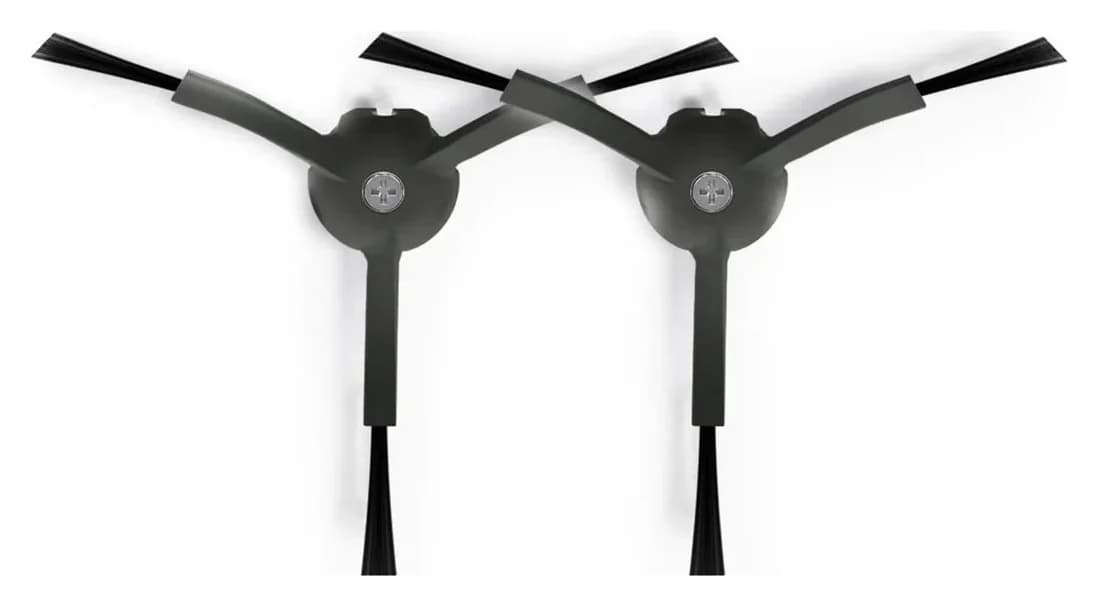
Roborock RR-BS5-Q85MaxPlus-M2
- Check
- However, the separate black-product listing gives that same SKU a model list including S8, Qrevo and Q5 Pro families, without naming S5 or S5 Max.
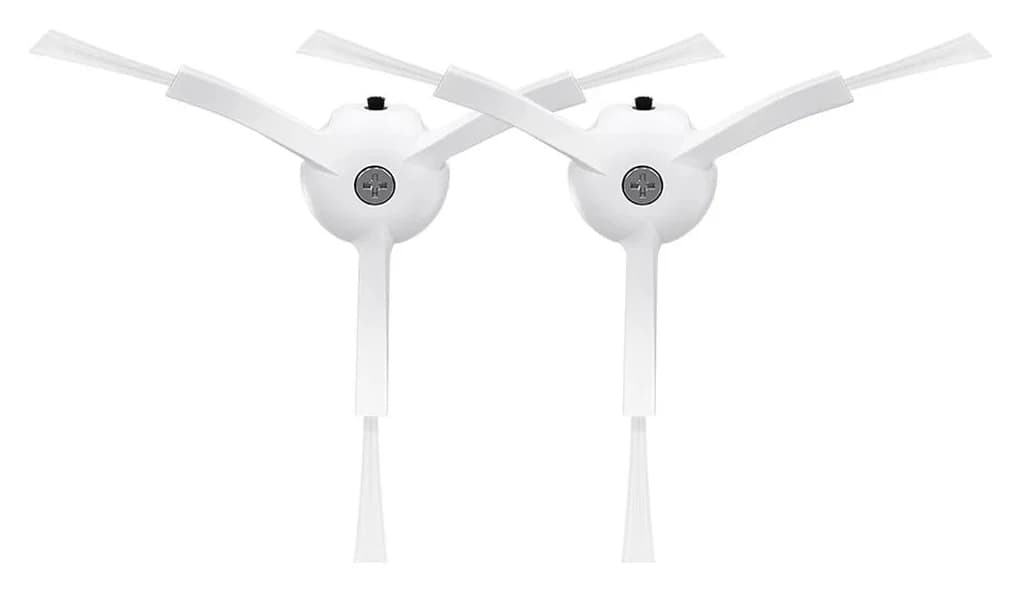
Roborock · RR-BS0-Q80MaxPlus-M2
White Side Brushes Replacement
- Pack contents
- 2 white side brushes
- Check
- Not for newer FlexiArm designs on Saros and recent Qrevo Curv/Edge models, which use a different side brush sold separately
For a replacement side brush for Roborock S5, our starting pick is Roborock's white two-pack, RR-BS0-Q80MaxPlus-M2: its US product description explicitly names both S5 and S5 Max. Both models have a screw-secured side brush, so check the existing fastener before ordering. The black pack needs an extra compatibility check because Roborock's own fit lists differ.
Quick picks
- S5 or S5 Max, with serviceable mounting hardware: choose the official white two-pack, checking SKU RR-BS0-Q80MaxPlus-M2.
- You specifically want black: confirm Roborock RR-BS5-Q85MaxPlus-M2 with Roborock first; the shared listing and separate black listing give different model coverage.
- The brush has stopped turning: clean before shopping. Roborock's S5 instructions say to remove trapped hair; the S5 Max manual likewise directs cleaning for its side-brush tangle error.
Compare the exact packs
Compare specifications and all conditions
White side brushes
- Maker SKU
- RR-BS0-Q80MaxPlus-M2
- S5 evidence
- Named in its product description
- S5 Max evidence
- Separately named in the same description
All specifications
- Pack and hardware
- Two brushes; screw inclusion not stated
- Our decision
- Best documented starting choice
Black side brushes
- Maker SKU
- Roborock RR-BS5-Q85MaxPlus-M2
- S5 evidence
- Shared listing names S5; separate black listing omits it
- S5 Max evidence
- Shared listing names S5 Max; separate black listing omits it
All specifications
- Pack and hardware
- Two brushes; screw inclusion not stated
- Our decision
- Confirm exact fit before buying
Qrevo Curv / Edge family side brush
- Maker SKU
- RR-BS2-QrevoCurv-02
- S5 evidence
- Not named in this pack's model list
- S5 Max evidence
- Not named in this pack's model list
All specifications
- Pack and hardware
- Two brushes; hardware not itemized in its description
- Our decision
- No established S5-family match
Full comparison table
Swipe to compare. Row labels stay visible.
| Official US option | Maker SKU | S5 evidence | S5 Max evidence | Pack and hardware | Our decision |
|---|---|---|---|---|---|
| White side brushes | RR-BS0-Q80MaxPlus-M2 | Named in its product description | Separately named in the same description | Two brushes; screw inclusion not stated | Best documented starting choice |
| Black side brushes | Roborock RR-BS5-Q85MaxPlus-M2 | Shared listing names S5; separate black listing omits it | Shared listing names S5 Max; separate black listing omits it | Two brushes; screw inclusion not stated | Confirm exact fit before buying |
| Qrevo Curv / Edge family side brush | RR-BS2-QrevoCurv-02 | Not named in this pack's model list | Not named in this pack's model list | Two brushes; hardware not itemized in its description | No established S5-family match |
Scroll horizontally to see every column
| Official US option | Maker SKU | S5 evidence | S5 Max evidence | Pack and hardware | Our decision |
|---|---|---|---|---|---|
| White side brushes | RR-BS0-Q80MaxPlus-M2 | Named in its product description | Separately named in the same description | Two brushes; screw inclusion not stated | Best documented starting choice |
| Black side brushes | Roborock RR-BS5-Q85MaxPlus-M2 | Shared listing names S5; separate black listing omits it | Shared listing names S5 Max; separate black listing omits it | Two brushes; screw inclusion not stated | Confirm exact fit before buying |
| Qrevo Curv / Edge family side brush | RR-BS2-QrevoCurv-02 | Not named in this pack's model list | Not named in this pack's model list | Two brushes; hardware not itemized in its description | No established S5-family match |
Sources: Roborock's white pack, shared color listing, separate black pack and Qrevo Curv / Edge pack. The detailed S5 and S5 Max names appear in the white page's underlying product description; its visible summary says “Q Series/S Series.”
Best documented fit: Roborock white side brushes
Choose RR-BS0-Q80MaxPlus-M2 when you need the clearest documented replacement route for either robot. The white-product page and the shared page's white variant agree on that SKU. The description lists S5 and S5 Max individually, so the Max match does not depend on interpreting “S Series” broadly.
The official pack contains two side brushes. Use one and keep the other as a spare if you only need one replacement. This is a current replacement identifier; the captured sources do not establish the part number of the brush originally installed at the factory.
The main limitation is hardware clarity: the listing does not confirm included screws, screw dimensions or a driver. Check those details before treating the package as everything needed for an installation with missing hardware.
Check the white pack at Roborock.
Black option: confirm Roborock RR-BS5-Q85MaxPlus-M2 first
The shared accessory listing offers Black and White variants. Its product description names S5 and S5 Max, and its variant data assigns RR-BS5-Q85MaxPlus-M2 to Black.
However, the separate black-product listing gives that same SKU a model list including S8, Qrevo and Q5 Pro families, without naming S5 or S5 Max. That is a difference between Roborock's own descriptions, rather than a third-party compatibility claim.
An omission does not prove that the brush cannot fit. It does mean we cannot give black the same unqualified recommendation as white. If color matters, ask Roborock to confirm the exact black SKU against your robot's full label and a photograph of the existing brush mount. Keep that confirmation with your order.
Identify the robot and inspect the mount
Start with the robot's full model label. Write down whether it says S5 or S5 Max, including any additional model code. If your label differs from the accessory's named models, ask Roborock to identify the correct replacement instead of translating it from a marketplace title.
Roborock's S5 maintenance instructions describe unscrewing the side brush, removing trapped hair and screwing it back into place. The S5 Max manual independently describes removing and tightening its retaining screw. These confirm a screw-secured attachment, but do not supply a screw thread, length or tightening torque.
Before ordering, photograph the removed brush's connecting face and the robot's mount. Compare those with the exact replacement's official images as a secondary check alongside the model list. Retain the existing screw while checking what the new package supplies. If the screw is missing or damaged, request the correct hardware from Roborock; do not infer its dimensions from another model's repair instructions.
- Yes: The complete robot name appears in the chosen part's official fit statement
- Yes: The selected SKU matches the version you intend to order
- Partly: Mounting hardware is serviceable, or a correct replacement is confirmed
- No: Color or a universal Xiaomi title is the only evidence of fit
Bristles, silicone and newer brush versions
The captured US white and black listings do not specify a brush material or arm count. We cannot reliably label these SKUs as nylon, rubber or silicone, or reconstruct a factory-versus-revised material history from them. Do not interpret the digits in a SKU as a count of brush arms.
If you want a particular construction, ask for the selected SKU's material and revision as well as its compatible-model list. Choose it on that confirmed basis. These sources provide no material comparison that would justify promising better corner pickup, fewer carpet tangles or a scratch-free floor.
Likewise, an “anti-tangle” description is not a fit statement. Roborock's newer RR-BS2-QrevoCurv-02 pack names Qrevo S5V and Q10 S5 among its compatible models, but its list does not name the older S5 or S5 Max. Keep the complete model names intact when shopping: an “S5” fragment in a longer name is insufficient evidence for a retrofit.
Single brush, two-pack or maintenance kit?
For a side-brush-only replacement, the white two-pack is our documented purchase route. A single brush could suit someone who wants no spare, but we have not established an official single-brush listing with equivalent S5-family fit evidence here. Check its own part identity and package contents before treating it as the same option.
A maintenance kit is worth considering when you also need its other components. Require an itemized list and an exact model match for each brush, filter or pad you intend to use. Do not count a kit's total number of assorted pieces as its number of side brushes.
For the central roller, use our S5 main-brush guide. For the wider model and component lookup, see Roborock replacement brushes.
Check the selected pack at checkout before deciding value. We do not publish a fixed price or claim that a larger pack saves money. Extra parts only improve your purchase when you need them and their fit is confirmed.
Install the matched brush and keep it clear
The S5 Max manual requires switching off the product and removing the plug from the socket before maintenance. The S5 manual also instructs preventing unintended starting and using the switch's off position. Follow your own model's instructions before turning it over.
Make the robot safe
Power it off and follow its manual's maintenance precautions.
Remove and clean
Undo the side-brush screw, lift off the brush and clear trapped hair.
Check the connection
Compare the replacement's mounting face with the removed part before fitting it.
Refit and secure
Install the matched brush and tighten its retaining screw as the model's instructions direct.
For S5 Max, the manual recommends monthly cleaning and replacement every 3–6 months. That is model-specific guidance, not a promised lifespan for either pack. The separate S5 maintenance article supports clearing trapped hair and refitting the brush, without giving that replacement schedule.
If an S5 Max side brush is not spinning
Use the fault message to decide the next step. The S5 Max manual distinguishes Error 6, a possible side-brush tangle requiring removal and cleaning, from Error 17, a side-brush module fault for which it directs a system reset. Follow the manual's reset procedure if applicable; a new consumable brush is not an established repair for the module fault.
If the problem continues after the prescribed steps, seek Roborock support before buying more brushes. These code descriptions are from the S5 Max manual; consult the S5's own documentation for its messages.
How we choose
We compare Roborock's official US accessory descriptions, selected-variant SKUs and model-specific maintenance documents. Explicit model names and clear pack contents decide the recommendation; differing maker descriptions remain visible. This is document research, with no physical cleaning test behind the picks. Manufacturer pages are linked so you can check the exact version before ordering. See our disclosure.
Verdict
For S5 and S5 Max, start with the white RR-BS0-Q80MaxPlus-M2 two-pack and verify your mounting hardware. Choose black only after Roborock resolves its differing fit statements for your robot. Buy additional hardware only when required and confirmed; do not substitute a newer brush family on the strength of color or a partial model name.
Frequently asked questions
Does the Roborock S5 Max use the same replacement side brush as the S5?
Roborock's US white two-pack, SKU RR-BS0-Q80MaxPlus-M2, explicitly names both S5 and S5 Max in its product description. That establishes a shared replacement option for this particular pack. It does not make the robot names interchangeable or establish that every S5 accessory, black brush or newer brush family fits S5 Max.
Does the Roborock side-brush replacement pack include screws?
The captured US listings identify two side brushes but do not itemize replacement screws or their dimensions. Both robots' maintenance instructions describe removing and tightening a retaining screw. Keep your existing screw if it is serviceable, and confirm replacement hardware with Roborock before ordering if it is missing or damaged. Do not choose a substitute screw by appearance alone.
Will a black Roborock side brush fit the S5?
The shared US accessory page names S5 and S5 Max and offers a black variant, RR-BS5-Q85MaxPlus-M2. However, the separate black-product page uses the same SKU with a different model list that omits both. This does not prove incompatibility, but it leaves an unresolved fit question. Ask Roborock to confirm that SKU for your exact robot before buying black.
Is a silicone side brush better than a bristle brush for the S5?
The captured US white and black listings do not specify their brush material or provide a comparison of silicone and bristle cleaning results. We therefore do not assign a material or a pickup advantage to either SKU. If construction matters to you, request the selected part's material and revision from Roborock alongside confirmation of your robot's fit.
How often should I replace the S5 Max side brush?
The S5 Max manual recommends monthly cleaning and replacement every 3–6 months. Treat that as the maker's maintenance guidance, not a guaranteed service life. The separate S5 maintenance article explains how to remove trapped hair and refit the brush; it does not establish that replacement interval for S5. Follow the documentation for your own model.
Roborock RR-BS5-Q85MaxPlus-M2
Related guides
Buying guide · Brushes & Mop Pads
Roborock S6 Replacement Brushes: Exact Fits, Covers and Kits
Find the right Roborock S6 replacement brush: compare S6, S6 Pure and S6 MaxV fit, roller and cover codes, side-brush packs, kit contents and installation.
Buying guide · Brushes & Mop Pads
Roborock T7S Main Brush: Choose the Right Roller or Cover
Find a Roborock T7S main brush, distinguish rollers from covers and cleaning brushes, check regional model labels, and avoid unverified maintenance kits.
Buying guide · Brushes & Mop Pads
Roborock S5 Main Brush: Choose the Correct Roller, Cover or Kit
Choose the right Roborock S5 main brush with roller-end checks, cover guidance and kit comparisons. Separate S5 from S5 Max before ordering replacement parts.