

Buying guide
Roborock Auto-Empty Dock Pure Dust Bags
Find the Right US Pack
Match your Roborock Auto-Empty Dock Pure label to the genuine six-bag pack. Check the SKU, compare lookalike families, and fit the replacement correctly.
By thisSWEEP EditorialUpdated November 3, 20267 min read1 pick
On this page · The short answer
The short answer
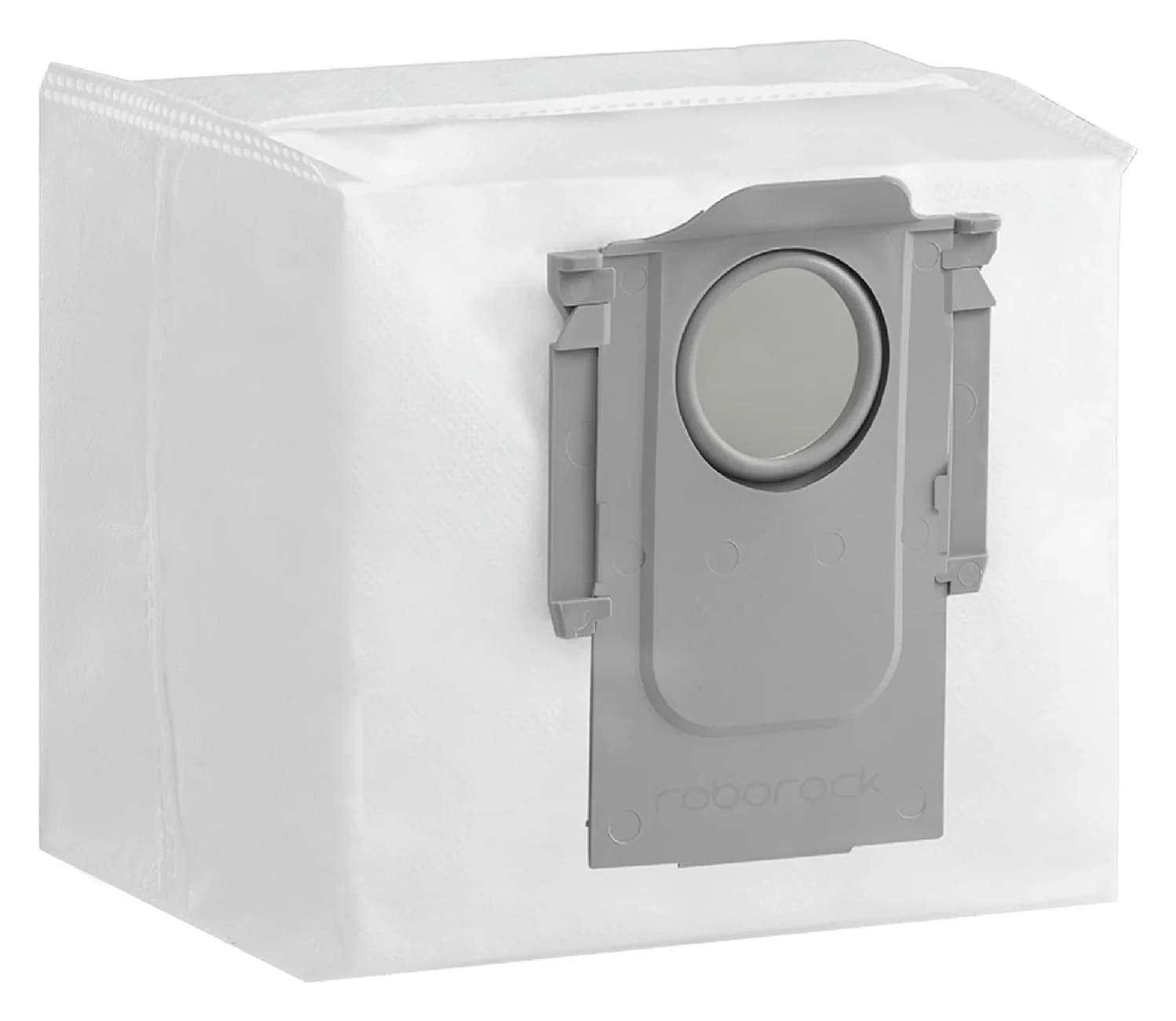
Roborock · RR-CDYCX0-Q5-06
Dust Bag
- Check
- Not compatible with Qrevo, S8 or Saros docks, which use a different dust bag (RR-CDYCX0-QRevo-06) sold separately
For a confirmed US Roborock Auto-Empty Dock Pure, our pick is the genuine six-bag pack RR-CDYCX0-Q5-06: Roborock lists Q5+ compatibility and offers it with its Q7 Max+ Pure package. First match your base label to the Pure manual's AED03LRR or AED04LRR, then check the robot-and-dock combination against the maker's accessory information. If the label differs or the base was replaced, get an exact match confirmed before ordering.
Sources: Roborock bag pack, Q7 Max+ package and accessories and US Pure manual.
Quick picks: identify the base before the bag
Compare specifications and all conditions
US Auto-Empty Dock Pure, AED03LRR / AED04LRR
- Pack or next step
- Genuine six-pack, RR-CDYCX0-Q5-06
- Buying decision
- Our Pure pick; confirm the robot pairing too
Q5 Max+ robot, dock label still unchecked
- Pack or next step
- The same six-pack lists Q5 Max+
- Buying decision
- Check the base; its US manual covers AED06LRR / AED07LRR
S7 MaxV Ultra with its documented dock
- Pack or next step
- The same six-pack explicitly lists S7 MaxV Ultra
- Buying decision
- A wash-and-refill setup can share this bag listing
Qrevo / Saros family
- Pack or next step
- Separate six-pack, RR-CDYCX0-QRevo-06
- Buying decision
- Follow that pack's named compatibility list; no Pure substitution recommended
Auto-Empty Dock AED01LRR / AED02LRR
- Pack or next step
- Use the original dock's accessory lookup
- Buying decision
- These codes belong to the original Auto-Empty Dock manual; stop the Pure purchase
Full comparison table
Swipe to compare. Row labels stay visible.
| What you can identify | Pack or next step | Buying decision |
|---|---|---|
| US Auto-Empty Dock Pure, AED03LRR / AED04LRR | Genuine six-pack, RR-CDYCX0-Q5-06 | Our Pure pick; confirm the robot pairing too |
| Q5 Max+ robot, dock label still unchecked | The same six-pack lists Q5 Max+ | Check the base; its US manual covers AED06LRR / AED07LRR |
| S7 MaxV Ultra with its documented dock | The same six-pack explicitly lists S7 MaxV Ultra | A wash-and-refill setup can share this bag listing |
| Qrevo / Saros family | Separate six-pack, RR-CDYCX0-QRevo-06 | Follow that pack's named compatibility list; no Pure substitution recommended |
| Auto-Empty Dock AED01LRR / AED02LRR | Use the original dock's accessory lookup | These codes belong to the original Auto-Empty Dock manual; stop the Pure purchase |
Scroll horizontally to see every column
| What you can identify | Pack or next step | Buying decision |
|---|---|---|
| US Auto-Empty Dock Pure, AED03LRR / AED04LRR | Genuine six-pack, RR-CDYCX0-Q5-06 | Our Pure pick; confirm the robot pairing too |
| Q5 Max+ robot, dock label still unchecked | The same six-pack lists Q5 Max+ | Check the base; its US manual covers AED06LRR / AED07LRR |
| S7 MaxV Ultra with its documented dock | The same six-pack explicitly lists S7 MaxV Ultra | A wash-and-refill setup can share this bag listing |
| Qrevo / Saros family | Separate six-pack, RR-CDYCX0-QRevo-06 | Follow that pack's named compatibility list; no Pure substitution recommended |
| Auto-Empty Dock AED01LRR / AED02LRR | Use the original dock's accessory lookup | These codes belong to the original Auto-Empty Dock manual; stop the Pure purchase |
The comparison uses the Q5-family pack list, Qrevo-family pack, Q5 Max+ manual and original Auto-Empty Dock manual. Recommendations apply to the documented combinations, with other revisions requiring confirmation.
Best documented Pure pack: Roborock RR-CDYCX0-Q5-06
Choose this six-piece replacement-bag pack for a matched Pure setup. The maker's store data identifies the SKU as RR-CDYCX0-Q5-06; its visible compatibility list includes Q5+, while the Q7 Max+ with Auto-Empty Dock Pure page offers this exact accessory under replacement parts. That gives the recommendation a model-specific evidence trail.
The long store title also names S8 Pro Ultra, S8+, Q8 Max+ and Q5 Max+. Those are additional maker-listed matches, rather than alternative names for your base. Use the SKU to recognize this pack when the title leads with another robot.
What you get: six replacement dust bags. This is a bag purchase; inspect the pack description separately if you also need brushes, robot filters or mop pads. Avoid judging a mixed maintenance kit by the total accessory count.
Check the genuine six-bag pack at Roborock.
Find the Pure label and resolve the lookalikes
Unplug the dock before handling it. Record the full model code from the base label, the robot's model, the market, and whether the station is the one supplied with that robot. Keep a photograph of the label for a support enquiry.
The Pure US manual names AED03LRR and AED04LRR and specifies 120VAC. Its product description says the dock recharges and empties. These details identify the documented version; they do not establish which robot can use an unfamiliar replacement station.
The original Auto-Empty Dock manual instead identifies AED01LRR and AED02LRR. A search for “Roborock RockDock auto-empty dock dust bags” can therefore leave the actual dock unresolved. Keep “Pure” and the model code together in your shopping notes.
For Q5 Max+, the US manual lists AED06LRR and AED07LRR as auto-empty dock models. Roborock's bag page lists that robot, but the manual alone does not select the base revision in your particular package. Reuse the bag compatibility evidence while retaining the actual dock identity.
For a different region, a missing label, or a secondhand robot with an unfamiliar station, send Roborock the robot and base labels plus a photograph of the existing bag fitting. Ask for the compatible accessory SKU for that combination. Leave the order unplaced until that answer is specific.
- Yes: Pure US identity: AED03LRR or AED04LRR in the Pure manual
- Yes: Ordering identifier: RR-CDYCX0-Q5-06 for the selected six-bag pack
- Partly: Q5 Max+ is maker-listed for the pack; read its actual base label
- No: Shared RockDock branding or an unchecked replacement station as the only fit evidence
Pure, Ultra and Qrevo: what changes the decision?
The Qrevo/Saros pack also contains six bags, but its official SKU is RR-CDYCX0-QRevo-06. Roborock names S8 MaxV Ultra, S8 Max Ultra, Qrevo, Qrevo Curv, Qrevo Edge, Saros and QV series on that listing. Keep it as a separate accessory family when buying for Pure.
Conversely, S7 MaxV Ultra, S7 Max Ultra and S7 Pro Ultra appear on the RR-CDYCX0-Q5-06 compatibility list. “Ultra,” a water tank, or mop washing is therefore an unreliable shortcut for bag selection. Read the complete model name: S8 Pro Ultra is on the Q5-pack list, whereas S8 MaxV Ultra is on the Qrevo-pack list.
The useful distinction is the maker's documented part match. Do not extend either family list to an unlisted regional revision. Our broader Roborock replacement dust-bag guide is the place to start when the station turns out to belong to another family.
Check the collar, opening and closing handle
Use the original bag as a comparison reference before discarding it. Compare the rigid collar, its opening, the edges that enter the slot, and the handle with the replacement and the maker's illustrations. Ask support about a difference before trying to make it fit; do not trim the collar or enlarge an opening.
The Pure manual labels the dust bag slot and says to install a new bag along it. It also states that the handle seals the bag during removal to prevent dust leakage. Roborock's Pure/RockDock Plus troubleshooting instructions add that the handle should be inserted all the way down.
Use those instructions to inspect a delivered bag. We have no verified collar dimensions to publish for this pack, so there is no millimeter-based fit promise here. Order by documented compatibility and SKU, then check that the delivered item installs as instructed.
Replace the bag without creating another emptying problem
The following sequence follows the Pure manual's maintenance instructions. It calls for unplugging before maintenance and cleaning the dock filter with a dry cloth.
Disconnect power
Unplug before maintaining the dock.
Lift the cover and remove the bag
Remove the dustbin cover vertically, then lift out and discard the used bag; its handle seals it during removal.
Wipe the filter dry
Use a dry cloth as the Pure manual directs.
Seat the new bag and refit the cover
Install along the slot; check the handle is fully down and put the dustbin cover back.
Roborock rules out using Pure without a bag: it warns of possible fan damage and says the inlet seals automatically when the bag is absent. Buy a fresh disposable bag rather than treating bag removal as a bagless conversion.
If emptying remains weak after replacement, the Pure/RockDock Plus support instructions also say to check the main brush, brush cover and air duct. Correct the bag seating first, then follow the dock's maintenance directions for a blockage. Avoid buying another pack before checking the supported causes; contact Roborock if the problem persists.
Capacity, replacement timing and cost per matched bag
Roborock's original Q5 page describes Pure with a 2.5 L bag and up to seven weeks between changes. Those are dock claims for the described setup. We do not transfer them to every robot named on the replacement pack.
The maker's support FAQ suggests replacing the disposable bag every seven weeks, depending on actual use; the Pure manual says replace as needed. Use that as a reminder to inspect the bag and its emptying behavior. A pack count does not guarantee a calendar duration.
The verified Pure purchase here is the six-pack. For a cost comparison, use the delivered checkout total after applicable discounts, divided by six. For another pack, establish the same fit first, then divide its delivered total by its own confirmed bag count. Include shipping consistently and check whether any coupon actually applies to the accessory.
We do not publish a static price or a calculated per-bag price. Open the maker's page for the current offer. A larger multipack earns a place in the comparison only after its fit is documented; this guide does not recommend an unconfirmed larger Pure pack or third-party substitute.
How we choose
We compare official US accessory listings, their SKU data, model-specific package accessories, manuals and support instructions. The recommendation connects the selected bag identifier to documented Pure setups. Regional uncertainty and an unconfirmed base remain reasons to stop.
This is document-based research; physical fit and cleaning performance have not been independently verified by this site. The Qrevo/Saros comparison explains a similar-looking purchase route that needs its own compatibility check. Commissions do not determine the match; see our disclosure.
Verdict
For a matched US Pure setup, choose Roborock RR-CDYCX0-Q5-06, six bags. Read both labels, retain the exact accessory SKU, and check the delivered collar and handle against the maker's installation instructions.
If the dock code or pairing remains unresolved, get Roborock's confirmation before buying. If you are shopping for a station rather than its consumables, our Roborock S7 auto-empty dock guide handles that separate decision.
Frequently asked questions
Which dust bags fit the Roborock Auto-Empty Dock Pure?
Our documented US choice is Roborock's six-bag pack RR-CDYCX0-Q5-06. The maker lists Q5+ compatibility and offers that accessory with the Q7 Max+ Auto-Empty Dock Pure package. The Pure US manual covers AED03LRR and AED04LRR. Check both labels before ordering; get Roborock confirmation for a different regional code or a replacement base.
Are all Roborock RockDock dust bags the same?
Use the accessory SKU and exact compatibility list to choose. The Pure choice here is RR-CDYCX0-Q5-06, while Roborock lists RR-CDYCX0-QRevo-06 for Qrevo, Saros and other named families. Some wash-and-refill models, including S7 MaxV Ultra, appear on the Q5-pack list, so dock functions alone cannot decide which bag to buy.
Can the Auto-Empty Dock Pure work without a bag?
Roborock says no: emptying without a dust bag can damage the fan, and the inlet seals automatically when the bag is absent. Fit the correct disposable bag before using emptying. For a bag that is already installed, Roborock's troubleshooting advice says its handle should be inserted all the way down.
How often should I replace a Pure dust bag?
Roborock's support guidance suggests every seven weeks, depending on actual use; the Pure manual says to replace as needed. Treat that as a maintenance prompt, with the bag's condition deciding the change. The Q5 page's up-to-seven-week claim does not establish a guaranteed service life for every bag in a replacement pack.
Does Q5 Max+ prove that my base is Auto-Empty Dock Pure?
Keep the robot and dock identities separate. Roborock lists Q5 Max+ on the six-bag pack, but its US robot manual covers auto-empty dock models AED06LRR and AED07LRR. The Pure manual covers AED03LRR and AED04LRR. Read the actual base label before transferring any dock-specific advice to your setup.

Related guides
Buying guide · Bags & Filters
Eufy Robot Vacuum Filters: How to Change and Match the Right Part
Change your eufy robot vacuum filter and choose the correct replacement. Compare 11S MAX, original 11S, G30 revisions and X10 Pro Omni filter packs and kits.
Buying guide · Bags & Filters
Roborock QV 35A Dust Bags: The Genuine Pack and Dock Check
Find the genuine Roborock QV 35A dust bag pack, check robot and dock labels, avoid the similar Q5 bags, and follow the official replacement and fault checks.
Buying guide · Bags & Filters
Roborock Replacement Dust Bags: Match Robot and Dock First
Find the right Roborock replacement dust bags by robot and dock. Compare genuine six-packs, check Qrevo and Pure variants, and avoid ordering an unverified fit.