

Buying guide
Roborock Q10 Dust Bags
Exact US Pack and Dock Match
Find the confirmed Roborock Q10 S5+ and X5+ dust-bag pack, check your dock label, resolve PF/VF suffixes, compare packs and replace a bag without guesswork.
By thisSWEEP EditorialUpdated November 3, 20267 min read1 pick
On this page · The short answer
The short answer
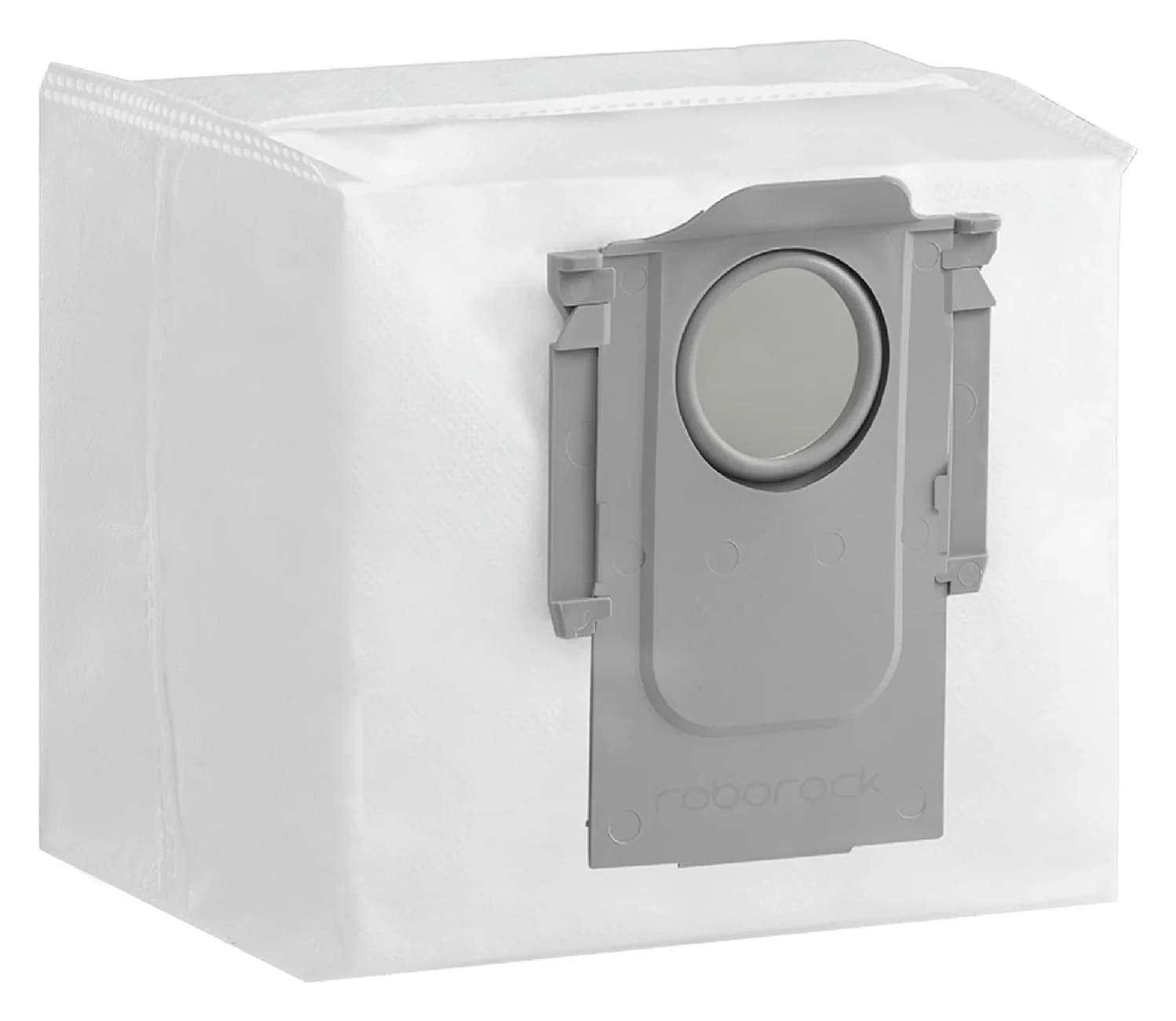
Roborock · RR-CDYCX0-Q5-06
Dust Bag
- Check
- Not compatible with Qrevo, S8 or Saros docks, which use a different dust bag (RR-CDYCX0-QRevo-06) sold separately
For a US Roborock Q10 S5+ or Q10 X5+ with its supplied auto-empty dock, our pick is Roborock's six-bag pack, SKU RR-CDYCX0-Q5-06: both exact suffixes appear in the official compatibility list. If your label says only Q10, or uses PF+, VF+ or VFS+, use the checks below before buying; we have no confirmed bag match here for those incomplete or alternate identities.
Quick picks: buy, skip or confirm
Compare specifications and all conditions
US Q10 S5+ with its supplied auto-empty dock
- Recommendation
- Buy RR-CDYCX0-Q5-06, six bags
- What decides it
- S5+ is explicitly named by Roborock
US Q10 X5+ with its supplied auto-empty dock
- Recommendation
- Buy the same six-bag pack
- What decides it
- X5+ is explicitly named too
Q10 S5 or X5 with the standard charging dock
- Recommendation
- Skip station bags for that package
- What decides it
- Charging and auto-empty packages are distinct
Q10 PF+, VF+, VFS+, or a separately changed dock
- Recommendation
- Get exact confirmation first
- What decides it
- A grouped marketing name is insufficient for our part recommendation
Full comparison table
Swipe to compare. Row labels stay visible.
| Your exact package | Recommendation | What decides it |
|---|---|---|
| US Q10 S5+ with its supplied auto-empty dock | Buy RR-CDYCX0-Q5-06, six bags | S5+ is explicitly named by Roborock |
| US Q10 X5+ with its supplied auto-empty dock | Buy the same six-bag pack | X5+ is explicitly named too |
| Q10 S5 or X5 with the standard charging dock | Skip station bags for that package | Charging and auto-empty packages are distinct |
| Q10 PF+, VF+, VFS+, or a separately changed dock | Get exact confirmation first | A grouped marketing name is insufficient for our part recommendation |
Scroll horizontally to see every column
| Your exact package | Recommendation | What decides it |
|---|---|---|
| US Q10 S5+ with its supplied auto-empty dock | Buy RR-CDYCX0-Q5-06, six bags | S5+ is explicitly named by Roborock |
| US Q10 X5+ with its supplied auto-empty dock | Buy the same six-bag pack | X5+ is explicitly named too |
| Q10 S5 or X5 with the standard charging dock | Skip station bags for that package | Charging and auto-empty packages are distinct |
| Q10 PF+, VF+, VFS+, or a separately changed dock | Get exact confirmation first | A grouped marketing name is insufficient for our part recommendation |
The S5+ and X5+ product pages also offer the selected bag as an accessory. For a different Roborock, start with our replacement dust-bag selector.
Best confirmed US match: Roborock six-bag pack RR-CDYCX0-Q5-06
Choose this pack for the named US S5+ and X5+ packages. The accessory URL still mentions S7 MaxV Ultra and Q5, but its current title and Key Features explicitly include Q10 X5+ and Q10 S5+. The manufacturer's SKU data identifies it as RR-CDYCX0-Q5-06. This recommendation rests on that current fit list and identifier.
There is no need to choose a different bag because your named package is X5+ rather than S5+: Roborock lists both for this same pack. Keep the complete SKU when comparing offers; its Q5 reference does not override the explicitly documented Q10 match.
The confirmed quantity is six replacement bags. We have not established a bag capacity or filtration classification from this pack's specification, so neither is a selection claim here. Our pick is based on documented fit.
Check price and availability at Roborock.
Read the robot and dock labels separately
Record the complete robot sales name from your paperwork, including the suffix and plus sign, and photograph its underside sticker and the dock's rating label. The US Q10 manual locates the robot serial-number sticker underneath. Its FCC/IC statement lists robot RRA0TAL, charging station SPCDZ04RR and auto-empty dock AED09LRR separately. A robot regulatory code alone does not settle which station you have.
Q10 US auto-empty dock
- Official identification
- AED09LRR; 120 V
- How to use it
- Check this against the supplied station and complete robot name
Q10 charging station
- Official identification
- SPCDZ04RR
- How to use it
- Charging-station identity; do not confuse it with AED09LRR
Q10 CE auto-empty dock
- Official identification
- AED09HRR; 220–240 V
- How to use it
- Different regional dock code; this guide does not confirm a US bag order for it
Older Q5 Max+ US manual
- Official identification
- AED06LRR or AED07LRR
- How to use it
- Older dock identities, not the Q10 dock code above
Full comparison table
Swipe to compare. Row labels stay visible.
| Label or document | Official identification | How to use it |
|---|---|---|
| Q10 US auto-empty dock | AED09LRR; 120 V | Check this against the supplied station and complete robot name |
| Q10 charging station | SPCDZ04RR | Charging-station identity; do not confuse it with AED09LRR |
| Q10 CE auto-empty dock | AED09HRR; 220–240 V | Different regional dock code; this guide does not confirm a US bag order for it |
| Older Q5 Max+ US manual | AED06LRR or AED07LRR | Older dock identities, not the Q10 dock code above |
Scroll horizontally to see every column
| Label or document | Official identification | How to use it |
|---|---|---|
| Q10 US auto-empty dock | AED09LRR; 120 V | Check this against the supplied station and complete robot name |
| Q10 charging station | SPCDZ04RR | Charging-station identity; do not confuse it with AED09LRR |
| Q10 CE auto-empty dock | AED09HRR; 220–240 V | Different regional dock code; this guide does not confirm a US bag order for it |
| Older Q5 Max+ US manual | AED06LRR or AED07LRR | Older dock identities, not the Q10 dock code above |
The older codes come from the Q5 Max+ US manual. That robot remains a comparison reference in our catalog, not the evidence used to establish Q10 fit. The bag maker's explicit Q10 listing is the relevant purchase evidence.
Sources: US product page, S5+ support route and CE manual.
Record the robot name
Keep the complete suffix and plus sign from your package paperwork.
Record the station
Copy its full model code and market from the rating label.
Match the bag
Look for your exact robot package on the maker's fit list and retain the bag SKU.
If the label differs from the documented US setup, pause the purchase. Send Roborock the complete robot name, dock model, market and a photo of the current bag's opening and mounting edge. Ask for the exact replacement SKU and pack link. For another dock name, our RockDock Auto-Empty Dock Pure bag guide is the next lookup, not automatic permission to use its recommendation.
Q10 suffixes: what the US page does and does not establish
Roborock's US Q10 page groups S5 with VF, X5 with PF, S5+ with VF+ and VFS+, and X5+ with PF+ in its model-selection text. It also distinguishes the non-plus and plus packages.
Those groupings explain why a search for Q10 can lead to several names. They do not explicitly add every alias to the selected bag's compatibility list. For PF+, VF+ and VFS+, our result is therefore no confirmed match from the saved official bag evidence. This is a limit on this recommendation, not a claim that the bags are physically incompatible.
Apply the same rule to an imported package or a replacement station: keep its own identity. Do not erase a suffix, translate a regional dock code, or infer fit from a similar-looking opening. A written manufacturer confirmation naming your exact dock and replacement part is the useful next step.
Compare genuine packs and calculate cost per bag
Regular US pack, RR-CDYCX0-Q5-06
- Bags
- 6
- Manufacturer evidence
- Q10 S5+ and X5+ explicitly listed
- Buying decision
- Our confirmed pick for those packages
US Points Program pack, RR-CDYCX0-Q5-06
- Bags
- 6
- Manufacturer evidence
- Same SKU and named Q10 models
- Buying decision
- Same documented part; compare the redemption terms
Qrevo/Saros pack, RR-CDYCX0-QRevo-06
- Bags
- 6
- Manufacturer evidence
- Its listed families do not include Q10
- Buying decision
- Not a confirmed substitute in this guide
Full comparison table
Swipe to compare. Row labels stay visible.
| Pack or route | Bags | Manufacturer evidence | Buying decision |
|---|---|---|---|
| Regular US pack, RR-CDYCX0-Q5-06 | 6 | Q10 S5+ and X5+ explicitly listed | Our confirmed pick for those packages |
| US Points Program pack, RR-CDYCX0-Q5-06 | 6 | Same SKU and named Q10 models | Same documented part; compare the redemption terms |
| Qrevo/Saros pack, RR-CDYCX0-QRevo-06 | 6 | Its listed families do not include Q10 | Not a confirmed substitute in this guide |
Scroll horizontally to see every column
| Pack or route | Bags | Manufacturer evidence | Buying decision |
|---|---|---|---|
| Regular US pack, RR-CDYCX0-Q5-06 | 6 | Q10 S5+ and X5+ explicitly listed | Our confirmed pick for those packages |
| US Points Program pack, RR-CDYCX0-Q5-06 | 6 | Same SKU and named Q10 models | Same documented part; compare the redemption terms |
| Qrevo/Saros pack, RR-CDYCX0-QRevo-06 | 6 | Its listed families do not include Q10 | Not a confirmed substitute in this guide |
Sources: regular pack, Points Program pack and Qrevo/Saros pack. The points route is not another pack size. We confirm only the six-bag size here, and no alternative from another manufacturer earns a recommendation from this research.
For a normal purchase, calculate cost per bag = today's final delivered pack total ÷ 6. Include delivery and use the same tax basis when comparing offers. For the redemption route, keep the cash payment and points spent separate; do not treat points as free or assume a cash value. Count confirmed bags rather than the total pieces in a mixed accessories kit.
The regular US pack's structured offer was marked InStock when checked; confirm availability at checkout. An orderable maker offer does not establish that a marketplace listing has the same part. Match SKU, quantity and the exact compatibility wording before choosing the seller.
Replace a full bag and check its seating
Follow the US manual's Auto-Empty Dock maintenance section. Switch the product off and unplug it before maintenance, as that manual directs.
- Open the dock cover, lift out the used bag and discard it.
- Clean the dock filter with a dry cloth.
- Install a new bag fully along its slot, then close the cover.
- Wipe the dock location beacon and charging contacts with a soft, dry cloth.
The manual specifically warns that the bag must sit correctly along the slot to prevent dust leakage and dock damage. Its washable-filter instructions concern the robot's filter; follow the separate dock instructions above when changing a bag.
Replace immediately when full. The S5+ page advertises up to seven weeks, whereas the Q10-series page says seven to ten weeks. Both attach usage qualifications. These are differing manufacturer interval claims, not a reason to leave a full bag installed. Inspect its condition instead of buying on the assumption that every bag lasts the longest advertised interval.
A red light or failed emptying: check before reordering
The US manual distinguishes a missing or incorrectly seated bag from blocked airflow and settings that prevent emptying. Use its troubleshooting checks before concluding that you bought the wrong pack:
- No: Steady red dock light: check that the dust bag is installed in place
- Partly: Reduced emptying: inspect the filter, air duct, bag, inlets and dustbin for blockages
- Partly: No auto-emptying: check the app setting, dock cover and Do Not Disturb period
- Partly: Returning without cleaning does not trigger auto-emptying
A replacement bag will not change an app setting. Check the bag and airflow path when performance drops; check the settings and cover when automatic emptying does not start. Roborock's support page is the escalation route if the documented checks do not resolve it.
How we choose
We prioritize the exact US accessory fit list, maker SKU data, robot accessory links and regional manuals. We distinguish positive compatibility evidence from an unconfirmed alias or revision. This is document-based research, without physical product evaluation; the existing Q5 Max+ record and a legacy accessory URL cannot establish Q10 fit by themselves. Purchase links go to the maker. See our disclosure.
Verdict
For the named US Q10 S5+ and X5+ auto-empty packages, choose RR-CDYCX0-Q5-06, six bags. Check the complete robot and station labels first. For alternate suffixes, imported docks or an unexplained station revision, obtain exact manufacturer confirmation before ordering; the useful result is a verified part match.
Frequently asked questions
Which dust bag fits the Roborock Q10 S5+ and Q10 X5+?
Roborock's US store explicitly lists Q10 S5+ and Q10 X5+ for its six-bag pack, SKU RR-CDYCX0-Q5-06. Both robot product pages also offer that accessory. Match your complete robot name and supplied dock before ordering; a bare Q10 name or an unexplained replacement dock is insufficient for this recommendation.
Does a Roborock Q10 without the plus need station bags?
For the standard charging-dock package, no station bag purchase is indicated. Roborock distinguishes Q10 S5 and X5 from the S5+ and X5+ packages, and its US manual distinguishes charging station SPCDZ04RR from auto-empty dock AED09LRR. If your dock was changed separately, identify the installed dock rather than relying on the robot's original package name.
Do Q5 dust bags fit a Q10?
The exact US pack RR-CDYCX0-Q5-06 lists Q5 Max+, Q5+ and the Q10 S5+ and X5+ among its compatible models. That establishes a shared replacement pack for those named packages. It does not establish that every bag advertised for Q5, or every Q-series dock revision, fits your Q10. Check the SKU and complete fit list.
Are Q10 PF+, VF+ and VFS+ bags confirmed here?
No confirmed match is established here for those suffixes. Roborock's US Q10 page groups PF+ with X5+, and VF+ and VFS+ with S5+, but the bag page explicitly names S5+ and X5+. Ask Roborock to confirm the bag SKU against your complete robot name, dock code and market before ordering for an alias.
How often should I replace a Q10 dust bag?
Replace it immediately when full, following the US manual. Roborock's S5+ product page advertises up to seven weeks, while its Q10-series page says seven to ten weeks; both qualify the interval by usage conditions. Use bag condition as the replacement trigger rather than treating either marketing interval as a fixed schedule for your home.
Can I wash and reuse a Q10 dock dust bag?
Roborock documents a disposable bag: lift it out, discard it and install a new one. Its dock-maintenance instructions call for cleaning the dock filter with a dry cloth. The washable filter inside the robot has a separate maintenance procedure. Follow the replacement procedure for the bag; filter-rinsing instructions are not bag-reuse instructions.

Related guides
Buying guide · Bags & Filters
Eufy Robot Vacuum Filters: How to Change and Match the Right Part
Change your eufy robot vacuum filter and choose the correct replacement. Compare 11S MAX, original 11S, G30 revisions and X10 Pro Omni filter packs and kits.
Buying guide · Bags & Filters
Roborock QV 35A Dust Bags: The Genuine Pack and Dock Check
Find the genuine Roborock QV 35A dust bag pack, check robot and dock labels, avoid the similar Q5 bags, and follow the official replacement and fault checks.
Buying guide · Bags & Filters
Roborock Replacement Dust Bags: Match Robot and Dock First
Find the right Roborock replacement dust bags by robot and dock. Compare genuine six-packs, check Qrevo and Pure variants, and avoid ordering an unverified fit.