

Buying guide
Roborock S7 Replacement Brushes
Roller, Side Brush and Kit Fit
Find the right Roborock S7 roller, side brush and cover. Compare exact part codes, kit contents and model variants, with official fit checks before you order.
By thisSWEEP EditorialUpdated November 6, 20267 min read4 picks
On this page · The short answer
The short answer
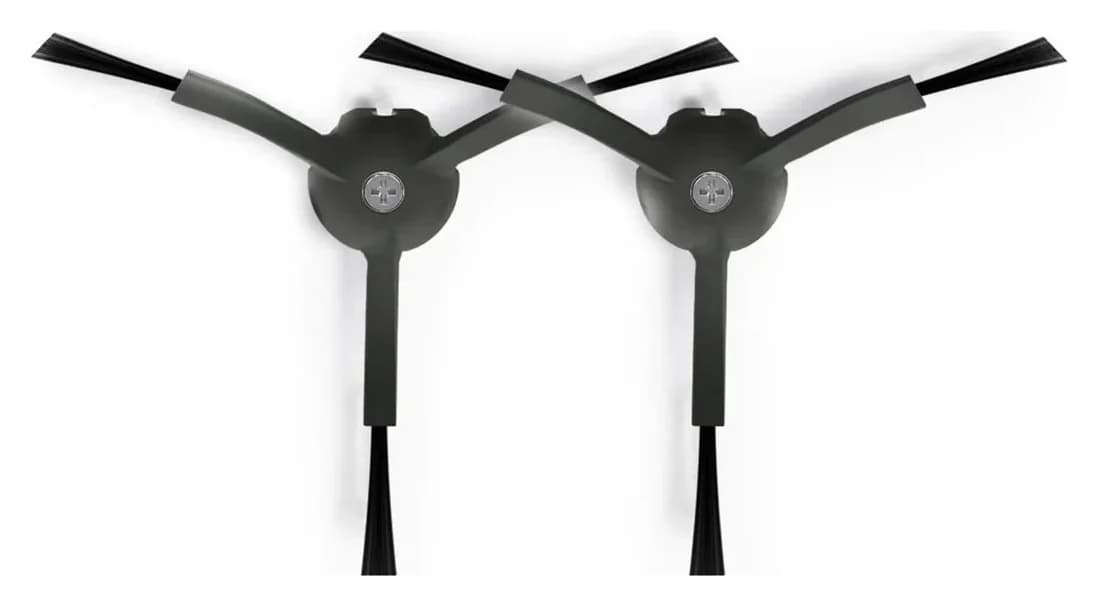
Roborock · RR-BS5-Q85MaxPlus-M2
Black Side Brushes Replacement
- Pack contents
- 2 black side brushes
- Choose
- Buy for side-brush replacement; both options available at our check
- Check
- Not for newer FlexiArm designs on Saros and recent Qrevo Curv/Edge models, which use a different side brush sold separately
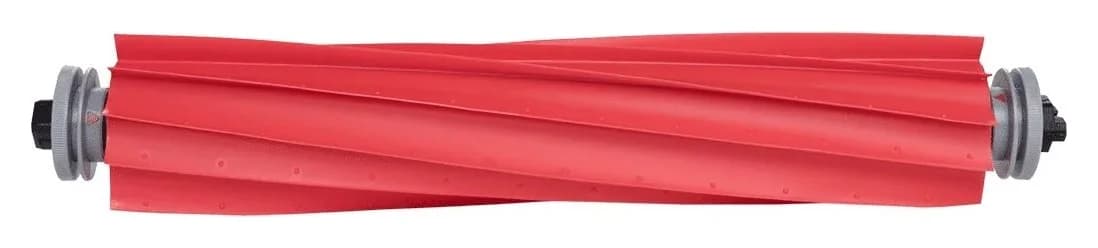
Roborock Main Brush
- Choose
- Confirm US fit before ordering for original S7
- Check
- The maker's own sources do not align.
Roborock Main Brush Cover (RR-S75MBC-01, RR-S70MBC-01)
- Choose
- Both colors unavailable at our check; use the codes to request the correct part
- Check
- Do not substitute a cover because another robot shares the roller: Roborock lists a different cover for Qrevo models.
More picks (1)
- 4
Build a component basket only after resolving each fit and availability check
Full maintenance kit
Choose for: Build a component basket only after resolving each fit and availability check
For an original Roborock S7, our straightforward purchase pick is the official two-piece side-brush pack, whose manufacturer description explicitly names S7. If you need the main roller, match RR-S7-ZS-02 but obtain US fit confirmation: the current US roller list omits the original S7, while Roborock's points page and Japanese accessory list name it. The retaining cover is a separate listing; both matched colors were unavailable when checked.
Quick picks and component comparison
Buy the worn component first. For a complete refresh, use the table as a shopping list and verify every line before ordering; a label such as “Xiaomi Roborock brush S7” is not a substitute for a component-specific fit list.
Compare specifications and all conditions
Roborock Black Side Brushes Replacement (2 Pieces) (RR-BS5-Q85MaxPlus-M2)
- Exact part or option
- Black RR-BS5-Q85MaxPlus-M2; white RR-BS0-Q80MaxPlus-M2
- Documented contents and S7 fit
- Two side brushes; S7 explicitly named in the official description
- Purchase decision
- Buy for side-brush replacement; both options available at our check
Roborock Main Brush (RR-S7-ZS-02)
- Exact part or option
- RR-S7-ZS-02
- Documented contents and S7 fit
- Main-brush listing; US text omits original S7, but matching-barcode Japanese brush lists S7
- Purchase decision
- Confirm US fit before ordering for original S7
Roborock Main Brush Cover (RR-S75MBC-01, RR-S70MBC-01)
- Exact part or option
- Black RR-S75MBC-01; white RR-S70MBC-01
- Documented contents and S7 fit
- Main-brush cover; official US list includes S7 and S7+
- Purchase decision
- Both colors unavailable at our check; use the codes to request the correct part
Full maintenance kit
- Exact part or option
- No prepacked kit recommended here
- Documented contents and S7 fit
- An official US S7 kit with complete contents was not verified
- Purchase decision
- Build a component basket only after resolving each fit and availability check
Full comparison table
Swipe to compare. Row labels stay visible.
| Choice | Exact part or option | Documented contents and S7 fit | Purchase decision |
|---|---|---|---|
| Roborock Black Side Brushes Replacement (2 Pieces) (RR-BS5-Q85MaxPlus-M2) | Black RR-BS5-Q85MaxPlus-M2; white RR-BS0-Q80MaxPlus-M2 | Two side brushes; S7 explicitly named in the official description | Buy for side-brush replacement; both options available at our check |
| Roborock Main Brush (RR-S7-ZS-02) | RR-S7-ZS-02 | Main-brush listing; US text omits original S7, but matching-barcode Japanese brush lists S7 | Confirm US fit before ordering for original S7 |
| Roborock Main Brush Cover (RR-S75MBC-01, RR-S70MBC-01) | Black RR-S75MBC-01; white RR-S70MBC-01 | Main-brush cover; official US list includes S7 and S7+ | Both colors unavailable at our check; use the codes to request the correct part |
| Full maintenance kit | No prepacked kit recommended here | An official US S7 kit with complete contents was not verified | Build a component basket only after resolving each fit and availability check |
Scroll horizontally to see every column
| Choice | Exact part or option | Documented contents and S7 fit | Purchase decision |
|---|---|---|---|
| Roborock Black Side Brushes Replacement (2 Pieces) (RR-BS5-Q85MaxPlus-M2) | Black RR-BS5-Q85MaxPlus-M2; white RR-BS0-Q80MaxPlus-M2 | Two side brushes; S7 explicitly named in the official description | Buy for side-brush replacement; both options available at our check |
| Roborock Main Brush (RR-S7-ZS-02) | RR-S7-ZS-02 | Main-brush listing; US text omits original S7, but matching-barcode Japanese brush lists S7 | Confirm US fit before ordering for original S7 |
| Roborock Main Brush Cover (RR-S75MBC-01, RR-S70MBC-01) | Black RR-S75MBC-01; white RR-S70MBC-01 | Main-brush cover; official US list includes S7 and S7+ | Both colors unavailable at our check; use the codes to request the correct part |
| Full maintenance kit | No prepacked kit recommended here | An official US S7 kit with complete contents was not verified | Build a component basket only after resolving each fit and availability check |
Part identities, variant availability and the roller barcode come from Roborock's official side-brush data, roller data and cover data. Availability was checked on November 3, 2026; check the selected option again at checkout.
Best documented purchase: Roborock Black Side Brushes Replacement (2 Pieces) RR-BS5-Q85MaxPlus-M2
Roborock
Black Side Brushes Replacement
RR-BS5-Q85MaxPlus-M2
- Pack contents
- 2 black side brushes
- Choose
- Buy for side-brush replacement; both options available at our check
- Check
- Not for newer FlexiArm designs on Saros and recent Qrevo Curv/Edge models, which use a different side brush sold separately
Choose this pack when the side brush needs replacing. The official product description names S7, S7 MaxV, S7 MaxV Ultra and S7 Max Ultra individually, rather than relying solely on the visible “S Series” heading. That makes it the clearest current purchase route in this comparison.
The pack contains two side brushes. Black is RR-BS5-Q85MaxPlus-M2; white is RR-BS0-Q80MaxPlus-M2, according to the maker's variant data. Treat those as color options within this listing and check the selected code before paying.
There is a useful listing trap: Roborock's separate black-only page uses the same black SKU but its description lists S7 Max Ultra without naming the original S7. Use the linked color-selector page's explicit S7 description when checking this recommendation; do not generalize from every page headed “all Roborock cleaners.”
The S7 manual instructs you to unscrew the side brush, clear entangled dirt, then reinstall and tighten it. Clean a jam before deciding that the brush needs replacing.
Check the S7-listed side-brush pack at Roborock.
Main roller to match: Roborock Main Brush (RR-S7-ZS-02), with a fit caveat
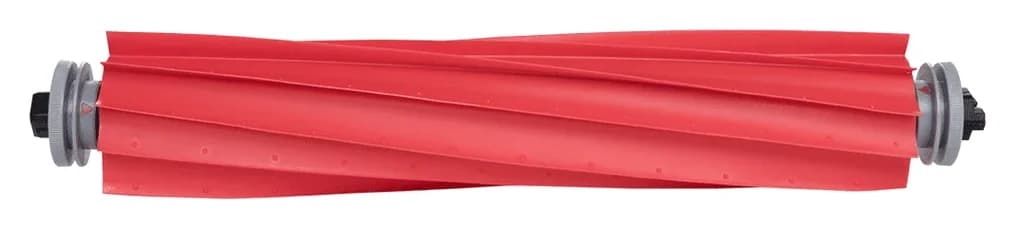
For a main-roller purchase, record RR-S7-ZS-02 and barcode 6970995783186. Both appear in Roborock's US product data. The roller was available when checked, but the current US title and feature list name S7 MaxV, S7 Pro Ultra and S7 Max Ultra, while omitting the original S7.
The maker's own sources do not align. Its US points page advertises a main brush for S7. Its Japanese accessory list identifies a rubber main brush, SDZS05RR, with the same 6970995783186 barcode and explicitly lists S7 and S7+, alongside S7 MaxV variants.
Our interpretation: the matching barcode is strong evidence for the roller identity, but it does not repair the missing original-S7 entry in the current US purchase page. Before ordering for an original S7, send Roborock your robot label, the US product link and that barcode, and request confirmation of the supplied revision. This is a conditional roller recommendation, not an unconditional fit guarantee.
For S7 MaxV, S7 Pro Ultra or S7 Max Ultra, the current US roller page explicitly names the model. Still verify the side brush and cover independently. The roller's description does not itemize a side brush, cover, spare bearing or spare end-cap set, so do not budget for those as included extras.
Check the roller listing and confirm your model with Roborock.
Exact cover reference: Roborock Main Brush Cover (RR-S75MBC-01, RR-S70MBC-01)
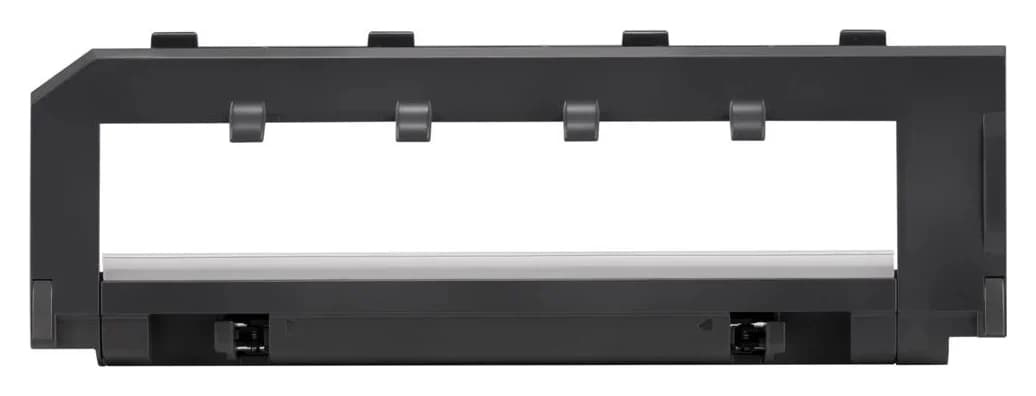
Roborock
S7/S7 MaxV/S7 Max Ultra/Q5/Q7/Q7 Max Series Main Brush Cover
RR-S75MBC-01
- Pack contents
- 1 main brush cover
- (no brush included)
The official S7 main-brush-cover page explicitly includes S7, S7+, S7 MaxV, S7 MaxV Plus, S7 MaxV Ultra and S7 Max Ultra. Its black option is RR-S75MBC-01 and white option is RR-S70MBC-01. Both options were marked unavailable in the maker's variant data.
Keep this as an exact-part reference while seeking availability. Do not substitute a cover because another robot shares the roller: Roborock lists a different cover for Qrevo models.
The S7 manual shows the cover, latches, roller, bearing and brush cap as separate components. Inspect the retaining cover when you remove the roller; if it will not lock in place, resolve that before resuming use. Roborock's maintenance guidance also calls for replacing a guard when its rubber strip wears down. A roller refresh alone does not address a worn guard.
Check the exact S7 cover options at Roborock.
Match the model before buying a “universal” kit
Copy the complete robot name from your unit or its documentation. Keep S7, S7 MaxV and S7 Max Ultra as separate entries in your shopping notes, then match each component's official list. If adding dock supplies, record the dock separately and use our Roborock replacement dust-bag guide.
Roborock's model-specific support answer says only the side brush is interchangeable between S7 and previous models; the main brush and brush cover are not. An S5/S6 kit therefore cannot be approved as a complete S7 kit merely because its side brush fits.
- Yes: Side brush: Roborock says S7 can share this component with previous models
- No: Previous-model main brush and brush cover: Roborock says these are not interchangeable with S7
- Partly: DuoDivide replacement: its cited official fit list does not establish S7 compatibility
- Partly: T7S: the cited US roller and cover lists do not establish a T7S/S7 crosswalk
Roborock identifies DuoDivide as the Saros 10R's main brush; that family's replacement listing names Qrevo Curv/Edge families and Saros models in its fit text, without S7. It is not an established S7 upgrade. Likewise, this guide does not establish that a T7S label is equivalent to S7; obtain a model-specific statement before using the S7 shopping list for that robot. For other families, start with the broader Roborock replacement-brush selector.
One worn part or a complete maintenance kit?
Replace one part when only that part is worn. For a side-brush replacement, buy the documented side-brush pack. For a roller refresh, resolve the roller fit and retain a serviceable cover. Add the cover when its condition calls for replacement, rather than assuming every maintenance purchase needs one.
For a full refresh, build a component basket. Start with the confirmed main roller and the S7-listed two-piece side-brush pack; add the correctly colored cover only if needed and available. This is a shopping plan, not a manufacturer bundle. No prepacked kit is recommended because we did not verify an official US S7 kit with both an exact fit list and complete contents.
Before comparing a bundled offer with that basket, write down:
- The exact robot model and the fit statement for each included component.
- The quantities of main rollers, side brushes and covers separately.
- Whether bearings, end caps or screws are explicitly included.
- Whether filters and mop cloths are actually needed, with their own S7 fit evidence.
- The selected color/revision and the contents of the option being ordered.
Compare today's checkout total for the parts you will use. For the side-brush pack, divide its total by two for cost per side brush; do not divide a mixed kit's total by every object in the box and treat that as cost per roller. Extra cleaning tools or unwanted pads should not decide the purchase.
Clean first, then install the matched part
The S7 manual identifies Error 5 as a main-brush jam and Error 6 as a side-brush jam, and directs cleaning of the affected brush. Start there before ordering parts for an error message.
Its schedule calls for cleaning the main brush every two weeks, with replacement every six to twelve months; clean the side brush monthly, with replacement every three to six months. These are guidelines, not a fixed kit lifespan: the manual says actual conditions can change replacement frequency and abnormal wear calls for replacement.
The sequence below follows the S7 manual, with the power-off step from Roborock's maintenance article.
Power off
Turn off the robot before maintenance.
Release the cover
Turn the robot over, unlatch the main-brush cover and remove it.
Clear the roller ends
Lift out the roller; remove and clean the bearing, then unlock the end cap to clear trapped hair or dirt.
Refit the main assembly
Lock the cap back on, reinstall the roller and press the main-brush cover into its locked position.
Service the side brush
Unscrew it, remove entangled dirt, then reinstall and tighten it.
For the main roller, the S7 manual specifies wiping with a wet cloth, drying thoroughly before use away from direct sun, and avoiding corrosive detergent or disinfectant. Follow that model-specific method rather than assuming a replacement kit makes every component washable.
How we choose
We compare official model-specific compatibility lists, product and variant data, and the S7 manual. We read the descriptions behind broad collection headings, compare codes across color options, and keep conflicts between the maker's pages visible. These are research-based selections; we have not physically evaluated these parts. A shared barcode is identified as a cross-check, and an unavailable cover stays an availability-limited reference. Commissions do not decide the recommendations (disclosure).
Verdict
Buy the S7-listed side-brush two-pack for the clearest documented replacement purchase. For the main roller, use RR-S7-ZS-02 as the exact reference and resolve the original-S7 omission with Roborock before checkout. Keep RR-S75MBC-01 / RR-S70MBC-01 for a cover request, checking availability again. Build a full basket only from individually matched parts you need.
Frequently asked questions
Which replacement brush should I buy for a Roborock S7?
Choose the component you need: the main roller, the side brush or the separate main-brush cover. Roborock's official two-piece side-brush pack explicitly lists S7. The RR-S7-ZS-02 roller needs a US fit confirmation because Roborock's US and Japanese compatibility descriptions differ. The S7-listed cover codes are black RR-S75MBC-01 and white RR-S70MBC-01.
Is the Roborock S7 main brush the same as the S7 MaxV brush?
Roborock's Japanese accessory list names both S7 and S7 MaxV for a rubber main brush with barcode 6970995783186. That matches the US RR-S7-ZS-02 roller's barcode. However, the current US product fit list names S7 MaxV and omits the original S7. Treat the barcode match as a useful cross-check and obtain US confirmation for your original S7 before ordering.
Can an S5 or S6 brush kit fit a Roborock S7?
Do not transfer a complete older-model kit to S7. Roborock's support article says only the side brush is interchangeable with previous models; the main brush and brush cover are not. Use an exact S7 fit statement for every other component. Sharing a brand name, a side-brush fit or a similar-looking roller does not establish compatibility for the whole kit.
How often should Roborock S7 brushes be replaced?
The S7 manual specifies main-brush cleaning every two weeks and replacement every six to twelve months. For the side brush, it specifies monthly cleaning and replacement every three to six months. These are maintenance guidelines: the same manual says replacement frequency varies with the actual situation and that abnormal wear calls for replacement of the affected part.
Does a Roborock S7 replacement brush kit include a brush cover?
Check the itemized contents rather than assuming it does. Roborock lists the S7 main-brush cover separately from the roller and side-brush pack. We did not verify an official US S7 maintenance kit with both an exact fit list and complete contents for this guide. Add a cover only if you need it, and verify the chosen cover's availability before paying.

Related guides
Buying guide · Brushes & Mop Pads
Roborock S6 Replacement Brushes: Exact Fits, Covers and Kits
Find the right Roborock S6 replacement brush: compare S6, S6 Pure and S6 MaxV fit, roller and cover codes, side-brush packs, kit contents and installation.
Buying guide · Brushes & Mop Pads
Roborock T7S Main Brush: Choose the Right Roller or Cover
Find a Roborock T7S main brush, distinguish rollers from covers and cleaning brushes, check regional model labels, and avoid unverified maintenance kits.
Buying guide · Brushes & Mop Pads
Roborock S5 Main Brush: Choose the Correct Roller, Cover or Kit
Choose the right Roborock S5 main brush with roller-end checks, cover guidance and kit comparisons. Separate S5 from S5 Max before ordering replacement parts.