

Buying guide
Roborock Z70 FreeFlow Brush
Exact Parts and Kit Guide
Find the exact Roborock Z70 FreeFlow brush and cover SKUs. Compare separate parts with an itemized maintenance pack, check model fit and follow official care.
By thisSWEEP EditorialUpdated November 9, 20267 min read3 picks
On this page · The short answer
The short answer
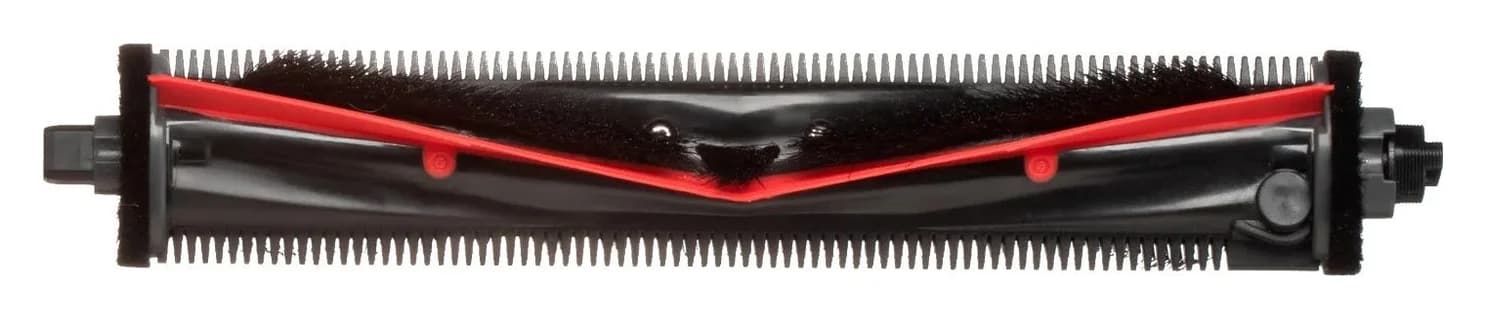
Roborock · RR-ZS4-SarosZ70-M01
Main Brush
- Pack contents
- 1 main brush
- The retaining cover is not itemized on this listing
- Check
- Z70-only fit; the Saros 10/10R brush (RR-ZS4-QrevoCurv-01) is a different part
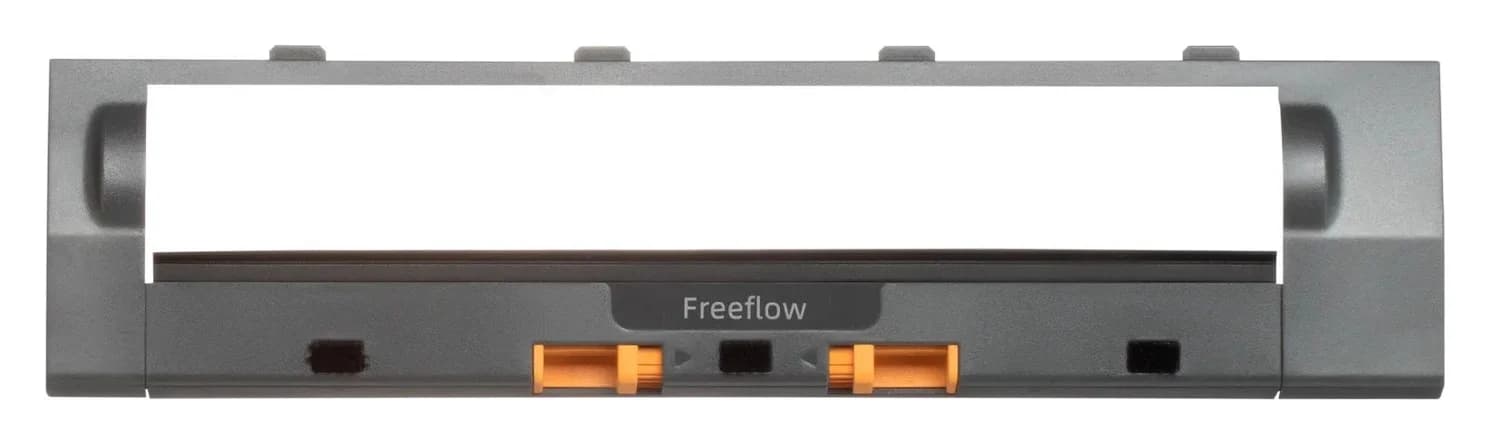
Roborock · RR-ZSZ5-SarosZ70-M01
Main Brush Cover
- Pack contents
- 1 main-brush cover
- The brush itself is a separate part
- Check
- Cover only; the main brush must be bought separately
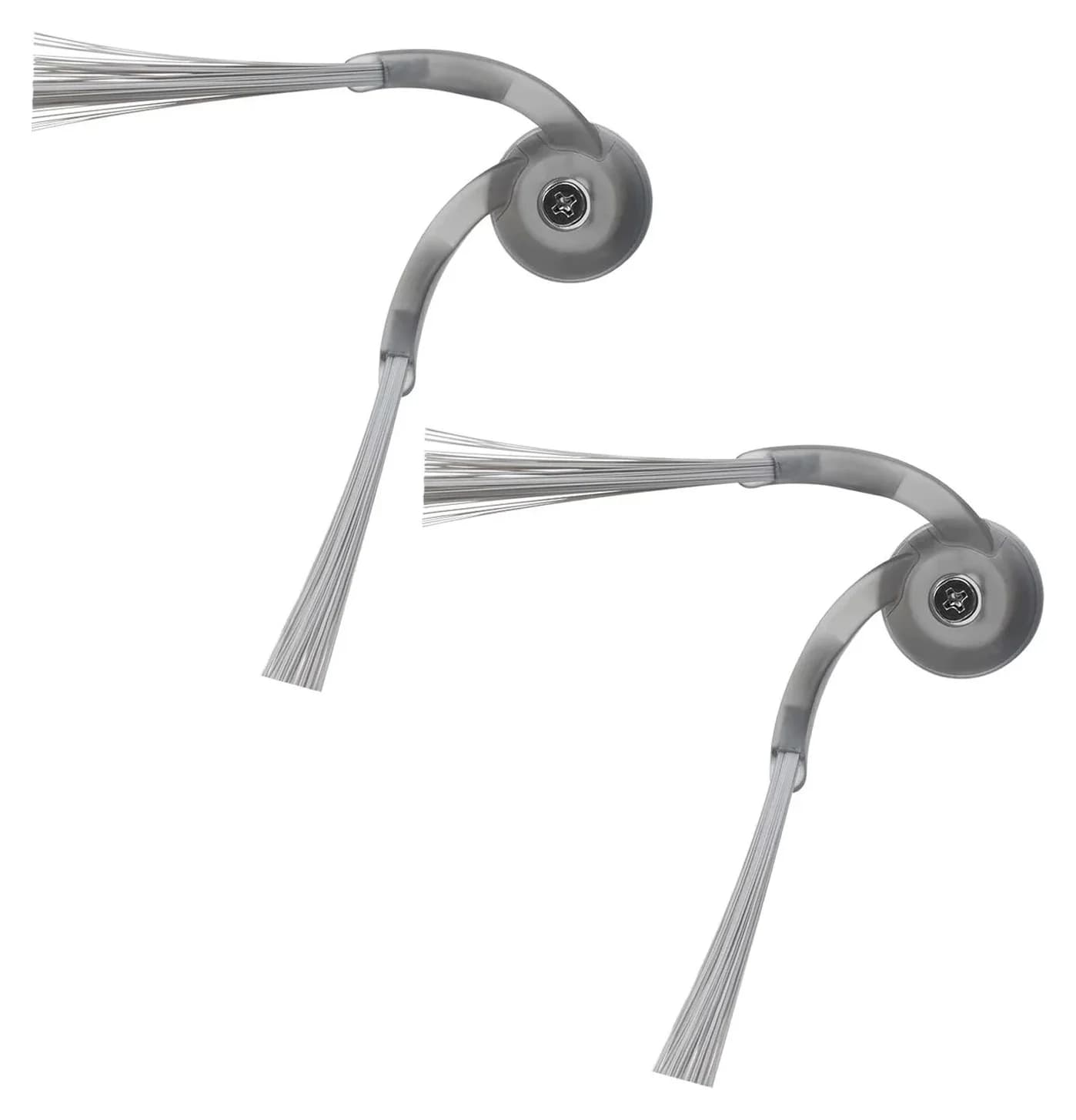
Roborock · RR-BS2-QrevoCurv-02
Side Brushes
- Pack contents
- 2 side brushes
- Check
- Only fits Qrevo Curv and Qrevo Edge, not earlier Qrevo/S/Q-series robots, which use the RR-BS0/BS5 two-packs
For a US Saros Z70, our replacement pick is Roborock’s Main Brush for Roborock Saros Z70, RR-ZS4-SarosZ70-M01. The matching main-brush cover is listed separately as RR-ZSZ5-SarosZ70-M01; its inclusion with the brush is unconfirmed. Buy the component that needs replacing, then add maintenance supplies only as needed.
Quick picks: order by the worn component
- Worn main brush: choose the Z70 main-brush listing, Roborock Saros Z70 Main Brush (RR-ZS4-SarosZ70-M01).
- Damaged retaining cover: choose the Z70 main-brush cover, Roborock Saros Z70 Main Brush Cover (RR-ZSZ5-SarosZ70-M01).
- Worn side brush: choose the side-brush pack; its description specifies Roborock Qrevo Curv Side Brushes (RR-BS2-QrevoCurv-02).
- Maintenance kit: the itemized UK pack has a Z70/Saros 10 model conflict; pause that purchase until Roborock resolves it.
For another robot, start with the Roborock replacement-brush selector. Keep dock supplies on a separate shopping list using the Saros Z70 dust-bag guide.
Part-number and pack comparison
Compare specifications and all conditions
Z70 main brush
- Official identifier and market
- RR-ZS4-SarosZ70-M01 · US
- What the listing establishes
- Explicit Z70 fit; cover contents unconfirmed
- Buying decision
- Starting pick for main-brush replacement
Z70 main-brush cover
- Official identifier and market
- RR-ZSZ5-SarosZ70-M01 · US
- What the listing establishes
- Separately listed cover for Z70
- Buying decision
- Add if the old cover needs replacing
Side-brush pack
- Official identifier and market
- RR-BS2-QrevoCurv-02 · US
- What the listing establishes
- Two side brushes; listed on the Z70 robot page
- Buying decision
- For side-brush wear
Washable-filter pack
- Official identifier and market
- RR-LW0-QRevoMaster-01 · US
- What the listing establishes
- Two filters; title explicitly includes Z70
- Buying decision
- Optional maintenance supply
Z70-titled accessory pack
- Official identifier and market
- RRUK-PJTZ-SarosZ70-P01-2C · UK
- What the listing establishes
- Four bags, two side brushes, two filters; description says Saros 10
- Buying decision
- Resolve the model conflict first
Cataloged Saros 10/10R main brush
- Official identifier and market
- RR-ZS4-QrevoCurv-01 · US
- What the listing establishes
- Z70 absent from the compatibility sentence
- Buying decision
- Do not substitute without maker confirmation
Full comparison table
Swipe to compare. Row labels stay visible.
| Component or pack | Official identifier and market | What the listing establishes | Buying decision |
|---|---|---|---|
| Z70 main brush | RR-ZS4-SarosZ70-M01 · US | Explicit Z70 fit; cover contents unconfirmed | Starting pick for main-brush replacement |
| Z70 main-brush cover | RR-ZSZ5-SarosZ70-M01 · US | Separately listed cover for Z70 | Add if the old cover needs replacing |
| Side-brush pack | RR-BS2-QrevoCurv-02 · US | Two side brushes; listed on the Z70 robot page | For side-brush wear |
| Washable-filter pack | RR-LW0-QRevoMaster-01 · US | Two filters; title explicitly includes Z70 | Optional maintenance supply |
| Z70-titled accessory pack | RRUK-PJTZ-SarosZ70-P01-2C · UK | Four bags, two side brushes, two filters; description says Saros 10 | Resolve the model conflict first |
| Cataloged Saros 10/10R main brush | RR-ZS4-QrevoCurv-01 · US | Z70 absent from the compatibility sentence | Do not substitute without maker confirmation |
Scroll horizontally to see every column
| Component or pack | Official identifier and market | What the listing establishes | Buying decision |
|---|---|---|---|
| Z70 main brush | RR-ZS4-SarosZ70-M01 · US | Explicit Z70 fit; cover contents unconfirmed | Starting pick for main-brush replacement |
| Z70 main-brush cover | RR-ZSZ5-SarosZ70-M01 · US | Separately listed cover for Z70 | Add if the old cover needs replacing |
| Side-brush pack | RR-BS2-QrevoCurv-02 · US | Two side brushes; listed on the Z70 robot page | For side-brush wear |
| Washable-filter pack | RR-LW0-QRevoMaster-01 · US | Two filters; title explicitly includes Z70 | Optional maintenance supply |
| Z70-titled accessory pack | RRUK-PJTZ-SarosZ70-P01-2C · UK | Four bags, two side brushes, two filters; description says Saros 10 | Resolve the model conflict first |
| Cataloged Saros 10/10R main brush | RR-ZS4-QrevoCurv-01 · US | Z70 absent from the compatibility sentence | Do not substitute without maker confirmation |
Identifiers come from the official listings’ embedded SKU data. Sources: main brush, cover, side brushes, filters, UK pack and cataloged alternative. A separate listing proves a separate ordering route; it does not, by itself, prove what is excluded from another box.
Identify your Z70 and the component first
The Saros Z70 FCC manual identifies the robot as RRE0R50. Check your robot’s label against that manual and retain a photo for a parts enquiry. For this brush purchase, establish the robot identity before considering a dock consumable or another Saros model’s accessory.
The manual names the main brush, main-brush cover and side brush separately. The cover releases through its latches, whereas the side brush is removed by undoing its screw. Inspect which component is worn before building a shopping basket. If the retaining cover is the damaged piece, buying a roller alone leaves that repair unresolved.
- Yes: US main-brush listing explicitly names Saros Z70
- Yes: Z70 main-brush cover has its own replacement listing
- Partly: Main-brush package does not itemize an included cover
- No: Cataloged Saros 10/10R main-brush compatibility sentence omits Z70
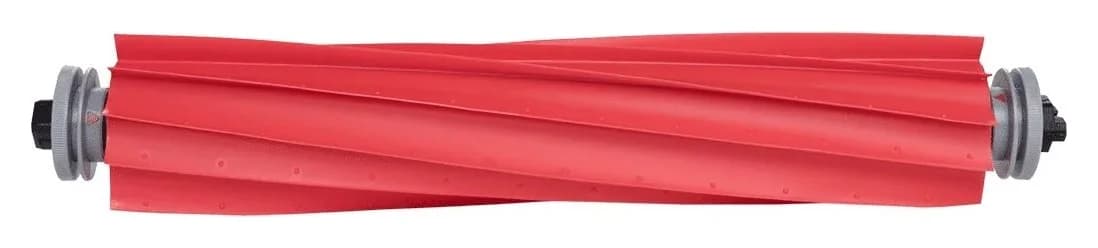
Best for a worn main brush: Roborock Saros Z70 Main Brush RR-ZS4-SarosZ70-M01
Roborock
RR-ZS4-SarosZ70-M01
- Pack contents
- 1 main brush
- The retaining cover is not itemized on this listing
- Choose
- Best for a worn main brush
- Check
- Z70-only fit; the Saros 10/10R brush (RR-ZS4-QrevoCurv-01) is a different part
Choose RR-ZS4-SarosZ70-M01 for the documented US Z70 main-brush buying route. Roborock calls the system FreeFlow Main Brush on its Z70 feature page, while the replacement accessory is titled simply Main Brush for Roborock Saros Z70. Search and order by the exact model and SKU rather than requiring every listing to use the FreeFlow name.
Roborock’s wording also varies: the robot page describes a “dual all-rubber brush design,” while its FAQ describes active cutting at the main brush. Those descriptions are insufficient to determine a replacement pack’s roller count or included fittings. We use the accessory identity and manual for this decision, and make no claim that a replacement improves pickup or removes every hair tangle.
The brush listing does not itemize an included cover. Ask Roborock to confirm the contents of the selected package if you need both parts. Do not assume a main-brush listing supplies a complete powered cleaning head or every surrounding component.
Check the exact Z70 main brush at Roborock.
Best for a damaged cover: Roborock Saros Z70 Main Brush Cover RR-ZSZ5-SarosZ70-M01
Roborock
RR-ZSZ5-SarosZ70-M01
- Pack contents
- 1 main-brush cover
- The brush itself is a separate part
- Choose
- Best for a damaged cover
- Check
- Cover only; the main brush must be bought separately
Choose RR-ZSZ5-SarosZ70-M01, titled Roborock Main Brush Cover for Saros Z70. Keep its code beside the brush code when checking your order: these are separate component choices. A serviceable roller is not a reason to replace the entire brush arrangement when your identified need is the cover.
The manual requires the cover’s four teeth to sit fully in their slots and the cover to lock with a click. Inspect those retaining features during maintenance. Roborock says to replace parts immediately if abnormal wear occurs. If the cover will not secure properly, resolve that before resuming cleaning.
Check the Z70 main-brush cover at Roborock.
Best for side-brush wear: Roborock Qrevo Curv Side Brushes RR-BS2-QrevoCurv-02
Roborock
RR-BS2-QrevoCurv-02
- Pack contents
- 2 side brushes
- Choose
- Best for side-brush wear
- Check
- Only fits Qrevo Curv and Qrevo Edge, not earlier Qrevo/S/Q-series robots, which use the RR-BS0/BS5 two-packs
The Z70 robot page lists the side-brush accessory RR-BS2-QrevoCurv-02, and the accessory’s description specifies two side brushes. Its compatibility wording includes the Saros series; the Z70 feature page calls the side-brush system FlexiArm Riser. This is the side-brush purchasing route. If the surrounding moving mechanism needs repair, ask Roborock which assembly is required before ordering consumable brushes.
Installation uses the side-brush screw: align the central groove with the raised position on the robot, then tighten the screw. Follow that separate procedure instead of treating the side brush as a clip-in main roller.
Check the side-brush pack at Roborock.
Maintenance kit comparison: itemized contents, unresolved fit
The official UK listing is titled Accessory Pack for Saros Z70, SKU RRUK-PJTZ-SarosZ70-P01-2C. Its title itemizes four dust bags, two side brushes and two filters. A main brush, main-brush cover and mop cloths are not listed in those contents. Even if the model match is confirmed, treat it as a consumables stock-up option rather than your main-brush repair order.
For a US order, build an itemized basket around the part you actually need. If filters are also due, the separate RR-LW0-QRevoMaster-01 filter pack explicitly names Z70 and specifies two filters. Check its current availability on the official filter page. Add side brushes only if wanted, and choose dock bags through the linked bag guide. This keeps the main-brush repair separate from optional stock.
Compare kits by useful compatible contents. A large assortment with an unverified main brush does not settle this purchase. We have not established a complete US Z70 main-brush maintenance kit from the official listings used here; the UK pack is a comparison, not a cleared recommendation.
Why we do not substitute the cataloged DuoDivide part
Roborock identifies the Saros 10R system as DuoDivide Main Brush on its 10R feature page. The existing Saros 10/10R alternative is RR-ZS4-QrevoCurv-01. Its official compatibility sentence names Qrevo Curv series, Qrevo Edge series, Saros 10, Saros 10R and Qrevo S5V; it does not name Z70. Shared branding and an anti-tangle description do not provide written approval for this substitution. We leave physical interchangeability unconfirmed and direct Z70 owners to the Z70-specific listing.
For a third-party offer, require its own documented Z70 compatibility, the maker’s identity and an itemized package. “Compatible with” should be read as that supplier’s claim, not as proof that Roborock manufactured the part. No third-party replacement is cleared by the evidence used in this guide.
Installation and care from the Z70 manual
Before maintenance, Roborock requires the arm retracted into its compartment, the robot switched off and the dock unplugged. For the main brush, press the two latches inward to remove the cover, lift out the brush and remove hair or dirt at both ends. After reinstalling the brush, seat the cover’s four teeth fully in the slots and press until it locks with a click.
Prepare the robot
With the arm retracted into its compartment, switch off the robot and unplug the dock.
Open the cover
Press its two latches inward and remove it.
Lift and clear
Remove the main brush and clear hair or dirt from both ends.
Reassemble
Reinstall the brush, seat the cover’s four teeth in the slots and press until it clicks.
The manual recommends wiping the main brush with a wet cloth, then air-drying it away from direct sunlight if wet. It says not to use corrosive cleaning fluid or disinfectant on the main brush. Use that part-specific guidance instead of applying another accessory’s wash instructions to everything underneath the robot.
For routine scheduling, the manual gives main-brush cleaning every two weeks, with replacement every six to twelve months. It gives monthly side-brush cleaning, with replacement every three to six months. It also says replacement frequency varies with actual conditions and abnormal wear needs immediate replacement. The robot-page FAQ acknowledges that hair can still entangle and recommends regular cleaning. Treat intervals as inspection prompts rather than a guaranteed lifespan.
How we choose
We compare official US accessory listings, embedded SKU data and the model-specific FCC manual. Regional packs retain their market and any conflicting model descriptions. Recommendations depend on documented fit and the part needed; this is a document-based guide with no physical fit or cleaning-performance evaluation. Maker links let you verify the exact component. See our disclosure.
Verdict
For a worn Z70 main brush, start with RR-ZS4-SarosZ70-M01. Add RR-ZSZ5-SarosZ70-M01 when the cover also needs replacing, and use RR-BS2-QrevoCurv-02 for the side-brush purchase. Keep the UK kit on hold until its model conflict is resolved. Order only after the model, SKU and selected package contents agree.
Frequently asked questions
Which Roborock Z70 FreeFlow brush replacement should I buy?
For a US Saros Z70, start with Main Brush for Roborock Saros Z70, SKU RR-ZS4-SarosZ70-M01. FreeFlow is the name on Roborock’s Z70 feature page; the replacement listing uses the generic main-brush title. Check the exact SKU and written package contents before ordering, especially if you also need the retaining cover.
Is the main-brush cover included with the Z70 brush?
The main-brush listing does not itemize an included cover, and Roborock lists the Z70 cover separately as RR-ZSZ5-SarosZ70-M01. Treat cover inclusion as unconfirmed. If your existing cover is damaged, ask for written confirmation of the brush package contents or select the matching cover separately. Avoid paying for a duplicate cover you do not need.
Can I use the Saros 10R DuoDivide replacement brush in the Z70?
The cataloged RR-ZS4-QrevoCurv-01 listing names Saros 10 and Saros 10R in its compatibility sentence, but does not name Z70. We therefore do not recommend it for a Z70 without written confirmation from Roborock. That absence establishes a gap in documented compatibility; it does not establish that a physical fit is impossible. Use the Z70-specific listing as your buying route.
Does the Saros Z70 maintenance kit include a FreeFlow main brush?
The official UK pack title itemizes four dust bags, two side brushes and two filters; it does not list a main brush or cover. Its title says Saros Z70, while its description says Saros 10. Resolve that model conflict with Roborock before purchase. This regional listing does not verify a complete US Z70 maintenance kit or a replacement FreeFlow assembly.
How often should I clean and replace the Z70 brushes?
The Z70 FCC manual says to clean the main brush every two weeks and replace it every six to twelve months. For the side brush, it specifies monthly cleaning and replacement every three to six months. These are maintenance guidelines: replacement frequency varies with actual use, and abnormal wear calls for immediate replacement. Inspect the parts before deciding which replacements to order.

Related guides
Buying guide · Brushes & Mop Pads
Roborock S6 Replacement Brushes: Exact Fits, Covers and Kits
Find the right Roborock S6 replacement brush: compare S6, S6 Pure and S6 MaxV fit, roller and cover codes, side-brush packs, kit contents and installation.
Buying guide · Brushes & Mop Pads
Roborock T7S Main Brush: Choose the Right Roller or Cover
Find a Roborock T7S main brush, distinguish rollers from covers and cleaning brushes, check regional model labels, and avoid unverified maintenance kits.
Buying guide · Brushes & Mop Pads
Roborock S5 Main Brush: Choose the Correct Roller, Cover or Kit
Choose the right Roborock S5 main brush with roller-end checks, cover guidance and kit comparisons. Separate S5 from S5 Max before ordering replacement parts.