

Buying guide
Roomba i7 Filter: Choose the Right 3-Pack or Maintenance Kit
Find the right Roomba i7 filter, compare genuine packs and kit contents, check shared-model fit, avoid lookalikes, and follow iRobot's cleaning instructions.
By thisSWEEP EditorialUpdated November 6, 20267 min read2 picks
On this page · The short answer
The short answer
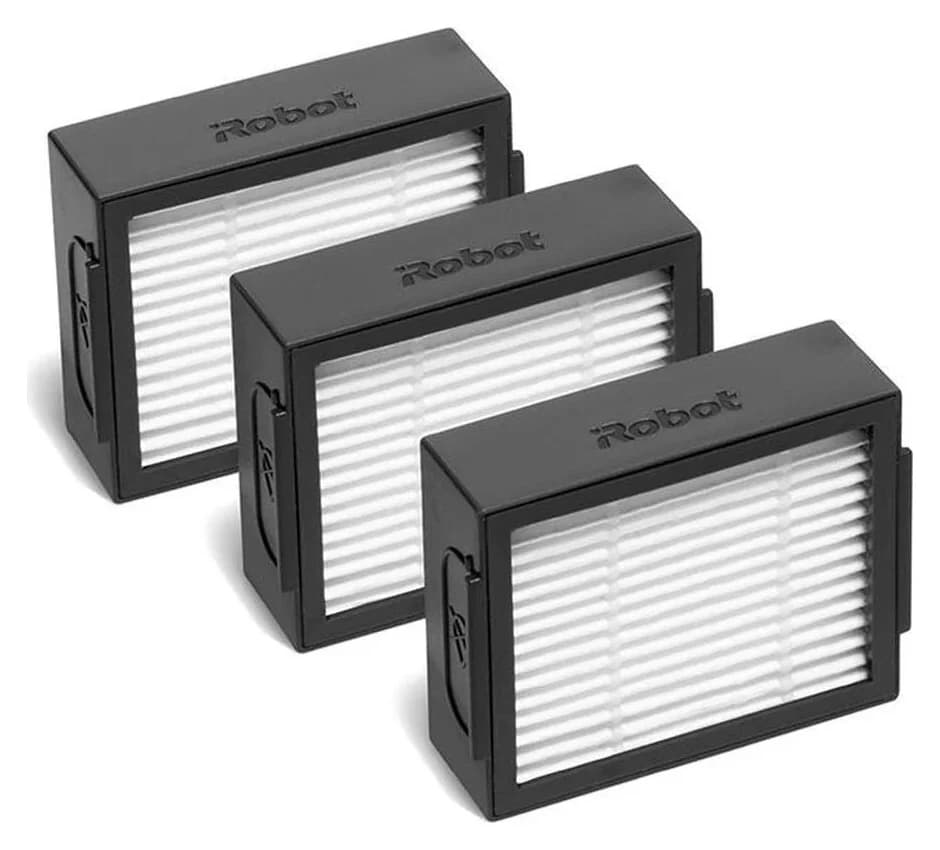
iRobot · 4639161
High-Efficiency Filter
- Pack contents
- 3 High-Efficiency Filters
- Check
- Fits only Roomba e, i and j Series and Combo i5/j5 Series; not for Combo j7+ or j9+ or the newer Plus/Max combos
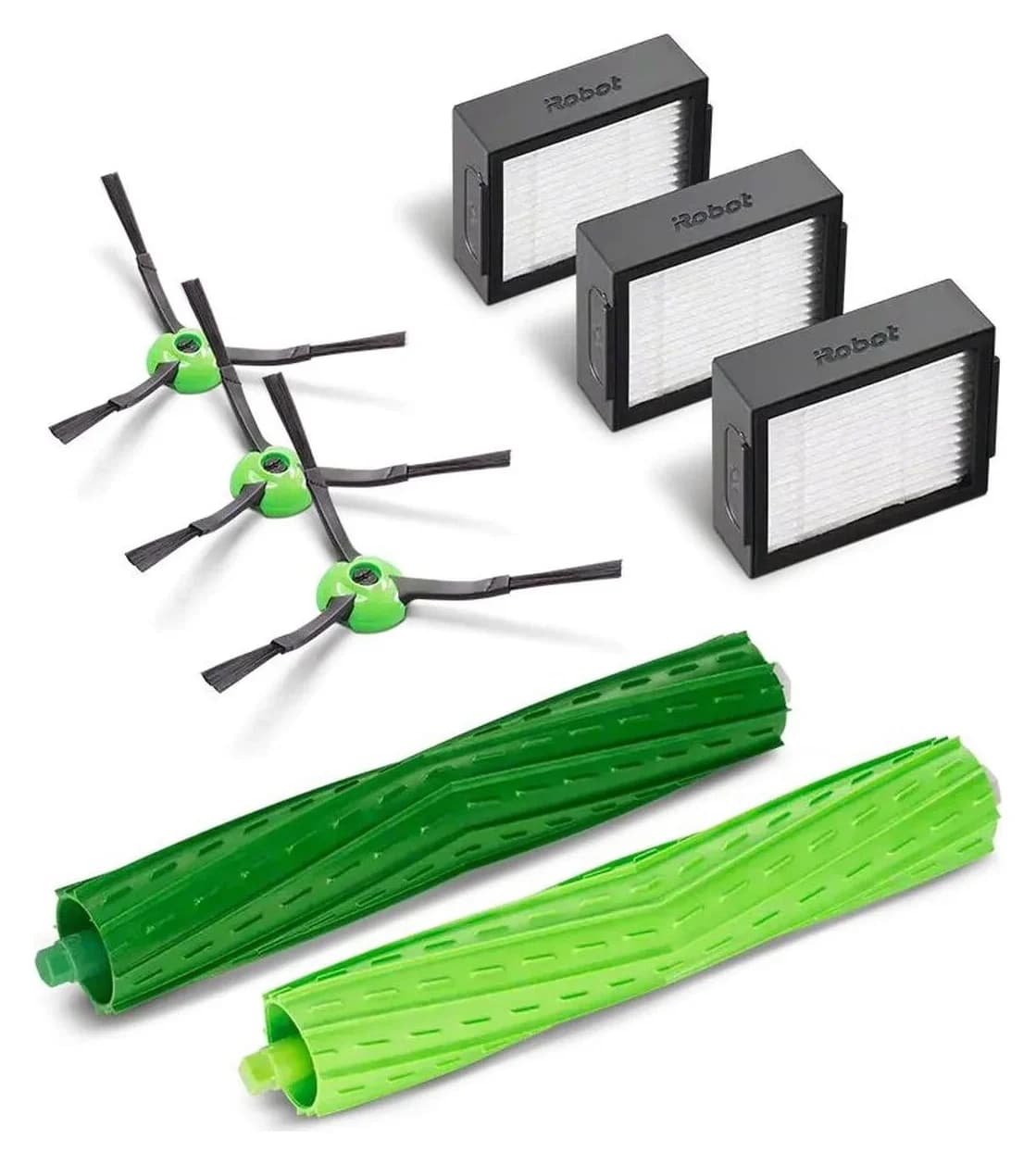
iRobot · 4757964
Replenishment Kit
- Check
- Not compatible with Roomba Combo j7+, j9+ or 10 Max, per iRobot
In the box: 3 High-Efficiency Filters, 3 Edge-Sweeping Brushes, 1 set of Dual Multi-Surface Rubber Brushes, per iRobot's kit list
For a Roomba i7 or i7+, choose the genuine iRobot High-Efficiency Filter 3-pack, part 4639161: iRobot lists the i-series as compatible and groups the i7/i7+ together in its anatomy guide. Choose replenishment kit 4757964 if you also need side brushes and a rubber brush set; both packages contain three filters. Keep the complete model name when buying: j7 vacuum and Combo j7 are different filter decisions.
Quick picks: filters alone or a brush refresh
Compare specifications and all conditions
Filters alone
- Exact model
- iRobot 4639161 High-Efficiency Filter 3-pack
- Filters included
- 3
- Other included parts
- None listed
All specifications
- Our recommendation
- Start here when the brushes can stay in service
Filters and brushes
- Exact model
- iRobot 4757964 Replenishment Kit
- Filters included
- 3
- Other included parts
- 3 edge-sweeping brushes; 1 set of dual multi-surface rubber brushes
All specifications
- Our recommendation
- Choose when those extra parts also need replacing
Full comparison table
Swipe to compare. Row labels stay visible.
| Your need | Exact model | Filters included | Other included parts | Our recommendation |
|---|---|---|---|---|
| Filters alone | iRobot 4639161 High-Efficiency Filter 3-pack | 3 | None listed | Start here when the brushes can stay in service |
| Filters and brushes | iRobot 4757964 Replenishment Kit | 3 | 3 edge-sweeping brushes; 1 set of dual multi-surface rubber brushes | Choose when those extra parts also need replacing |
Scroll horizontally to see every column
| Your need | Exact model | Filters included | Other included parts | Our recommendation |
|---|---|---|---|---|
| Filters alone | iRobot 4639161 High-Efficiency Filter 3-pack | 3 | None listed | Start here when the brushes can stay in service |
| Filters and brushes | iRobot 4757964 Replenishment Kit | 3 | 3 edge-sweeping brushes; 1 set of dual multi-surface rubber brushes | Choose when those extra parts also need replacing |
iRobot's i7 owner's guide specifies replacing the filter every two months. That interval and the identical filter counts matter more to this purchase than the kit's total accessory count.
- 3 filtersIncluded in either recommended package
- 2 monthsiRobot's specified filter replacement interval
Read the complete model label before ordering
iRobot says the model number is on the underside near the left wheel. Read it before choosing an accessory family, and keep any Combo wording when comparing the name with the maker's compatibility list. A partial name such as “j7” can send you to the wrong filter.
The 4639161 product page declares compatibility by series. The model examples below are identified in iRobot's manuals index; the i7/i7+ pairing is also explicit in its anatomy guide. These are manufacturer-declared matches, with the Combo models kept separate.
Roomba i7 / i7+
- 4639161 filter pack
- Compatible: i-series
- 4757964 maintenance kit
- Compatible: i-series
- Buying distinction
- Buy the robot-bin filter; retain the full model name
Other Roomba i-series vacuum models: i1, i2, i3, i4, i5, i6, i8
- 4639161 filter pack
- Compatible: i-series
- 4757964 maintenance kit
- Compatible: i-series
- Buying distinction
- These names share the declared family; do not silently add Combo variants
Roomba e-series
- 4639161 filter pack
- Compatible
- 4757964 maintenance kit
- Compatible
- Buying distinction
- Both US accessory pages expressly list this series
Roomba j-series vacuums, including j6, j7/j7+, j8+ and j9/j9+
- 4639161 filter pack
- Compatible: j-series
- 4757964 maintenance kit
- Compatible: j-series
- Buying distinction
- Vacuum models; keep separate from Combo j7/j9
Roomba Combo i5 / i5+
- 4639161 filter pack
- Compatible: Combo i5 series
- 4757964 maintenance kit
- Compatible: Combo i5 series
- Buying distinction
- Specifically named Combo family
Roomba Combo j5 / j5+
- 4639161 filter pack
- Compatible: Combo j5 series
- 4757964 maintenance kit
- Compatible: Combo j5 series
- Buying distinction
- Specifically named Combo family; different from Combo j7
Full comparison table
Swipe to compare. Row labels stay visible.
| Complete robot name or family | 4639161 filter pack | 4757964 maintenance kit | Buying distinction |
|---|---|---|---|
| Roomba i7 / i7+ | Compatible: i-series | Compatible: i-series | Buy the robot-bin filter; retain the full model name |
| Other Roomba i-series vacuum models: i1, i2, i3, i4, i5, i6, i8 | Compatible: i-series | Compatible: i-series | These names share the declared family; do not silently add Combo variants |
| Roomba e-series | Compatible | Compatible | Both US accessory pages expressly list this series |
| Roomba j-series vacuums, including j6, j7/j7+, j8+ and j9/j9+ | Compatible: j-series | Compatible: j-series | Vacuum models; keep separate from Combo j7/j9 |
| Roomba Combo i5 / i5+ | Compatible: Combo i5 series | Compatible: Combo i5 series | Specifically named Combo family |
| Roomba Combo j5 / j5+ | Compatible: Combo j5 series | Compatible: Combo j5 series | Specifically named Combo family; different from Combo j7 |
Scroll horizontally to see every column
| Complete robot name or family | 4639161 filter pack | 4757964 maintenance kit | Buying distinction |
|---|---|---|---|
| Roomba i7 / i7+ | Compatible: i-series | Compatible: i-series | Buy the robot-bin filter; retain the full model name |
| Other Roomba i-series vacuum models: i1, i2, i3, i4, i5, i6, i8 | Compatible: i-series | Compatible: i-series | These names share the declared family; do not silently add Combo variants |
| Roomba e-series | Compatible | Compatible | Both US accessory pages expressly list this series |
| Roomba j-series vacuums, including j6, j7/j7+, j8+ and j9/j9+ | Compatible: j-series | Compatible: j-series | Vacuum models; keep separate from Combo j7/j9 |
| Roomba Combo i5 / i5+ | Compatible: Combo i5 series | Compatible: Combo i5 series | Specifically named Combo family |
| Roomba Combo j5 / j5+ | Compatible: Combo j5 series | Compatible: Combo j5 series | Specifically named Combo family; different from Combo j7 |
A maker-copy inconsistency worth catching: the filter page's title and description specify Combo j5, but a compatibility bullet shortens this to “Roomba j5 Series.” The kit page explicitly names Combo j5, and the separate 4785883 page directs Combo j5+ buyers back to the other family. Preserve the full Combo j5 name rather than treating that shortened bullet as a new vacuum model.
No confirmed match? Stop at the model list. Combo i8 and other Combo names beyond the expressly listed families are not added here. Return to the Roomba filter selector or use iRobot's filter category to find a model-specific declaration.
Best for filter replacement: iRobot 4639161
iRobot
4639161
- Pack contents
- 3 High-Efficiency Filters
- Choose
- Filters alone
- Check
- Fits only Roomba e, i and j Series and Combo i5/j5 Series; not for Combo j7+ or j9+ or the newer Plus/Max combos
The genuine filter-only package contains three high-efficiency filters. iRobot describes the filter as attaching to the dustbin to catch particles. Brushes, bags and a replacement bin are absent from its itemized box contents.
This is our default recommendation when the filter is due and the brushes remain usable. It keeps the purchase focused on the part you need. Look for the maker's item number in the selected package details, rather than relying on a search-result title containing “i7 compatible.”
The limitation is straightforward: this pack supplies filters only. If the brushes also show visible wear, compare the complete kit below before ordering separate replacements. iRobot's manual says worn parts should be replaced; a filter purchase is a useful moment to inspect the rest of the cleaning head.
Check the genuine 4639161 pack at iRobot.
Best when brushes also need replacing: iRobot 4757964
iRobot
4757964
- Choose
- Filters and brushes
- Check
- Not compatible with Roomba Combo j7+, j9+ or 10 Max, per iRobot
The genuine replenishment kit itemizes three high-efficiency filters, three edge-sweeping brushes and one set of dual multi-surface rubber brushes. The rubber brushes are a set, not three sets, and the kit supplies the same filter quantity as the filter-only pack. Disposal bags and mop pads are not in the itemized contents.
Choose it when the added brushes solve a maintenance need you already have. For a filter-only restock, judge the extra brush stock on whether you will actually use it. A larger accessory count alone is not a reason to buy the kit.
There is a real care-schedule discrepancy: the i7 manual gives 12 months for edge-sweeping and multi-surface brush replacement, while the i-series support chart gives 6–12 months for brushes and no fixed edge-brush replacement interval. Both specify filter replacement every two months. Inspect for wear and follow the guidance for your robot; do not replace every kit component at each filter change.
Check the genuine 4757964 kit at iRobot.
Similar names that belong to other filter families
Use these rows to reject a mismatched shopping result. They are separate manufacturer-listed applications, not interchangeable i7 recommendations.
Roomba 670 / legacy 600-series
- Official filter reference
- AeroVac 3-pack, 4636450
- Why it belongs outside your i7 order
- The declared fit requires a 600-series AeroVac bin; keep that bin requirement
Roomba 800 / 900-series
- Official filter reference
- AeroForce High-Efficiency 3-pack, 4636433
- Why it belongs outside your i7 order
- “High-Efficiency” also appears on this different series-specific part
Roomba Combo j7/j7+, Combo j9+, Combo 10 Max
- Official filter reference
- High-Efficiency 3-pack, 4785883
- Why it belongs outside your i7 order
- Its page explicitly excludes vacuum-only j7+/j9+ and Combo j5+
Roomba Plus 405 / 505 Combo
- Official filter reference
- Filter 3-pack, 4849900
- Why it belongs outside your i7 order
- A separately listed Plus Combo family
Roomba Max 705 Vac / Plus 504 Vac
- Official filter reference
- Filter 3-pack, 4849904
- Why it belongs outside your i7 order
- A separately listed Vac family; retain Vac in the model name
Full comparison table
Swipe to compare. Row labels stay visible.
| Robot on the label | Official filter reference | Why it belongs outside your i7 order |
|---|---|---|
| Roomba 670 / legacy 600-series | AeroVac 3-pack, 4636450 | The declared fit requires a 600-series AeroVac bin; keep that bin requirement |
| Roomba 800 / 900-series | AeroForce High-Efficiency 3-pack, 4636433 | “High-Efficiency” also appears on this different series-specific part |
| Roomba Combo j7/j7+, Combo j9+, Combo 10 Max | High-Efficiency 3-pack, 4785883 | Its page explicitly excludes vacuum-only j7+/j9+ and Combo j5+ |
| Roomba Plus 405 / 505 Combo | Filter 3-pack, 4849900 | A separately listed Plus Combo family |
| Roomba Max 705 Vac / Plus 504 Vac | Filter 3-pack, 4849904 | A separately listed Vac family; retain Vac in the model name |
Scroll horizontally to see every column
| Robot on the label | Official filter reference | Why it belongs outside your i7 order |
|---|---|---|
| Roomba 670 / legacy 600-series | AeroVac 3-pack, 4636450 | The declared fit requires a 600-series AeroVac bin; keep that bin requirement |
| Roomba 800 / 900-series | AeroForce High-Efficiency 3-pack, 4636433 | “High-Efficiency” also appears on this different series-specific part |
| Roomba Combo j7/j7+, Combo j9+, Combo 10 Max | High-Efficiency 3-pack, 4785883 | Its page explicitly excludes vacuum-only j7+/j9+ and Combo j5+ |
| Roomba Plus 405 / 505 Combo | Filter 3-pack, 4849900 | A separately listed Plus Combo family |
| Roomba Max 705 Vac / Plus 504 Vac | Filter 3-pack, 4849904 | A separately listed Vac family; retain Vac in the model name |
iRobot groups the 670 under the 600-series in its packout reference. The old numeric families stay in the broader filter selector; this page's purchase decision is the shared i7-compatible family.
Clean the i7 filter dry; wash only the removed bin
The i7 manual says to clean the filter weekly, or twice weekly with pets. It gives the following removal, cleaning and installation procedure.
Remove the bin and filter
Press the bin-release button, then grasp both ends of the filter and pull it out.
Tap debris into the trash
Follow the dry-cleaning procedure. Do not wash the filter.
Reinstall with the grips out
Put the filter back with the ridged grips facing outward, then return the bin to the robot.
If you need to rinse the bin, remove the filter first, rinse the bin with warm water and let it dry completely before reassembly. The manual says the bin is not dishwasher safe and the robot will not run with the filter installed incorrectly. Check seating after a filter change before assuming the new part or robot has failed.
If pickup has fallen off, iRobot's first maintenance advice is to empty the bin, clean the filter and clean the brushes. Work through those checks before deciding a larger kit is the answer.
Compare the purchase you will actually use
For filters alone: divide the delivered total for the verified filter-only pack by 3 to compare the cost per compatible filter at checkout. Include shipping in the total, and confirm you are comparing the same genuine part and pack size.
For the kit: subtract the delivered filter-pack total from the delivered kit total. That difference is what you are paying for the added brushes in this comparison, because both packages provide the same three filter replacements. Decide whether those particular extras are worth that difference to you; this is a calculation method, not a claim that either package is always cheaper.
Before placing the order, use this checklist:
- Yes: Full robot name, including any Combo wording, matches the maker's stated fit
- Yes: Selected package shows the intended iRobot item number
- Yes: Box contents match the filter-only or brush-kit choice above
- Partly: A different or unlisted model needs its own explicit compatibility confirmation
Treat disposal bags as a separate dock-specific purchase. For the broader robot-and-dock decision, see our self-emptying robot vacuum guide. For a different filter family, return to the Roomba replacement-filter selector.
How we choose
We compare official US item numbers, compatible-model statements, itemized box contents and manufacturer care instructions. Our recommendations are based on those documents and the parts a buyer needs to replace. We preserve the maker's naming and maintenance discrepancies instead of turning them into an unsupported universal fit claim. This is document research, without physical product testing; commissions do not decide the recommendations (disclosure).
Verdict
Buy 4639161 for a straightforward i7/i7+ filter replacement. Buy 4757964 when you also need its listed brushes. Both supply three filters, so choose on useful extra contents after confirming the complete robot name and exact package at the maker's page.
Frequently asked questions
What filter does the Roomba i7 or i7+ use?
Choose iRobot High-Efficiency Filter 3-pack, part 4639161. Its US compatibility list includes the Roomba i-series, and iRobot groups the i7 and i7+ together in its anatomy guide. For a brush refresh too, kit 4757964 includes three compatible filters, three edge-sweeping brushes and one set of dual multi-surface rubber brushes.
Can you wash a Roomba i7 filter?
No. The i7 owner's guide says not to wash the filter. Remove the bin, pull out the filter, tap debris into a trash container, and reinstall it with the ridged grips facing out. The bin can be rinsed separately with warm water after removing the filter; let the bin dry completely before reassembly.
How often should you replace a Roomba i7 filter?
iRobot specifies replacement every two months in both its i7 owner's guide and its i-series care chart. Clean the filter weekly, or twice weekly in a home with pets. The manual also says replacement frequency may vary and visibly worn parts should be replaced, so treat the calendar as guidance alongside the filter's condition.
Are the Roomba j7 and Combo j7 filters the same?
They use different documented filter families. The vacuum-only j-series belongs to the 4639161 family used by the i7. The separate 4785883 page lists Combo j7, Combo j7+, Combo j9+ and Combo 10 Max, and explicitly excludes vacuum-only j7+ and j9+. Keep the word Combo when matching a replacement.
Does the i7 maintenance kit include Clean Base bags?
The itemized contents of kit 4757964 are three filters, three edge-sweeping brushes and one set of rubber brushes; bags are not listed. The filter attaches to the robot's dustbin. If you also need disposal bags, make that a separate dock-specific purchase rather than assuming a filter or brush kit supplies them.

Related guides
Buying guide · Bags & Filters
Eufy Robot Vacuum Filters: How to Change and Match the Right Part
Change your eufy robot vacuum filter and choose the correct replacement. Compare 11S MAX, original 11S, G30 revisions and X10 Pro Omni filter packs and kits.
Buying guide · Bags & Filters
Roborock QV 35A Dust Bags: The Genuine Pack and Dock Check
Find the genuine Roborock QV 35A dust bag pack, check robot and dock labels, avoid the similar Q5 bags, and follow the official replacement and fault checks.
Buying guide · Bags & Filters
Roborock Replacement Dust Bags: Match Robot and Dock First
Find the right Roborock replacement dust bags by robot and dock. Compare genuine six-packs, check Qrevo and Pure variants, and avoid ordering an unverified fit.